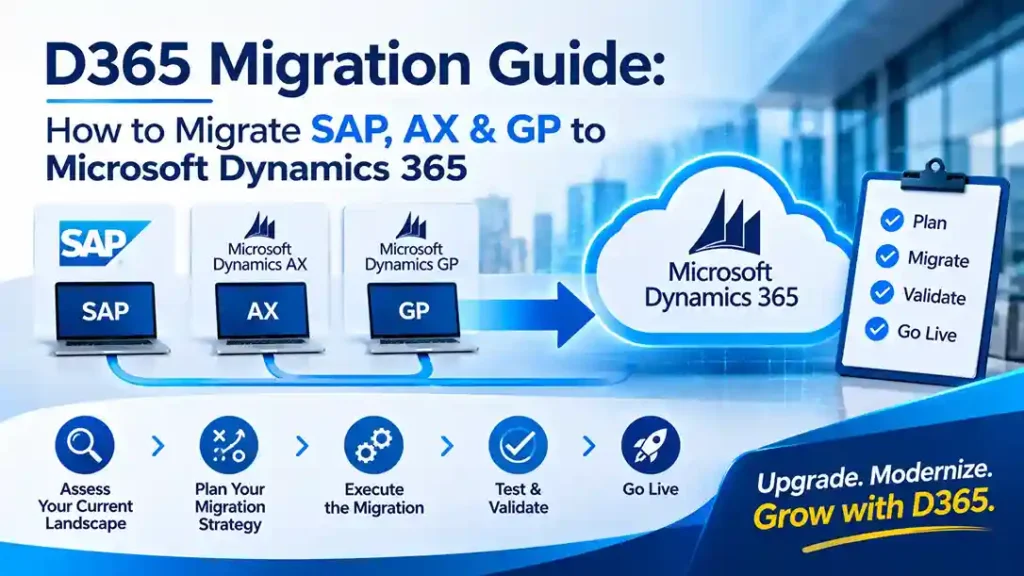
D365 migration follows different paths depending on your source system. Only Dynamics AX 2012 R2/R3 has a direct upgrade path to Dynamics 365 Finance. SAP and Dynamics GP require full migrations—designing new processes, moving master data and opening balances, and reconciling to source. Timeline ranges from 6–12 months for AX upgrades to 9–18 months for complex SAP migrations.
Why Migrate to D365 Now
Legacy ERP systems are reaching hard support deadlines. Dynamics AX 2012 extended support ended in 2023 . Dynamics GP technical support ends December 31, 2029, with security updates ending April 30, 2031 . Dynamics NAV 2018 extended support ends January 2028 .
Beyond dates, the capability gap is widening. Dynamics 365 delivers Copilot AI, Power Platform integration, continuous release waves, and native Microsoft 365 connectivity that legacy systems cannot match . Every month on unsupported software increases security exposure and maintenance cost while delivering zero innovation.
The Three Migration Paths: Not All Routes Are Equal
The critical distinction: AX 2012 has an upgrade path. SAP and GP do not.
AX 2012 to D365 Finance: The Upgrade Path
Microsoft provides a supported technical upgrade from AX 2012 R2 and R3 to Dynamics 365 Finance . This is the closest to a traditional upgrade—data and code move through Microsoft tooling.
The process runs through Lifecycle Services (LCS): run the upgrade analyzer against your AX database, upload the model store to the code upgrade service, resolve conversion conflicts, then execute data upgrade in development, sandbox, and production environments .
AX 2009 is different. There is no direct upgrade. Microsoft provides a Data Migration Tool (DMT) for AX 2009 to D365, treating it as a data migration rather than an application upgrade .
SAP to D365 Finance: A Full Migration
There is no technical upgrade from SAP to Dynamics 365. This is a reimplementation: design processes on D365 standard functionality, migrate master data and opening balances, reconcile to source .
Hitachi Solutions’ SAP migration approach uses prebuilt templates and automation to accelerate the transition, with phased rollouts to minimize disruption . Transdev, a global mobility company, replaced its legacy SAP R/3 system with D365 Finance, harmonizing onto a single platform across German entities. Results included faster closes, more reliable data, and real-time consolidated visibility .
Dynamics GP to Business Central: Built-In Migration Tools
GP migrates to Business Central (not Finance & Operations) using Microsoft’s built-in cloud migration tools. Supported from GP 2015 and later, requiring SQL Server 2016+ with compatibility level 130+ .
The GP Company Migration Configuration page controls the migration: select modules, set global dimensions, specify the oldest GL year to migrate, choose master-data-only modules, and disable auto-posting where needed .
What Actually Moves: Data Strategy Determines Cost
The single biggest cost lever is history. Migrating years of obsolete detail inflates cost, slows the new system, and delivers no operational value.
What to migrate: Master data (customers, vendors, items, chart of accounts), open transactions, opening balances, active inventory, required historical years.
What to archive: Long-term analytical history should live in a governed data platform (Fabric, OneLake, Power BI), not inside the new ERP.
Clean before moving. Close or remove inactive records, merge duplicates, reconcile subledgers to the general ledger, and redesign the chart of accounts where the old structure no longer fits .
For multi-entity AX 2012 upgrades, document attachments must be migrated into the AX database before the upgrade. In D365, attachments live in Azure Blob Storage or SharePoint Online—not file shares or local servers .
Customization Triage: The Make-or-Break Decision
D365 Finance and Business Central run extensions only. Legacy customizations cannot execute in the new environment. Every customization must be triaged into four outcomes:
- Retire — Standard D365 already provides this
- Replace — An AppSource solution covers it
- Convert/Rebuild — The logic matters; rewrite as a supported extension
- Keep (AX 2012 upgrade only) — The customization is small and converts cleanly
For AX 2012 upgrades, the LCS code upgrade service converts the model store and reports conflicts for developers to resolve . For SAP and GP migrations, customizations are rebuilt from scratch against D365 standard functionality .
Step-by-Step Migration Process
Phase 1: Assess (Months 0–2)
Inventory modules, customizations, ISV add-ons, integrations, data volume, and user count. Define the target system, history strategy, and migration route. Confirm your source version meets Microsoft requirements: AX 2012 R2/R3 for upgrade; GP 2015+ for Business Central migration .
Phase 2: Cleanse and Design (Months 2–4)
Clean legacy data: remove inactive records, reconcile balances, standardize units and dimensions. Design the D365 solution on standard functionality first—customize only where genuine business value justifies it. Write the field-by-field data map .
Phase 3: Build and Trial Load (Months 4–7)
Configure D365 modules. Run trial data migrations and reconcile results against the source system. For AX 2012, complete data upgrade in a development environment first, then sandbox . Rehearse until the cutover window is boring .
Phase 4: Test and Train (Months 7–9)
Conduct user acceptance testing with real business scenarios. Train by role—the D365 interface and workflows differ substantially from AX, SAP, and GP. Involve super-users early .
Phase 5: Cutover and Hypercare (Months 9–12)
Freeze the source system. Load the final delta. Reconcile opening balances on the morning of go-live. Provide 4–12 weeks of intensive post-go-live support.
Timeline Expectations
Common Migration Mistakes
Copying the legacy chart of accounts verbatim. D365’s dimension-based model requires deliberate design, not replication of outdated segment structures .
Migrating every customization. Most legacy customizations compensate for limitations D365 does not have.
Underestimating data quality. Clean before migration, not during. Poor data undermines user confidence immediately after go-live.
Skipping cutover rehearsals. Run at least two full dress rehearsals and time every step before agreeing the production window .
Final Thoughts
D365 migration is not a single process—it is three distinct paths with different technical realities. AX 2012 offers a supported upgrade. SAP and GP require full migrations with process redesign and data reconciliation. Understanding which path applies to your environment determines your timeline, cost, and risk profile.
The organizations that assess now—confirming their source version, inventorying customizations, and cleaning data—will migrate on their own timeline. Those that wait will migrate under vendor deadline pressure.
Planning a D365 migration? Start with a source-system assessment and a written history strategy. The diligence you invest before the first trial load determines whether go-live is routine or chaotic.