Welcome to Trident Information Systems!
Write us to - info@tridentinfo.com
Let's Socialize

Ls Central partner in ethiopia

LS Retail is now LS Central & Trident is LS Central Gold Implementation Partner

LS Central is Centralized Software solution for Restaurants and food services industry, this is all in one complete suit to manage front office to back office operations, inventory, customer service, online food ordering, Trident as LS Central Implementation Partner offering Retail ERP implementation, Support & training

LS Retail is now LS Central & Trident is LS Central Gold Implementation Partner Read More »

Streamline ordering and communication with a connected Kitchen Display System (KDS)

Since LS One 2020 was released in July, the LS One team has been developing extra functionality to enhance the system. They have put special focus on extending the capabilities for restaurants and food service businesses. Trident is LS Retail Central Platinum Partner, offering ERP for Retail & Hospitality. The Kitchen Display System (KDS) is a digital order viewer that replaces paper tickets and printers in a restaurant kitchen. A KDS has become an essential component in a modern kitchen, as it helps organize and streamline work: No more stained, hard-to-read paper tickets: all orders are displayed on screens, clear and tidy. No need for servers to waste time running from the front to the kitchen and back: all communication between kitchen and front (orders, items, their preparation status) goes through your POS system. Items and orders are automatically routed and displayed at the proper food preparation stations. Items are shown on the screens by production order, so kitchen staff can start and complete preparation timely. Kitchen staff can bump dishes to different stations, or mark orders and items as ready. The Kitchen Display System and the POS are connected via a two-way communication system. Front-of-house staff can see the status of orders at the POS, and make sure all dishes are delivered to the guests at the right time. You can add screens and set up specific automations to follow your kitchen’s flow. In the past, to connect a KDS to LS One you needed to do your own integration. From this version of LS One onwards, you can use your LS One POS system with the LS Retail Kitchen Display System. The systems are connected out of the box, no extra work needed. Picture this: Your server takes the order at the POS. When they send the order to the kitchen, the items are automatically routed to the KDS in the correct kitchen station (for example, the grill station versus the sauté or dessert station), and displayed in the right order of production. When a guest asks “When is my dish coming?” front-of-house staff can check at the POS the status of the order, and update the table. Easy, quick, and professional. Sell groups of items easily with assembly items It’s now easier than ever before to sell multiple items at once – for example, as a gift basket. In LS One you can now create “assembly items” by combining different items into one. The options are endless: Set up deals (or meal deals, if you run a restaurant or café) Create hampers and gift baskets Make bills of materials Set up recipes, managing the ingredients as separate items Assemble supply kits Do you run a chain, and want to differentiate your offering across locations? You can vary the list of component items between locations, and easily substitute products or ingredients as needed. For example, your holiday hamper can include Gouda cheese, instead of brie, in some of your store locations. You can set a special price for the final item, or add up the prices of the items that compose it – your choice. If you want, you can also display the list of components on the POS receipt, on the printed receipt, and on kitchen orders – or you can hide it. The integration to SAP Business One ERP just keeps on getting better Since we introduced the out-of-the-box integration between LS One and ERP SAP Business One, more and more businesses have moved from other POS solutions to LS One. Using their valuable feedback, we have been working on the integration to make it even more immediate and seamless. You can now add a U.S. tax setup when you create a customer on the POS The login service layer is more intuitive and quicker We have added tax synchronization for specific localizations You can now easily connect to different versions of SAP Business One HANA More enhancements to come as the LS One team keeps on ironing out the wrinkles. Endlessly enhancing LS One We are continuously working on improving LS One in terms of functionality, speed and simplicity. Some highlights from this release: You can now add the company’s country information Discount calculations are way faster than before We have redesigned the “send to station” and “menu type selection” dialogs (restaurant-specific functionality) The kitchen printing/send to station functionality is now fast and seamless (restaurant-specific). You can find more enhancements and fixes in the release notes. And as usual, more improvements are ahead as the team keeps on working to make LS One the best POS in the industry. If you have any comments, suggestions, or any query for us, get in touch! or write at info@tridentinfo.com

Streamline ordering and communication with a connected Kitchen Display System (KDS) Read More »

Retail store using mobile POS and digital checkout solutions to reduce customer queues and improve checkout speed.

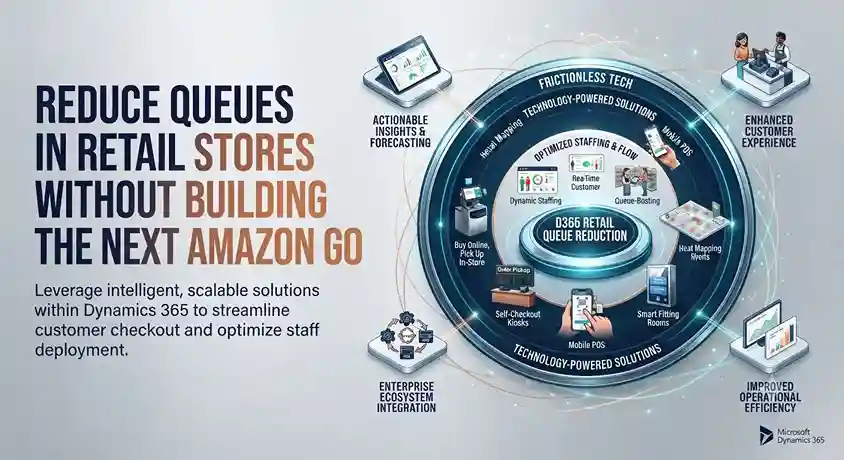
Reduce Queues in Retail Stores Without Building the Next Amazon Go

INTRODUCTION Nine out of ten shoppers in the UK say they will completely avoid a store with a long line; this means that every minute spent waiting to pay represents a real risk of losing the sale, not just a minor inconvenience. Amazon Go made headlines by eliminating checkout lines entirely, but a complete overhaul to remove checkouts is not feasible for most retailers. These six approaches can significantly reduce wait times without going to such extremes. 1. Bring the checkout to the customer with mobile POS systems Using a tablet or smartphone-based point-of-sale (POS) system allows staff to look up items, process payments, and print receipts wherever the customer is—whether inside or outside the store—instead of funneling all transactions through a fixed checkout counter. Furthermore, this solution facilitates scalability during peak periods: adding more mobile devices does not require allocating physical space for additional checkout stations, as traditional registers do. 2. Designate a specific line for complex transactions Simple purchases are quick, whereas returns, custom orders, and loyalty program sign-ups take longer. Mixing the two types in the same line means that every complex transaction slows down the progress of those waiting behind. Since straightforward sales usually far outnumber complex ones, routing complicated processes to a dedicated service point allows the main line to move at the pace most customers actually need. 3. Try virtual queuing Virtual queuing systems—common in banks and post offices but still rare in most retail stores—allow customers to get a number and reserve their spot without having to physically stand in line. Beyond convenience, this creates a genuine opportunity for upselling: a customer browsing the store while waiting for their turn might notice an item they hadn’t originally planned to buy. 4. Offer appointments for visits requiring personalized attention Not every store visit needs to be spontaneous. For specialized consultations or services, scheduled appointments allow retailers to manage visitor flow and devote proper attention to each customer, rather than rushing to serve them as quickly as possible. Watches of Switzerland took significant steps in this direction after reopening, organizing 13,000 one-on-one appointments (combining virtual and in-person formats) in just two weeks. While this model doesn’t suit every retail category, for purchases requiring more customer deliberation, it transforms queue management into an enhanced service experience rather than a compromise on the quality of care. 5. Implement self-scanning technology (Scan-and-Go) Self-scanning apps put the scanning process in the customer’s hands: items are scanned and added to a running total as they are placed in the cart, rather than all being scanned at once during checkout. Although this method is more established in the grocery sector, there is no structural reason preventing its application in sectors such as fashion, electronics, health, or home improvement. It offers an advantage beyond speed: scanning a barcode allows product details—such as ingredients, materials, or care instructions—to be displayed directly to the shopper, eliminating the need to consult staff or handle the packaging. 6. Ensure technology works correctly before it becomes a problem Unreliable point-of-sale (POS) technology not only slows down transactions but can bring them to a complete standstill. A Trident client recounted how their old system crashed during the Christmas Eve rush: every checkout in the store stopped working, transactions had to be processed manually, lines wrapped around the building, and the business estimated losses of $20,000 that day alone—not to mention the likely long-term impact on customer loyalty. Their conclusion, in their own words, was that reliability must be the primary criterion when evaluating payment technology, taking precedence over features or price. Before implementing new strategies to reduce queues, it is essential to ensure that the current system itself does not become the actual bottleneck. Are you looking for payment technology capable of handling demand spikes without failure? Contact Trident to discuss the best solution for your store.

Reduce Queues in Retail Stores Without Building the Next Amazon Go Read More »

Why it makes sense to move your retail management software to the cloud

As a successful retailer, chances are you are already running some of your IT functions in the cloud. That’s smart. The next logical step is to move your entire retail management system to the cloud, and go from the on-premises version to its software as a service (SaaS) one. But even if you know that the cloud is experiencing exponential growth, and that you will, one day, take the leap, you may be hesitant to do it now. Perhaps you are afraid you’re not ready for the change. Perhaps you have security concerns. Maybe you can’t clearly identify which practical, day-to-day benefits you’d get from moving to the cloud. Whichever your reasons, you want the best for your business, and you care about staying competitive. You want to make the right decision, and employ technology that will propel you forward today and tomorrow. While you are debating whether the cloud is for you, here are 8 good reasons why you should consider migrating your system. 1. Stay up to date, automatically With traditional on-premises software, businesses are responsible of keeping their hardware and software up to date. In order to stay current (and safe), they’d need to purchase new hardware every few years, and to update their software every few months. But in reality, retailers usually have more pressing concerns than keeping track of the latest software patch or upgrade. And if the company is using multiple software solutions and there are integrations in place, a system upgrade can become a costly and lengthy project. As a result, many companies end up with outdated IT environments that work, but don’t really support the business, and may even hinder it. In the worst cases, this old tech might reduce the company’s ability to grow and take on new projects, or stay on top of consumer demands. When you are using SaaS in the cloud, all these concerns belong to the past. You don’t need to worry about periodic maintenance, or to budget for expensive and complicated software upgrades. Instead, your supplier takes care of updating your software regularly. And if you have configured your add-ons correctly, you can maintain all your extensions, and even your configurations. SaaS software guarantees that you are always, automatically, on the latest version, and can use all the new functionality that comes with it. 2. Enhance productivity with intelligence One of the biggest advantages of the cloud is the advanced computational power it offers. Tasks that until yesterday were too complex for even the most powerful computer, for example predicting future sales patterns, are now within reach of any retailer. Businesses can run their data into Artificial Intelligence (AI) and machine learning (ML) powered tools available in the cloud, and without having to pay for extra servers or data scientists, they can get the answers they need, with minimal effort, very rapidly, and at a fraction of the cost than comparable on-prem technology. There is a wide variety of AI tools available in the cloud, giving businesses infinite possibilities to improve their effectiveness and productivity. AI can also help make smarter decisions, and deliver more personalized, to the point customer service. Would you like to send personalized promotions and special deals to your customers based on their shopping history and specific tastes? Are you thinking about adding a chatbot or virtual agent as a first-line customer support? Or perhaps you’d like to offer intelligent search on your e-commerce site? When you run your software in the cloud, all these initiatives are accessible to you, and can be started within a very short timeframe. But AI can do much more than help deliver bespoke customer experiences. You can use optimize your inventory with advanced forecasting that can factor seasonality, promotions, trends, and product substitutes and complements into your forecasts. You can refine your hiring practices with intelligent talent acquisition solutions. You can simplify searches across your catalog for both staff and customers using AI-powered accurate product tagging applied to images. When you infuse your business with intelligence, you also make it more proactive, agile, and profitable. 3. Guarantee business continuity with a reliable infrastructure With traditional in-house IT setups, businesses are at constant risk of downtimes and failures. On-site servers can’t usually guarantee a consistent performance, and if a key piece of your hardware breaks down, you may be left unable to serve customers or close sales – and could even risk losing your business data. As regards reliability, a traditional infrastructure usually necessitates a disaster recovery plan, requiring you to build redundancy, carefully monitor conditions, having dual firewalls and more – in short, you need to budget for time-consuming, expensive, complex monitoring. Switch to SaaS software, and you can step away from all of these problems. Even if you experience a hardware failure – say your computers or servers break down – you won’t lose your data, as it is safely stored in the cloud and can be accessed when and as you need to. The cloud also guarantees higher reliability. Large cloud services like Microsoft Azure, with expansive resources and entire dedicated teams, have already built in redundancy, from failover hardware to datacenters located across the world. As a result, Azure, the service where the cloud-based version of LS Central resides, can guarantee 99,995% uptime, and top security features. 4. Respond quickly to changing market conditions You know how important speed of action is in the retail industry. Yet, traditional IT environments are all but agile: even a project as simple as adding new servers or applications can be very time consuming. First, your IT staff needs time to procure the hardware or software that will fit within the current infrastructure. Then they have to set it up and test it, and finally, they’ll have to go through implementing it. In the past, this process was the only way to implement change. Today, this is an outdated and ineffective way of operating – especially when the businesses you are competing against are agile and unburdened by traditional infrastructure, such as e-commerce players. To stay

Why it makes sense to move your retail management software to the cloud Read More »