Growing businesses reach a point where spreadsheets, disconnected accounting software, and manual processes stop being inconveniences and start being strategic risks. Inventory decisions made without real-time stock data. Financial close processes that take weeks instead of days. Sales teams working from customer records that do not reflect the latest service interactions. Supply chain planning that cannot see production capacity in real time. These are not just operational frustrations — they are competitive vulnerabilities in a market where speed and accuracy determine which businesses grow and which ones stall.
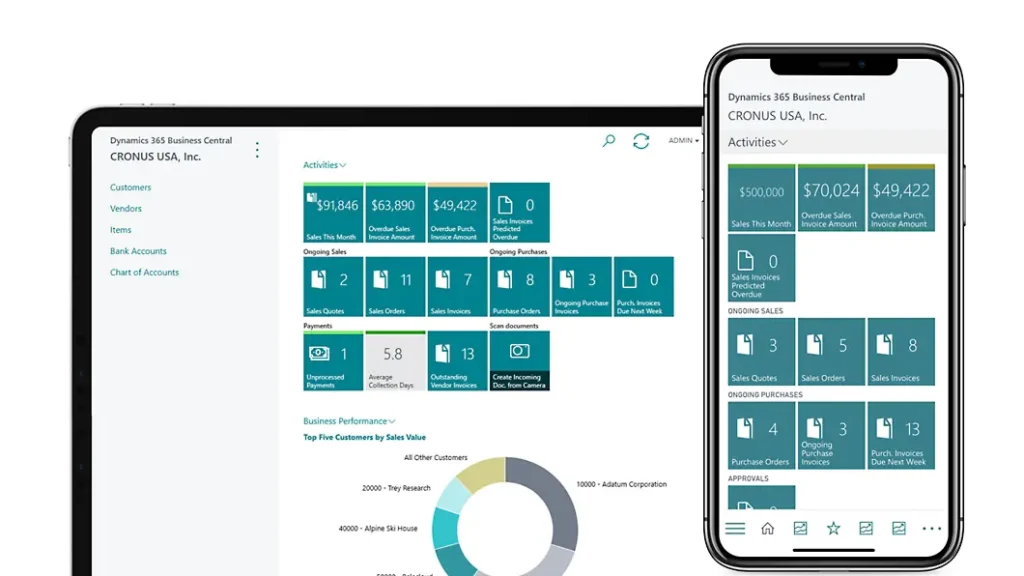
Microsoft Dynamics 365 Business Central is built for exactly this inflection point. It is an all-in-one business management solution that connects finance, sales, supply chain, manufacturing, project management, and service operations on a single, intelligent platform — giving growing businesses the end-to-end visibility, automation depth, and real-time intelligence they need to make better decisions and accelerate growth.
As the evolution of Microsoft Dynamics NAV — one of the world’s most widely deployed mid-market ERP platforms — Business Central combines the deep functional capability that NAV users trusted with the cloud-native architecture, embedded Power BI analytics, and Microsoft 365 integration that modern businesses require.
Trident Information Systems is a certified Microsoft Dynamics 365 Business Central implementation partner — helping businesses across manufacturing, retail, professional services, and distribution implement, configure, and maximize the value of Business Central across India.
This guide covers every major capability of Dynamics 365 Business Central — what it does, how it works, and what it delivers for growing businesses.
What Is Microsoft Dynamics 365 Business Central?
Microsoft Dynamics 365 Business Central is an all-in-one cloud ERP solution designed for small and mid-size businesses that need a single, integrated platform to manage their entire operation — without the complexity and cost of enterprise-grade ERP systems like Dynamics 365 Finance and Operations.
The Evolution of Dynamics NAV: Built for Modern Business
Business Central is the direct successor to Microsoft Dynamics NAV — one of the most successful mid-market ERP platforms in the world, with hundreds of thousands of deployments across more than 170 countries. If your organization is currently running Dynamics NAV, Business Central is your natural upgrade path — preserving the functional depth and business logic you depend on while adding cloud delivery, embedded AI, real-time analytics, and modern Microsoft 365 integration.
For new implementations, Business Central offers the fastest path to a fully integrated business management platform — with preconfigured industry templates, rapid deployment methodology, and no-code customization tools that allow businesses to adapt the system to their specific processes without expensive custom development.
Who Is Dynamics 365 Business Central Designed For?
Business Central is designed for:
- Small and mid-size businesses that have outgrown standalone accounting software like Tally, QuickBooks, or Sage and need a unified platform
- Dynamics NAV users planning to migrate to a modern, cloud-native ERP solution
- Growing businesses that need ERP functionality across finance, sales, supply chain, and manufacturing without the complexity of enterprise-tier platforms
- Multi-entity and multi-currency businesses managing operations across multiple locations, currencies, or legal entities
- Manufacturing and distribution companies needing integrated production planning, warehouse management, and supply chain visibility
Financial Management: Real-Time Intelligence Across Every Account
Financial management is the operational core of Business Central — built to give finance teams the real-time visibility, automation, and control they need to close faster, report more accurately, and forecast with confidence.
Make Informed Decisions With End-to-End Financial Visibility
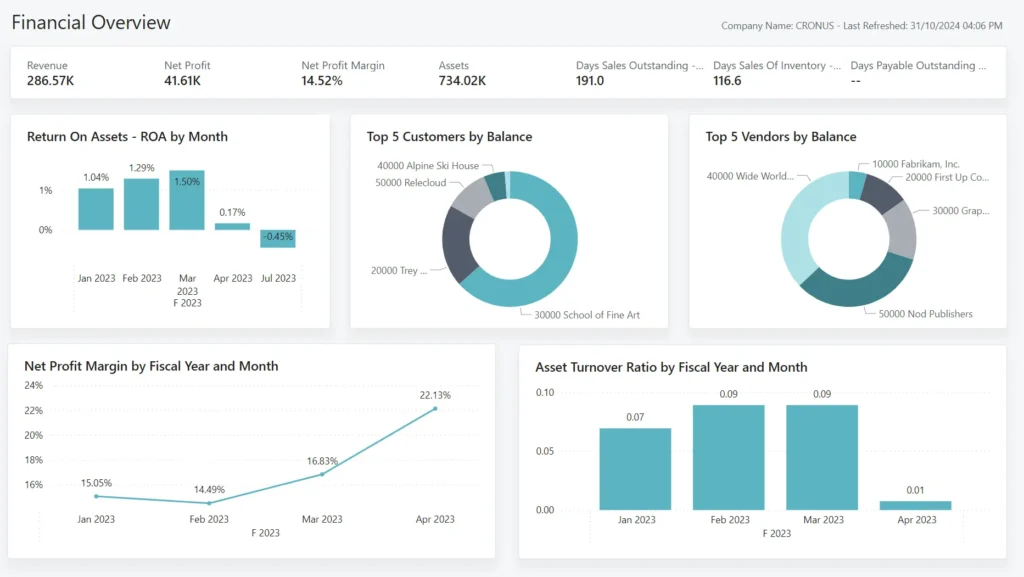
Business Central connects data across accounting, sales, purchasing, inventory, and customer interactions — creating a single, continuously updated financial picture of your business. Built-in Power BI dashboards display financial performance in real time, with drill-down capability from summary KPIs to individual transaction level:
- End-to-end financial view — see how every operational decision affects financial performance, in real time
- Real-time P&L, balance sheet, and cash flow — always current, without waiting for manual report compilation
- Multi-dimensional transaction analysis — add unlimited dimensions to any ledger entry for granular financial analysis by department, project, geography, or any other dimension your business requires
- Audit trails — automatically generated for every transaction, with user-defined reason codes for complementary audit documentation
Accelerate Financial Close and Reporting
Manual financial close processes consume weeks of finance team capacity every period — reconciling accounts, chasing documentation, and correcting errors that automated systems would have caught immediately. Business Central streamlines the entire close cycle:
- Automated accounts receivable and payable — streamline posting, matching, and reconciliation across both AR and AP
- Automatic bank reconciliation — match bank statement data to open ledger entries automatically, flagging exceptions for human review
- Recurring journal automation — set up and automate recurring journal entries, accruals, and deferrals through configurable templates
- Fast, accurate financial reporting — generate compliant financial statements quickly, with confidence in the accuracy of the underlying data
- VAT management — built-in VAT facilities for compliant tax posting and reporting
Improve Forecast Accuracy With Multi-Dimensional Analysis
Business Central’s forecasting capabilities give finance and leadership teams the tools to model future performance with confidence:
- Multi-dimensional financial modeling — analyze performance across any combination of dimensions — product line, geography, department, customer segment — to identify trends and model scenarios
- Budget management — create and manage budgets in general ledger accounts, with variance tracking against actuals in real time
- Microsoft Excel integration — build custom financial models and reports in Excel with live Business Central data — familiar tools, real-time accuracy
- Deferral templates — automate the process of deferring revenues and expenses across predefined schedules — eliminating manual deferral calculations
Core Financial Capabilities: GL, Fixed Assets, Receivables, and More
Business Central’s financial module covers every dimension of business accounting:
- General Ledger — full chart of accounts, general journals, source codes, and posting configuration
- Fixed Asset Management — track fixed assets and all related transactions including acquisitions, depreciations, write-downs, appreciations, and disposals
- Bank Account Management — create and manage multiple bank accounts across different currencies
- Multi-currency management — manage payables, receivables, GL reporting, inventory, and bank accounts across multiple currencies simultaneously
- Basic Receivables — post sales transactions and manage customer receivables through general journals
Customer Relationship Management: Deliver Value at Every Touchpoint
Business Central includes integrated CRM capabilities — giving sales teams the customer intelligence, opportunity management tools, and productivity features they need to close more deals and build stronger relationships.
Prioritize Leads, Track Interactions, and Close More Deals
- Revenue-based lead prioritization — rank sales leads by revenue potential so your team always focuses on the opportunities that matter most
- Complete interaction tracking — every customer contact, email, meeting, and service interaction logged and accessible from the customer record
- Opportunity management — track sales opportunities through defined pipeline stages with full visibility into deal health and projected close dates
- Upsell, cross-sell, and renewal guidance — AI-powered recommendations surface the best next action for each customer relationship throughout the sales cycle
- Campaign management — organize targeted campaigns based on contact segments defined within Business Central
Boost Sales Productivity From Within Microsoft Outlook
One of Business Central’s most practically impactful capabilities is its deep integration with Microsoft Outlook — the tool most sales professionals already spend the majority of their working day in:
- Manage sales inquiries, process quotes, and handle service requests directly from Outlook
- Access full customer and order history without leaving the email interface
- Synchronize contacts, tasks, and calendar items between Business Central and Outlook automatically
- Process payments and update order status from within the Outlook environment
- Eliminate the context switching between email and ERP that consumes sales team productivity
Dynamics 365 Business Central and Dynamics 365 Sales Integration
For organizations that require deeper CRM functionality than Business Central’s native capabilities provide, Dynamics 365 for Sales integration is available natively — synchronizing sales orders, item availability, units of measure, and currencies between the two platforms in a few straightforward steps.
Supply Chain Management: Automate, Optimize, and Protect Margins
Business Central’s supply chain capabilities give purchasing, inventory, and operations teams the intelligence and automation to maintain optimal stock levels, avoid costly shortages, and protect margins through smarter procurement.
Optimize Inventory Levels With Built-In Intelligence
- AI-powered replenishment prediction — built-in intelligence predicts when and what to replenish based on demand patterns, lead times, and current stock levels — so you purchase only what you need, when you need it
- Dynamically updated inventory levels — real-time stock visibility across all locations, updated with every transaction
- Automatic stock level calculation — continuous recalculation of optimal stock levels, lead times, and reorder points based on current demand
- Substitute item suggestions — when requested items are out of stock, Business Central automatically suggests available substitutes — preventing lost sales
- Item transfer tracking — track inventory as it moves between locations, with full value accounting for inventory in transit
Avoid Stockouts and Lost Sales With Automated Replenishment
Stockouts are one of the most costly and preventable operational failures in any product-based business. Business Central eliminates them through:
- Automated reorder point management — stock replenishment triggers fire automatically when inventory falls below defined thresholds
- Blanket order management — manage long-term supplier agreements with flexible call-off schedules
- Vendor discount optimization — recommendations on when to pay vendors to capture available discounts or avoid overdue penalties
- Approval workflow protection — prevent unauthorized or potentially fraudulent purchases through configurable approval routing
Purchase and Sales Order Management
- Sales order management — manage sales orders, blanket sales orders, and the full sales order processing workflow
- Purchase order management — manage purchases, blanket orders, and purchase order processing from requisition through receipt and invoice
- Multi-location inventory — manage stock across production plants, distribution centers, warehouses, showrooms, retail outlets, and service vehicles within a single system
- Assembly management — support for companies that supply products by combining components in simple processes, fully integrated with sales, planning, reservations, and warehousing
Warehouse Management: Basic and Advanced
Business Central’s warehouse management can be configured at different complexity levels — from basic order-by-order processing for simpler operations to advanced multi-order consolidation for high-volume distribution environments:
- Basic warehousing — activities performed order-by-order, suitable for lower-volume operations
- Advanced warehousing — activities consolidated across multiple orders simultaneously, with bin management, directed put-away, and wave picking
- Bin configuration — set up bins based on warehouse layout and storage unit dimensions for optimized space utilization
- Item tracking — track every item transaction and movement with full traceability
Manufacturing: From Planning to Production to Delivery
Business Central provides integrated manufacturing capabilities for companies that produce goods — from simple assembly operations through complex multi-level production with subcontracting.
Production Planning and Capacity Optimization
- Sales forecasting to production planning — use sales forecasts and expected stock-outs to automatically generate production plans and create purchase orders
- Capacity planning — calculate and optimize manufacturing capacity and resources to improve production schedules and meet customer demand commitments
- Resource management — register, group, and track manufacturing resources with visibility into availability and planned costs
- Production output optimization — reach optimal output levels through integrated capacity, materials, and scheduling management
Subcontracting and Assembly Management
- Subcontracting — send raw materials, unfinished goods, or partially finished goods to external processors for further work, with full cost and inventory tracking
- Assembly management — combine components into finished products through simple assembly processes integrated with sales, planning, and warehousing — without requiring full manufacturing functionality
Service Order Management: From After-Sales to Contract Management
Business Central provides a complete service management framework — giving service operations teams the tools to manage service requests, service contracts, field technician dispatch, and pricing across the full service lifecycle:
- Service orders — register and manage after-sales issues including service requests, services due, service orders, and repair requests
- Service item management — record and track all service items including contract information, component management, BOM references, and warranty information
- Service contract management — record service levels, response times, discount structures, and complete service history including parts, labor hours, and costs
- Dispatch management — manage service personnel and field technician information, filter by availability, skills, and required stock items
- Service price management — set up, maintain, and monitor service pricing across all service lines and contract types
- Work order planning — assign personnel to work orders with detailed logging of handling status and progress
Project Management: Stay on Budget, Deliver on Time
Business Central’s project management capabilities give professional services organizations and project-based businesses the tools to plan, track, and deliver customer projects profitably:
Job Costing, Timesheets, and Resource Planning
- Job costing — create, manage, and track customer projects using advanced job costing and reporting — supporting both fixed-price and time-and-materials billing models
- Timesheets — simple, flexible time registration with manager approval, integrated with service management, jobs, and resource management
- Resource management — register and sell resources, group related resources, and track individual resource utilization
- Capacity planning — manage resource levels by planning capacity and sales, tracking invoicing against planned costs on orders and quotes
- Estimates — monitor resource usage and maintain a complete overview of capacity, availability, and planned costs
Analyze Project Profitability in Real Time
- Real-time project status dashboards — see project health, budget consumption, and resource utilization at any moment without waiting for a status report
- Profitability analysis — make effective decisions with real-time insight into project profitability at the job, resource, and task level
- Budget management — develop, modify, and control project budgets throughout the project lifecycle to ensure profitability is protected
Human Resources and Expense Management
Business Central includes foundational human resources and expense management capabilities — giving HR and finance teams a single system for employee data and expense processing:
- Employee management — group and track employee information across multiple data types including experience, skills, education, training, and union membership
- Expense management — post expenses against employee cards to track and reimburse employee expenses systematically
Power BI Integration: Actionable Insights Across Every Function
Live Dashboards and KPIs From a Single Pane of Glass
Business Central’s native Power BI integration transforms business data into live, interactive intelligence — accessible to every user across the organization:
- Consolidated business view — see all operational and financial data through a single dashboard interface, regardless of whether data lives in the cloud or on-premises
- Live dashboards and reports — real-time visualizations and KPIs that update continuously as transactions occur
- Role-specific insights — configure dashboards for each function — finance, sales, operations, service — so every team sees the metrics most relevant to their work
- Drill-down capability — from summary KPI to underlying transaction in seconds, without switching systems
Microsoft Dataverse and App Integration
Business Central connects to the broader Microsoft ecosystem through Microsoft Dataverse (formerly Common Data Service) — enabling seamless data sharing across Dynamics 365 applications and Power Platform tools:
- Remove data silos by connecting Business Central data with other Dynamics 365 applications through Dataverse
- Build intelligence into every connected application using shared, consistent business data
- Access over 200 standard business entities and relationships through the Dataverse foundation
Power Platform: Automate, Build, and Extend Business Central
Power Automate: Workflow Automation Without Code
Microsoft Power Automate (formerly Microsoft Flow) enables Business Central users to automate virtually any business process — without writing a single line of code:
- Automate notifications, data collection, and approval routing across Business Central and connected applications
- Build multi-step workflows that trigger automatically based on Business Central events
- Connect Business Central to hundreds of external applications through Power Automate’s connector library
- Reduce manual process overhead and ensure consistent, error-free process execution
Power Apps: Custom Business Applications for Every Need
Microsoft Power Apps allows organizations to build custom business applications that connect directly to Business Central data — extending the platform’s capabilities for specific business scenarios:
- Build visually compelling apps that take advantage of device capabilities — cameras, GPS, pen controls, barcode scanners
- Run custom apps on any device — desktop, tablet, or mobile — without separate development for each platform
- Customize entirely for your business requirements — without waiting for standard product updates
- Use Microsoft Dataverse as the shared data foundation connecting Power Apps, Business Central, and other Dynamics 365 applications
Dynamics 365 Business Central vs Dynamics NAV: Key Differences
| Capability | Dynamics NAV | Dynamics 365 Business Central |
|---|---|---|
| Deployment | On-premises primary | Cloud-first, on-premises option |
| Updates | Manual upgrade cycles | Continuous cloud updates |
| Analytics | Requires separate BI tools | Native Power BI embedded |
| AI capabilities | None | Embedded AI for forecasting, replenishment |
| Microsoft 365 integration | Limited | Deep native integration |
| Mobile access | Limited | Full mobile app — iOS and Android |
| Power Platform | Not available | Native Power Apps and Power Automate |
| Scalability | On-premises constraints | Cloud scalability on demand |
| Total cost of ownership | Higher (infrastructure + licenses) | Lower (SaaS subscription model) |
Key Benefits of Microsoft Dynamics 365 Business Central
| Benefit | What It Delivers |
|---|---|
| All-in-one platform | Finance, sales, supply chain, manufacturing, service, and projects — one system |
| Real-time visibility | Live financial and operational data across every business function |
| Microsoft ecosystem | Native integration with Microsoft 365, Power BI, Power Platform, Teams |
| Cloud scalability | Scale users, modules, and capacity as your business grows |
| Rapid deployment | Faster implementation than traditional ERP through preconfigured templates |
| No-code customization | Adapt the system to your processes without developer involvement |
| Continuous updates | New features delivered automatically — including Microsoft Copilot AI |
| NAV upgrade path | Seamless migration from Dynamics NAV with preserved business logic |
Why Trident Is India’s Trusted Business Central Implementation Partner
Trident Information Systems is a trusted consulting and technology services partner with deep expertise in driving digital transformation across Manufacturing, Retail, Hospitality, Logistics, Services, and more. With a strong presence in India, the U.S., UK, UAE, Africa, and a rapidly expanding footprint in Southeast Asia, Trident has successfully delivered over 250+ customer engagements. These include smart manufacturing with intelligent shop floor automation, retail digitalization spanning 3,000+ stores, and IoT-driven asset management covering 400+ assets across 150+ locations.
Beyond infrastructure and operations, Trident excels in business applications (Microsoft Dynamics 365 ERP, CRM, O365, Azure, Power BI, Power Platform, Salesforce) and Data & AI services in collaboration with Microsoft and IBM. What truly sets them apart is their exclusive Managed Talent Services unit, designed to help organizations jumpstart digital transformation engagements quickly and effectively—bridging the gap between strategy and execution with the right skills at the right time.
As a certified Microsoft Dynamics 365 Business Central implementation partner, Trident Information Systems has helped businesses across manufacturing, retail, distribution, and professional services in India implement, configure, and maximize the value of Business Central — from initial discovery and data migration through go-live, user training, and ongoing support.
Ready to connect and grow your business with Microsoft Dynamics 365 Business Central? Book a free Business Central assessment with Trident today — and discover exactly how quickly your organization can move from disconnected systems to a unified, intelligent business management platform. For more insightful content and industry updates, follow our LinkedIn page.
FAQs
Q: What is Microsoft Dynamics 365 Business Central?
Microsoft Dynamics 365 Business Central is an all-in-one cloud ERP solution for small and mid-size businesses — connecting finance, sales, supply chain, manufacturing, project management, and service operations on a single integrated platform. It is the modern, cloud-native evolution of Microsoft Dynamics NAV, with embedded Power BI analytics, Microsoft 365 integration, and Power Platform connectivity built in.
Q: Who is Dynamics 365 Business Central designed for?
Business Central is designed for small and mid-size businesses that have outgrown standalone accounting software, Dynamics NAV users planning a cloud upgrade, and growing businesses that need integrated ERP across finance, sales, supply chain, and manufacturing without the complexity and cost of enterprise-tier platforms.
Q: How is Dynamics 365 Business Central different from Dynamics NAV?
Business Central is the cloud-native successor to Dynamics NAV — delivering the same deep functional capability with the addition of cloud deployment, continuous automatic updates, native Power BI integration, embedded AI for forecasting and replenishment, Power Automate workflow automation, and deep Microsoft 365 integration. It also offers a significantly lower total cost of ownership through the SaaS subscription model versus on-premises infrastructure.
Q: Does Dynamics 365 Business Central integrate with Microsoft 365?
Yes. Business Central integrates natively with the full Microsoft 365 ecosystem — including Outlook (for sales and service management), Excel (for financial analysis and reporting), Teams (for collaboration), and Power BI (for live dashboards and analytics). These integrations are built in — not third-party connections requiring separate configuration.
Q: Can Dynamics 365 Business Central handle manufacturing operations?
Yes. Business Central includes integrated manufacturing capabilities — covering production planning, capacity optimization, subcontracting, assembly management, resource scheduling, and service order management. For more complex manufacturing requirements, Business Central can be extended through industry-specific add-ons or upgraded to Dynamics 365 Finance and Supply Chain Management.