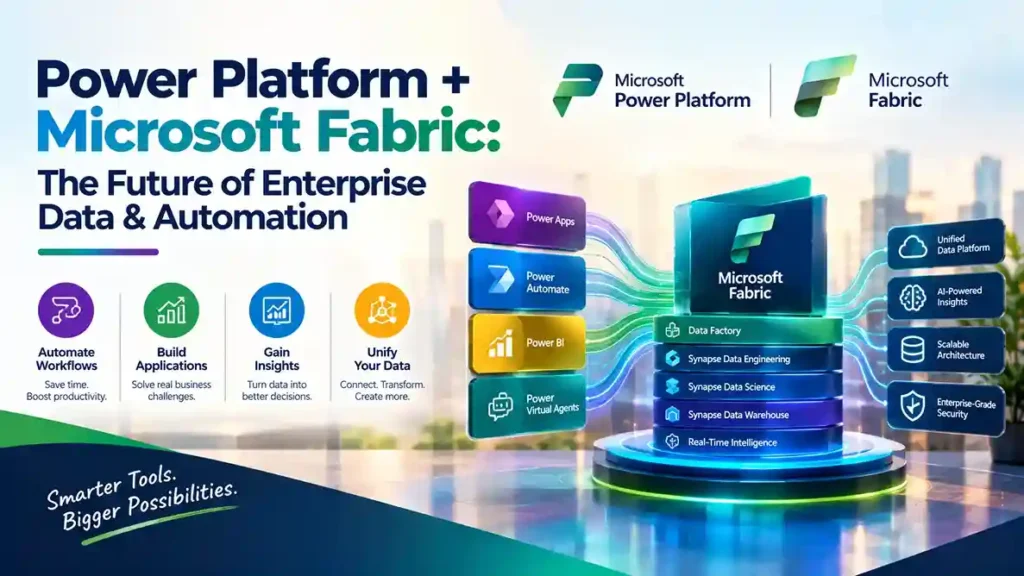
Microsoft’s enterprise data strategy has converged on a single, unified architecture: Power Platform for low-code application development and automation, Microsoft Fabric for analytics and data engineering, connected through OneLake and Dataverse. For organizations running Dynamics 365, the integration is not a future roadmap item—it is available now, and it fundamentally changes how data flows between operational systems and analytical insight.
This guide explains how the integration works, what it enables, and why it matters for businesses planning their data and automation strategy.
The Core Architecture: Dataverse as the Bridge
The integration centers on Dataverse, Microsoft’s data service that underpins Power Apps, Power Automate, and Dynamics 365. In July 2026, Microsoft released significant improvements to the Dataverse-to-Fabric link, allowing administrators to choose which Dataverse and Finance & Operations tables sync to Fabric, adding Workspace Identity and Service Principal authentication, and reducing sync latency to under 15 minutes for most cases.
The mechanism works through shortcuts: Dataverse creates a direct, secure connection to OneLake (Fabric’s built-in data lake) without exporting data, building ETL pipelines, or using partner integration tools. Your data remains in Dataverse while authorized users work with it in Fabric.
When you link a Dataverse environment to Fabric, the system automatically creates:
- A Fabric Lakehouse containing your Dataverse data
- A SQL endpoint for relational queries
- A Power BI dataset ready for reporting
This means analysts can immediately begin working with operational data—sales orders, inventory, customer cases, financial transactions—using Spark, Python, SQL, or Power BI, without waiting for IT to build a pipeline.
What This Enables: From Operational Data to Actionable Insight
The practical value emerges when you combine Dynamics 365 business data with other enterprise data sources in OneLake. A manufacturing company can blend production sensor data with D365 inventory and sales orders to predict shortages. A retailer can combine point-of-sale data with customer records to identify churn risk.
Microsoft describes the workflow clearly: “Combine data from your apps and devices, websites, mobile apps, sensors, and signals from your warehouse and factories with data from your business processes in Dynamics 365, such as sales, cases, inventory, and orders to help predict potential delays or shortages that affect your customer promise”.
Once insights are generated in Fabric, the loop closes through Power Apps and Power Automate. Low-code makers can add those insights back into Dataverse as virtual tables connected to OneLake, then build applications and automations that react to what the data reveals. A customer service agent sees a predicted churn score directly in their Power App; a supply chain manager receives an automated alert when inventory coverage drops below a Fabric-calculated threshold.
Microsoft Fabric: The Analytics Engine
Fabric itself is a comprehensive analytics platform that unifies what were previously separate services. Key components relevant to Power Platform integration include:
OneLake — the unified data lake that serves as the foundation for all Fabric workloads. It supports open formats (Delta Parquet) and shortcuts, allowing data to be referenced without copying.
Data Factory — the data integration layer with over 200 native connectors, incorporating the simplicity of Power Query for ingesting and transforming data.
Power BI — visualization and reporting, now tightly integrated so that reports connect directly to OneLake without moving data.
Data Activator — a no-code experience that triggers actions (email notifications, Power Automate workflows) when Fabric detects patterns or conditions in changing data. This is the direct automation bridge between Fabric analytics and Power Platform workflows.
Real-Time Intelligence — end-to-end capabilities for event-driven scenarios, streaming data, and log analysis, with no-code connectors converging into a governed enterprise data catalog.
Why This Matters for Dynamics 365 Customers
For organizations running D365 Finance, Supply Chain Management, or Customer Engagement, the integration addresses a long-standing gap: the separation between operational systems and analytical insight.
Previously, extracting D365 data for analysis required ETL development, data warehouse infrastructure, or third-party tools. The Dataverse-Fabric link eliminates that overhead. Data changes in Dataverse reflect automatically in the lakehouse, keeping analytics current without manual refresh cycles.
The July 2026 update allowing table-level selection is particularly significant. Administrators can now control which tables sync, reducing unnecessary storage consumption and focusing analytics on relevant business data. Sync latency under 15 minutes for most cases means near-real-time reporting is feasible for many scenarios.
Governance and Security
The integration maintains Dataverse’s security model. The replica created in OneLake is “governed and secured by Dataverse and remains in the same region as your Dataverse environment while allowing Fabric workloads to operate on this data”. Sensitivity labels from Purview inherit automatically across Fabric items, and row-level security is enforced.
Workspace Identity authentication, now recommended as the default, eliminates the need to manage secrets and avoids service principal misconfiguration—the most common cause of Fabric link setup failures.
Practical Considerations
Capacity requirements: Fabric capacity must exist in the same geographic region as your Dataverse environment. If it does not, the setup wizard will prompt you to acquire capacity in the required geography.
Storage implications: Linking tables to OneLake increases Dataverse database storage consumption. Administrators can monitor this in the Power Platform admin center.
Prerequisites: System Administrator role in the Power Platform environment, Power BI workspace admin rights, and appropriate Fabric tenant settings to allow item creation.
The Strategic View
Microsoft’s direction is clear: Dataverse holds operational data; Fabric holds analytical data; OneLake connects them; Power Platform acts on the results. This architecture positions organizations to adopt AI capabilities—Copilot in Fabric, agents in Power Platform—without rebuilding their data foundation.
For businesses still running legacy integration patterns (nightly exports, custom ETL, separate reporting databases), the Dataverse-Fabric link offers a simpler, lower-maintenance alternative. The question is no longer whether the integration works—it is whether your organization is ready to use it.
Evaluating Power Platform and Fabric for your enterprise? Start with a Dataverse environment assessment and a Fabric capacity review to confirm regional alignment and governance readiness.