Welcome to Trident Information Systems!
Write us to - info@tridentinfo.com
Let's Socialize

microsoft azure cloud

Why is Enterprise Mobility a Must-Have for your Business?

Have you thought of considering Enterprise Mobility Services already? If not, what are you waiting for? Enterprise Mobility showers tremendous benefits while allowing businesses to work remotely from any location via their laptops, personal computers, etc.   Businesses can access their data from the cloud. There are pretty good reasons why enterprise mobility is a boom these days: you get reduced resources, IT gaps being filled, and enhanced productivity all together!   It is a massive computation of innovation and collaboration for achieving organizational goals. Some enterprises might prefer a combination of an on-premise and remote working system for their employees. Overall, it is an effective and efficient technicity to attain business goals.    What is Enterprise Mobility?  Enterprise Mobility is usually addressed to Enterprise Mobility Management (EMM). It encompasses the comprehensive operations centered around data stored in a remote location- typically a cloud. It is usually the end-point management that checks on the inputs users can access, also the devices at hand being used.   Why Enterprise Mobility?   Credited to its flexibility and efficiency, enterprise mobility generously yields organizational benefits. You reap increased productivity, minimized benefits, and increased customer satisfaction, security, etc.   You can access Enterprise Mobility Services via Mobile App for Sales Tracking, Fields Sales Tracking Apps, etc. Enterprise Mobility Management (EMM) comprises people, technology, and services responsible to take care of the organizational data within its employee’s mobile devices. This rising on-demand trend allows entrepreneurs to operate their businesses in a safe, secured, and efficient environment without any hindrances.   Enterprise Mobility: A Must-Have    If you are still holding on to the traditional paper-oriented workflow system, it is time for a shift. Due to its Dynamic adaptability, mobility offers businesses flexible and competitive tools for sustainable growth. There are “n” number of reasons to adopt Enterprise Mobility. Some of them are:    Reduced operational costs    Competitive Advantages    Data Sharing Enablement   Targeted Support    Better Cost Management    Higher Customer Engagement    Reduced Operational Costs    Shifting your paper-based approach to the cloud is the ultimate game-changer. Being able to communicate with people across various locations via web and other mobile interfaces minimizes labor efforts and saves time. Once you are on this page, get ready to embrace streamlined operations. Therefore, save time and cut operational costs as much as possible. Instead, optimize your resources on other KPIs that need manual labor.   Competitive Advantages    One of the biggest challenges for any enterprise is to surpass its competition. Enterprise Mobility provides a set of flexible tools to streamline business operations as much as possible. Getting robust technology supporting web and mobile platforms simultaneously offers a secure and reliable business operation. Thus, generate superior values for the business. With enterprise mobility, you get to digitize business flow, drive better product and customer support, produce better quality at minimum costs, manage team and operation, streamline internal practices.   Data Sharing Enablement   Enterprise mobility is the greatest boon to modern businesses. With easy data transfer, organizations are embracing maximum benefits from this technology. Enterprise Mobility allows employees to share insights, data, and screens to enlighten customers more comprehensively, and ensures seamless regulation of relevant data throughout the organization. With this advancement, the owner can establish an enterprise mobility-enabled foundation, complying with the standard to ensure secure communication or data transfer. Organizations can tremendously embrace greater transparency and greater customer engagement.   Targeted Support    Enterprise Mobility frees up IT departments by providing timely and targeted support to the end-users. It typically connects employees with the resources and the tools to attain business goals, as well as drives IT resources to develop more useful business systems. It also pilots companies to recognize the importance of technology much sooner, allowing for deeper insights derived from the collected data, enabling more logical decisions.   Better Cost Management    Enterprise mobility reduces IT costs to a considerable extent. It minimizes in-house applications and ongoing IT maintenance through regular performance management and measurement. Cost management does not only optimize business spending throughout the organization but also ensures its proper allocation. With this technology, claim cost transparency, predictability, and management as your business scales.   Higher Customer Engagement    One of the key methods to get a massive loyal customer base is to provide prompt deliveries, no strategy is better than this. This mobile application ensures immediate interactions across users via quick messages and calls. Field technicians can resolve their queries in no time utilizing robust communication of these handy.   Why Trident?   With tons of Enterprise Mobility Service Providers around, endorsing themselves to be the best, it is important to do your research first. Trident Information Systems optimizes the Xamarin platform to develop and engage cross-platform and similar apps for iOS, Android such as Sales Automation Apps, which integrate business data to your staff’s mobiles. Our Enterprise Mobility Services ensure data security, ERP (Enterprise Resource Planning), CRM, and other line-of-business systems integration, irrespective of being on-premise, on the cloud, or in a hybrid environment.  

Why is Enterprise Mobility a Must-Have for your Business? Read More »
Why You Should Move Your IT Infrastructure to the Cloud?

Cloud service defines how businesses are going to operate. It is a business model taking the world by storm. Cloud computing defines not only how a business is going to operate and access their data but also what perks they can avail themselves of by their cloud service providers. Microsoft Cloud Azure Services is one of the biggest cloud service providers, assuring multiple and unique benefits to businesses irrespective of their size and structure.   Its flexibility and easy deployment get everyone. With faster data recovery and least maintenance save the bulk of your time. In Contrast, it gets more difficult to work on-premises due to its limited features.   While working on-premise, your business might come across:  Upgrading Issues: Upgrading your on-premise system might require certain investments.   Data lock: data locked in the previous format cannot be shared easily.   Complicated Deployment: the customer must purchase, deploy, operate, and upgrade their own IT infrastructure to get the software going.   Cloud: The Ultimate Business Booster  Get an automatic virtual office you can access anytime, anywhere via the growing web-enabled devices, such as tablets, smartphones, and so on. With the flexibility and additional perks of the cloud service provider, cloud computing becomes your ultimate business booster.   Increased Security  With essential data being saved to the cloud, you no longer must worry even if your laptop gets lost or breaks down. You can still access your company’s interface via another device. Since everything is stored online, you never have to worry about losing the company’s essential data to broken hardware.   Additionally, it gets a lot harder for someone to steal yours with comprehensive encryption and a login security system. Cloud computing gets your data to a safe place. On-premise systems can hardly provide this feature. As soon as your hardware disrupts, you lose your data unless you replicate it.   Reduced IT Costs   Cloud computing reduces IT running and management costs. Since you no longer must purchase expensive hardware and equipment for your business, you can use the tools your service provider provides and reduce operating costs. Your system upgrade costs fall significantly, and you even have new software and hardware comprehended within your contract. You cut costs on IT expert wages; you may also end up reducing your energy consumption with fewer time delays.   Scalability   You may want to scale-up or scale-down your business operation howsoever your current situation demands, allowing enough flexibility for desirable customizations. With an On-premise system, this whole thing becomes tedious and expensive. However, you no longer must worry about it with cloud; your cloud computer service provider handles the process on your behalf. Cloud can save a good deal of time so that you can optimize for more profitable causes.    Collaboration Efficiency   Cloud collaborates with your staff, clients, and third-party easier. You can share files or data more easily outside of your traditional methods. Suppose you have your staff working across various locations, or there are certain files you must share with the contractor, you can easily share its cloud access with them. Additionally, you can also utilize cloud computing models to share data with your advisors. For instance, sharing accounting records with your financial advisers quickly and securely.   Automatic Updates   Automatic Update fees depend upon your cloud service provider and the package. Depending upon the cloud computing service provider your system will be updated to the latest version, which might include up-to-date versions of the software, also the servers and computer processing power.   Cloud-Based Licensing      One of the most popular cloud-based licensing is MS Azure Licensing exhibiting vast benefits. The most attractive feature has to do with ease of usage and management according to the customer’s needs and desires. Microsoft Azure Licensing allows vendors and software developers to deliver software easily and quickly and give complete control to the customers over their licenses, their analytics, and much more.   How Microsoft Azure Outshines Other Cloud Service  Moving your IT infrastructure to Azure is a massive shift in how traditionally your business thinks of IT resources. Given below are top reasons how Azure Cloud Services outshine others:   Cost:  Cloud computing eliminates the capital expenses of purchasing hardware and software, and on-site data center running costs, i.e., the server racks, round the cloud electricity costs for power and cooling, also the IT experts for running and maintaining the infrastructure.   Global Scale: one of the major benefits of Azure is its elasticity. In terms of the cloud, this means delivering the right services at the location. For instance, diverse levels of computing powers, Bandwidth, and storage – right on time at the right geographic location.   Speed: Microsoft Azure delivers automatic services as well as on-demand. Therefore, provisioning a major amount of computing resources in a few clicks. It is flexible enough to take over the capacity planning pressure within a few clicks.   Productivity: Cloud computing eliminates the “rack and stack issues” such as software patching, hardware setup, and other tedious tasks. Therefore, your IT team can engage themselves in more productive tasks.   Performance: Microsoft Azure runs on the most worldwide network of secured data centers. It is frequently upgraded to the latest generation of fast and efficient computing hardware. Thus, availing multiple benefits on a single data center incorporating minimum application network latency and vast economies of scale   Reliability: Microsoft Azure allows easier MS Azure Backup, disaster recovery, and business continuity at minimum costs since the data can easily be replicated at multiple redundant sites within the provider’s network.   Armed with 150+ technical resources and over two decades of experience, Trident Information Systems has received multiple awards and is now renowned as the Gold partner of Microsoft Azure and LS Retail. We have a strong track of providing various successful businesses with Microsoft Azure Cloud Services. For further queries, contact us.

Why You Should Move Your IT Infrastructure to the Cloud? Read More »

Announcing Microsoft Cloud for Retail: Built for what’s next

2020 was the year in which we experienced disruptive change at a pace and a scale that we could never have imagined. Yet it was also the year in which many retailers embraced digital like never before. Take REI for example, which launched a new virtual outfitting service to help customers assemble bikes, find the right hiking boots, and gear up for camping trips using Microsoft Teams. Retailers who laid their digital tracks early were more agile, resilient, and ultimately positioned for growth. I’m optimistic about the future of retail and excited by the opportunity faced in retail. But as we all know, the journey past the COVID-19 pandemic has only just begun.   That’s why we thrilled to announce the availability of Microsoft Cloud for Retail public preview beginning on March 31.   Microsoft Cloud for Retail at-a-glance At Microsoft, we are committed to helping retailers by working side-by-side with them to co-innovate and co-develop next-generation solutions that address their most pressing business opportunities. Retail is 31 percent of the world’s GDP and that data is the demand signal for the world. Microsoft Cloud for Retail data services consolidates disparate customer data sources—your data, your suppliers’ data, the data you don’t even know about yet—to uncover actionable insights in minutes, not days. Discover retail insights from all data sources—data warehouses, data lakes, and big data analytics systems—with a single, unified experience at any point in the shopper journey. Microsoft Cloud for Retail uniquely connects experiences across the end-to-end shopper journey, using a set of capabilities that deliver more relevant personalized experiences and operational excellence for sustained profitability. Few retailers have the budget or infrastructure to “rip and replace.” Microsoft Cloud for Retail starts with a modular framework so retailers can innovate as they go. This modular and deployable solution activates both end-to-end services like curbside pickup or standalone services like Intelligent Recommendations. Microsoft Cloud for Retail is designed to give retailers the flexibility to adopt the capabilities they need to address their most pressing business needs, be it better knowing customers, empowering employees, building resilient supply chains, or reimagining retail. “We are excited to explore Microsoft Cloud for Retail as a crucial tool to bring together our stores, product, and marketing systems and unlock the power of our data,” Britten Maughan, SVP of Product and Partnerships, Lids. Let’s take a closer look at how we are integrating capabilities across the shopper journey. Demand generation Driving interest and awareness in your product or service is the beginning of the shopper journey. Using the right digital marketing channels with the right solution is critical in attracting new customers. E-commerce personalization. Showcase how well you know your customers by delivering a shopping experience that provides relevant, personalized results through Intelligent Recommendations and product search. Intelligent recommendations can help uniquely tailor experiences and increase conversion by helping customers find what they want. See how it comes to life. Digital advertising. Target, attract, and convert more shoppers by delivering engaging, personalized experiences thereby increasing customer loyalty and return on digital marketing ad spend with Microsoft Advertising. Stores and operations Retail associates or frontline workers are critical to the success of any retailer. They are the face and humanity of every brand. That’s why we’re so focused on putting retail-specific tools into frontline employees’ hands so they can deliver best-in-class, multichannel experiences in an environment where safeguards and privacy standards are built-in. At the same time offering retailers the ability to create digital and smart stores to automate processes and use real-time data to improve operations. Associate operations and collaboration. Empower your frontline employees to manage their tasks when they are in the store or remote while using robust communication, collaboration, and sharing capabilities, as well as use shared device management for business continuity.  Digital and smart stores. Use real-time observational data to improve in-store operations, keeping check-out lines short and shoppers happy. Optimize your retail space by analyzing customer movement and product status to maximize sales. Purchase Be it online, in-store, or via social shopping, at the point of purchase we offer connected tools to drive conversion, with on-site advertising, social selling capabilities, and secure payment enablement. Anywhere commerce conversion. Enable shoppers to purchase whenever, wherever, and on whatever device they choose supported with intelligent tools to deliver personalized, intuitive, and relevant shopping experiences. Maximize customer conversion and increase your average basket of goods with Microsoft Dynamics 365 Commerce Loss and fraud prevention. Protect your revenue from fraud using artificial intelligence (AI) to understand and detect patterns of fraudulent transactions across the shopper journey. Provide your employees tools to help decrease fraud costs, improve the customer experience, and streamline operational efficiency with Microsoft Dynamics 365 Fraud Protection. Fulfillment and service How do you get the physical product into the hands of the customer? Streamlining operations to make the delivery process as seamless as possible, with integrated customer support to help consumers at any point in the sales cycle. Multichannel fulfillment. Delight customers with streamline curbside pickup and buy online pick up in-store (BOPIS) operations with simplified payment processing and customer notifications. Increase employee effectiveness with optimized time management and infusing intelligence across your sales operations with AI capabilities that improve customer experience and drive better ROI.  Integrated customer service. Streamline customer service while empowering your employees to foster lasting relationships with customers via insights and delivering consistent engagement across online and offline channels. Post-purchase The journey then continues with our insight’s capabilities enabling retailers to better understand customer demand signals and cross-channel behavior with intelligent post-purchase analytics. Shopper analytics. Unlock data insights across every touchpoint of the shopper journey enabling better customer insights, better operations, and overall a better customer experience. Use Microsoft Dynamics 365 Customer Insights and Azure Synapse to bring together multichannel data in real-time to create a full view of your customer, so you can take relevant actions to increase customer loyalty. Merchandising and distribution These customer insights feed into and inform the supply chain process of demand planning, inventory management, pricing, and distribution. Our intelligent supply chain capabilities are designed to ensure channel operations are optimized so

Announcing Microsoft Cloud for Retail: Built for what’s next Read More »

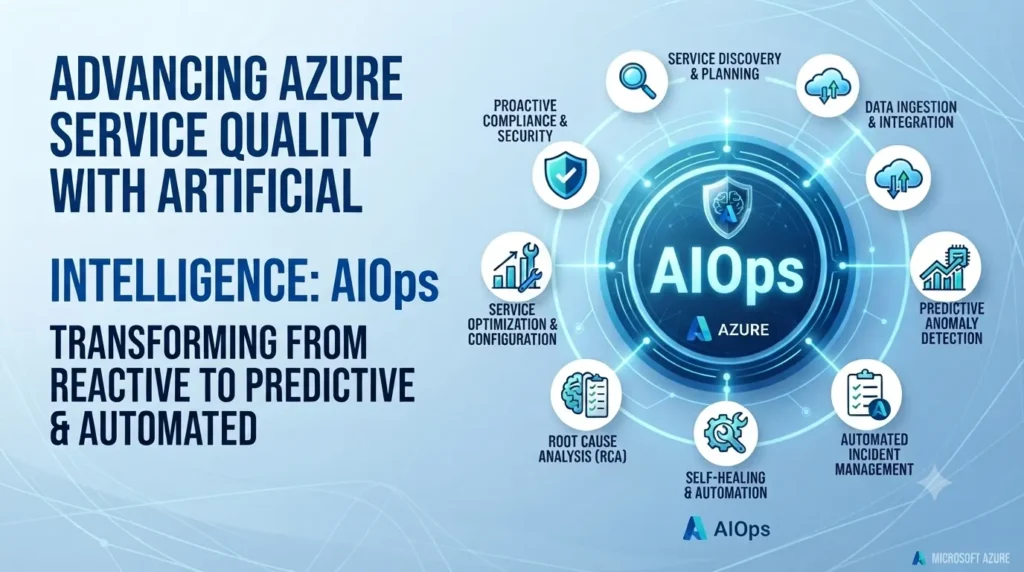
Microsoft Azure AIOps dashboard displaying AI-powered monitoring, predictive failure alerts, and real-time infrastructure health.

Advancing Azure service quality with artificial intelligence: AIOps

INTRO Somewhere on Azure’s infrastructure, a disk was predicted to fail — and your workload was migrated off it before that failure ever happened. That’s not a hypothetical. It’s Azure AIOps, Microsoft’s use of AI and machine learning to detect, predict, and fix infrastructure problems before they become customer-facing outages. For a business evaluating cloud reliability, this matters less as an engineering curiosity and more as a straight answer to a practical question: why does Azure keep improving its uptime numbers year over year? Failures Get Predicted, Not Just Detected Traditional infrastructure monitoring tells you something broke. Azure’s hardware failure prediction model tries to catch it before it does — flagging disks, memory, and networking hardware likely to fail, then automatically live-migrating affected virtual machines to healthy nodes. The customer impact of a hardware failure, in the cases this catches, is zero downtime rather than an outage ticket. Faster VM Provisioning, Powered by Prediction Azure’s pre-provisioning system uses historical deployment patterns to predict what VM configurations customers are likely to request — and creates a pool of them in advance. When a matching request comes in, it’s assigned from that pool instead of built from scratch. The practical effect for a business is faster deployment latency, without needing to know any of the prediction modeling happening behind it. Incidents Get Resolved Before They Escalate Azure tracks incident response against three metrics: time to detect, time to engage, and time to mitigate. AI-driven anomaly detection — built to catch not just obvious spikes but slow-building patterns like memory leaks — feeds directly into routing the right engineering team to an issue immediately, and in some cases triggers automated fixes with no human step at all. For a business running production workloads, that translates to shorter, less frequent disruptions. Safe Rollouts Prevent Widespread Impact Microsoft rolls out infrastructure changes constantly, which creates real risk of a bad change spreading before anyone notices. An internal system (code-named Gandalf) analyzes rollout patterns to catch issues that surface hours or days later, flagging suspicious changes before they propagate further. This is part of why platform-wide incidents from routine updates are rare rather than common. What This Actually Means for Your IT Roadmap None of this requires action on your end — it’s infrastructure Microsoft operates on your behalf. What it does mean is that Azure’s reliability improvements aren’t marketing claims; they’re the output of a systematic prediction-and-automation investment, which is a reasonable thing to weigh when comparing cloud providers on uptime and reliability, not just price. Want to know how Azure’s reliability engineering translates to SLAs for your specific workload? Talk to Trident about your cloud infrastructure options. FAQ What is Azure AIOps?Azure AIOps is Microsoft’s use of AI and machine learning to predict, detect, and resolve infrastructure issues on Azure automatically — including hardware failure prediction, faster VM provisioning, and automated incident response. Does Azure AIOps require any setup from customers?No — it operates at Microsoft’s infrastructure level. Customers benefit from improved reliability and uptime without configuring anything themselves. How does Azure predict hardware failures before they happen?Microsoft Research and Azure built models that analyze disk, memory, and networking behavior to flag components likely to fail, then automatically migrate affected virtual machines to healthy hardware.

Advancing Azure service quality with artificial intelligence: AIOps Read More »

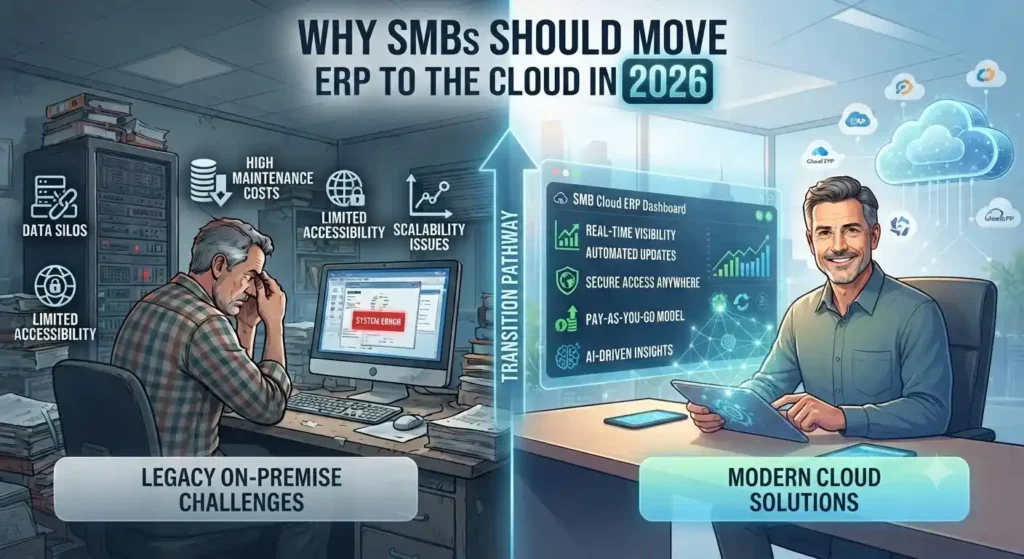
Cloud ERP dashboard helping SMBs manage finance, inventory, operations, and business performance.

Why SMBs Should Move ERP to the Cloud in 2026

Why SMBs Should Move ERP to the Cloud in 2026 Roughly 44% of small businesses now run meaningful cloud infrastructure, and that number keeps climbing. But most of that adoption is email and productivity tools — not the ERP system running finance, inventory, and operations. That gap is where SMBs quietly lose money every year. The Real Cost of Staying on Legacy ERP Companies spent 40% of their IT budgets in 2025 just keeping legacy systems running — patching, maintaining, and working around software that was outdated the day it was installed. That’s not investment; it’s maintenance debt with no return. Every year an SMB delays ERP migration, that wasted spend tends to grow, not shrink, because the gap between legacy capability and modern cloud ERP keeps widening. Global public cloud spending is projected to hit $723.4 billion in 2025, up from $595.7 billion the year before — a jump driven largely by core workloads shifting into the cloud, not just email. ERP is where legacy costs compound fastest, which is exactly why it’s driving so much of that growth. Predictable Costs Instead of Capital Surprises The CapEx-to-OpEx shift is the change SMBs feel first. Instead of a large upfront hardware and licensing spend followed by unpredictable maintenance bills, cloud ERP runs on subscription pricing tied to actual usage. For Microsoft-centric SMBs, this gets stronger. Azure Hybrid Benefit lets businesses that already own Windows Server or SQL Server licenses apply them toward cloud costs, cutting Azure VM costs by up to 40-55% compared to standard pay-as-you-go pricing. If your SMB already runs Microsoft 365 or Windows Server, that discount alone changes the ROI math on a Dynamics 365 migration. Security Concerns Are Backwards Now The instinct to keep ERP on-premises for “control” doesn’t hold up anymore. Modern cloud platforms often deliver stronger security, better uptime, and greater scalability than most SMBs can achieve running their own infrastructure. Built-in compliance frameworks and dedicated provider security teams cover ground most SMB IT teams can’t staff for — a real constraint for a five-person IT department juggling help desk tickets and server patching at the same time. Scalability Without the Hardware Gamble Legacy ERP forces a bet: buy enough server capacity for growth you haven’t hit yet, or underprovision and hit a wall mid-quarter. Cloud ERP removes that bet. Resources scale with actual transaction volume, seasonal demand, or headcount growth, with no hardware refresh cycle every three to five years. What This Means for a Dynamics 365 Decision For SMBs already in the Microsoft ecosystem, this isn’t a “should we move to the cloud” question anymore — it’s a “why are we still running Dynamics NAV or an on-prem F&O instance in 2026” question. The path to Dynamics 365 Business Central or Finance & Operations keeps the interface logic staff already know, while shifting cost structure, security posture, and scalability all at once. Still running ERP on-premises or on an older Dynamics NAV instance? Talk to Trident’s Dynamics 365 team about what a cloud migration looks like for your cost structure and timeline. FAQ Q: Is cloud ERP more secure than on-premises ERP for SMBs?A: Often yes — cloud providers invest in dedicated security teams and compliance frameworks most SMB IT departments can’t match in-house. Q: How much can SMBs save moving ERP to Azure?A: Businesses with existing Windows Server or SQL Server licenses can save 40-55% on Azure costs through Azure Hybrid Benefit. Q: What’s the cost of staying on legacy ERP systems?A: Organizations spent roughly 40% of their 2025 IT budgets just maintaining legacy systems — spend that delivers no new capability, only upkeep.

Why SMBs Should Move ERP to the Cloud in 2026 Read More »

Plan migration of physical servers using Azure Migrate

INTRO Migrating physical servers to Azure used to mean assessing them separately from your virtual machines — a gap that made mixed-environment planning harder than it needed to be. Azure Migrate now assesses physical servers alongside VMware and Hyper-V VMs in the same project, at a scale of up to 35,000 servers, so a business running a hybrid environment gets one unified migration plan instead of three disconnected ones. Here’s what that assessment actually covers, and how to run it. H2: Azure Suitability: Knowing What Can Move As-Is Before committing to a migration timeline, the assessment checks each discovered server against Azure’s compatibility requirements and flags what can migrate as-is versus what needs remediation first — with specific guidance on fixing flagged issues, not just a pass/fail flag. Assessment properties are adjustable, so a business can rerun the analysis against a specific VM series or a defined workload uptime requirement rather than relying on default assumptions. H2: Cost Estimation That’s Based on Actual Usage, Not Guesswork A common migration mistake is sizing new cloud infrastructure to match on-premise specs exactly — which usually means migrating years of over-provisioning along with the workload. Performance-based rightsizing solves this by using real on-premise performance data to recommend the actual Azure VM and disk SKU a workload needs. Subscription offers and Reserved Instance pricing apply directly to these estimates, so the cost projection reflects what the migration will actually cost, not list price. H2: Dependency Mapping Prevents the Migration That Breaks Something The riskiest part of any multi-server migration isn’t moving the servers — it’s discovering after the fact that two “unrelated” systems were actually dependent on each other. Application dependency analysis maps which workloads need to migrate together, visualized as a dependency map or exported as tabular data for planning. This is what lets a migration be phased into groups deliberately, instead of guessing at what’s safe to move first. H2: The Assessment Process in Four Steps H2: What Happens After the Assessment Assessment answers the planning questions — what’s compatible, what it will cost, what needs to move together. Actually executing the migration is a separate step, using Azure Migrate’s Server Migration tooling once the assessment and grouping are complete. CTAPlanning a physical server migration to Azure? Get in touch with Trident’s team for help running the assessment and migration.

Plan migration of physical servers using Azure Migrate Read More »

Business team using CRM software to manage sales, customer data, and communication workflows.

5 Clear Signs Your Business Needs CRM Software in 2026

Here is a question most business owners ask too late: at what point does managing customer relationships in spreadsheets, email inboxes, and memory become a liability rather than a system? The honest answer is — sooner than you think. Customer Relationship Management (CRM) software is not just for large enterprises with complex sales teams. It is for any business that wants to grow its customer base, retain the customers it already has, and make sure no opportunity falls through the cracks. The challenge is recognising when the moment has arrived. Here are five clear signs that your business needs CRM software — and why Microsoft Dynamics 365 is the platform most businesses choose. What Is CRM Software and Why Does It Matter? CRM software is a centralised system that manages every interaction between your business and your customers — from the first marketing touchpoint through the sales cycle, the initial purchase, ongoing service, and renewal. Done well, CRM gives every team member a complete, real-time picture of every customer relationship. Sales knows what marketing has sent. Customer service knows what sales has promised. Management knows exactly where every opportunity stands. Without CRM, this information lives in individual inboxes, personal spreadsheets, and people’s heads — and every time someone leaves the business, some of that knowledge leaves with them. 5 Signs Your Business Needs CRM Software Now Sign 1 — You Are Losing Leads Without Knowing Why Leads come in through your website, social media, phone calls, and referrals. But if you are managing them manually, some of those leads are simply not being followed up — because they were logged in the wrong place, assigned to the wrong person, or forgotten during a busy week. A CRM captures every lead automatically, assigns it to the right team member, sets follow-up reminders, and tracks every interaction. Nothing gets lost. Every opportunity gets the attention it deserves. If you have ever discovered a warm lead that was never followed up weeks after it arrived — your business needs CRM. Sign 2 — Your Marketing and Sales Teams Work in Silos Marketing generates leads. Sales closes deals. But when these two teams work from different systems and different data, the handoff between them is where opportunities die. Marketing does not know which leads converted. Sales does not know which campaigns generated their best prospects. Neither team can make decisions based on the complete picture — because that picture does not exist in any single place. CRM creates a shared view of every customer and every lead — so marketing can see which campaigns produce sales-ready prospects and sales can engage leads with full context on their marketing journey. The result is better targeting, higher conversion rates, and a measurable improvement in revenue. If your marketing and sales teams regularly blame each other for pipeline problems — your business needs CRM. Sign 3 — You Cannot Easily Create Quotes and Track Invoices For businesses that sell through a quotation process — professional services, manufacturing, technology, or any B2B operation — the ability to create, track, and follow up on quotes directly impacts how quickly deals close. A CRM with a built-in quoting and invoicing module connects the entire opportunity-to-cash process: If your team is manually creating quotes in Word documents and tracking them in a spreadsheet — your business needs CRM. Sign 4 — Customer Service Issues Are Falling Through the Gaps Customer service quality is directly tied to information quality. When a customer calls with a problem, the speed and accuracy of the resolution depends on whether your team can instantly see their complete history — what they bought, when, what issues they have had before, and what was promised. Without CRM, this information is scattered across email threads, support tickets, and different team members’ notes. The customer ends up repeating themselves. Issues take longer to resolve. Satisfaction drops. CRM centralises customer service management: If customers regularly complain about having to repeat their issue to multiple people — your business needs CRM. Sign 5 — You Cannot See How Your Business Is Really Performing Good management decisions are built on good data. But if your sales pipeline lives in a spreadsheet, your customer data is in email, and your service records are in a helpdesk tool — getting a clear, current picture of business performance requires manual compilation that takes hours and is outdated the moment it is finished. CRM provides real-time dashboards and reports that give every level of the organisation instant visibility: If your management team regularly makes decisions based on instinct because the data is too hard to access quickly — your business needs CRM. Why Microsoft Dynamics 365 CRM Microsoft Dynamics 365 is one of the world’s most widely adopted CRM platforms — and for good reason. It covers every scenario described above in a single, unified platform: lead management, marketing automation, sales pipeline, quoting and invoicing, customer service, and real-time analytics — all connected on the same data model. Key advantages over standalone CRM tools: Why Trident Is India’s Trusted Dynamics 365 CRM Partner As a certified Microsoft Dynamics 365 partner, Trident Information Systems has helped businesses across sales, marketing, manufacturing, retail, and professional services in India implement CRM solutions that close the gaps described in this article. Our CRM implementations are configured around your specific sales process and customer management requirements — not a generic template. Ready to find out how CRM software can transform your customer relationships? Book a free Dynamics 365 CRM assessment with Trident today. For more insightful content and industry updates, follow our LinkedIn page.

5 Clear Signs Your Business Needs CRM Software in 2026 Read More »

Microsoft Azure Cloud Security: The Real Reason Fortune 500 Firms Don't Switch

Microsoft Azure Cloud Security: The Real Reason Fortune 500 Firms Don’t Switch

Cost gets the headlines. Security is why 85% of Fortune 500 companies actually stay on Azure once they’ve moved. For CFOs and IT heads evaluating cloud platforms, that distinction matters more than any feature list. Microsoft Azure cloud security isn’t a bolt-on. It’s built into how Azure stores, replicates, and monitors data — which is exactly what makes it a defensible choice for regulated industries, not just a cheaper one. Where Your Data Actually Lives Azure doesn’t store data on a single server somewhere abstract. It runs across 100+ Microsoft data centers globally, and you choose the region — a decision that affects both latency for your customers and, increasingly, data-residency compliance requirements in markets like the UAE and India. Azure also replicates data automatically, and you control how: multiple copies in one region, or copies spread across regions for disaster resilience. That choice is a security decision as much as a performance one. Microsoft Defender for Cloud Does the Watching You Can’t Staff For Most mid-size IT teams don’t have a 24/7 security operations center. Microsoft Defender for Cloud (formerly Azure Security Center) is effectively Microsoft’s answer to that gap — it continuously scans hybrid cloud workloads, flags anomalous behavior using built-in analytics, and recommends remediation steps before a flagged issue becomes a breach. Paired with encryption at rest — data is cryptographically encoded the moment it’s stored, not just in transit — this gives a business without a dedicated security team something close to enterprise-grade monitoring by default. Disaster Recovery Without the Traditional Price Tag Azure Site Recovery replicates critical workloads to a secondary location automatically, so an outage at one site doesn’t take down the business. Azure Traffic Manager then reroutes traffic around a regional failure without manual intervention. Combined with the default of triple data replication, this is disaster recovery infrastructure that used to require a second physical data center — now available as a configuration choice, not a capital expense. What This Means for a Mid-Size IT Budget The financial case is straightforward: no upfront hardware spend, no hardware refresh cycle every two to three years, no warranty renewals or emergency service calls. You provision compute as needed and scale down when you don’t — Azure’s usage tracking tools make it visible exactly where that flexibility is saving money, rather than a vague promise of “efficiency.” For development teams specifically, Azure removes the cost barrier to testing at scale. Azure DevOps (including Visual Studio Team Services, free for up to five users) plus native integration with tools like Jenkins, Terraform, and Ansible means teams test in realistic conditions without provisioning permanent infrastructure for it. The Strategic Layer: AI and Automation Access Beyond infrastructure, Azure Machine Learning Services and the Azure AI Platform give mid-size firms access to the same automation and analytics capabilities that used to be exclusive to enterprises with dedicated data science teams. That’s less about cloud hosting and more about what a business can build once security and infrastructure stop being the constraint. Considering a move to Azure, or already on it and unsure if it’s configured for your risk profile? Talk to Trident about an Azure security and infrastructure assessment. FAQ Is Microsoft Azure secure enough for regulated industries?Yes — Azure combines encryption at rest, continuous threat monitoring through Microsoft Defender for Cloud, and regional data residency controls, which is why it’s widely adopted in finance, healthcare, and government sectors. What is Microsoft Defender for Cloud?It’s Azure’s built-in security monitoring service (formerly Azure Security Center) that scans hybrid cloud workloads for suspicious activity and recommends remediation steps automatically. How does Azure handle disaster recovery?Azure replicates data across multiple data centers by default, and services like Azure Site Recovery and Traffic Manager automatically fail over to a secondary location if one region goes down.

Microsoft Azure Cloud Security: The Real Reason Fortune 500 Firms Don’t Switch Read More »