INTRO
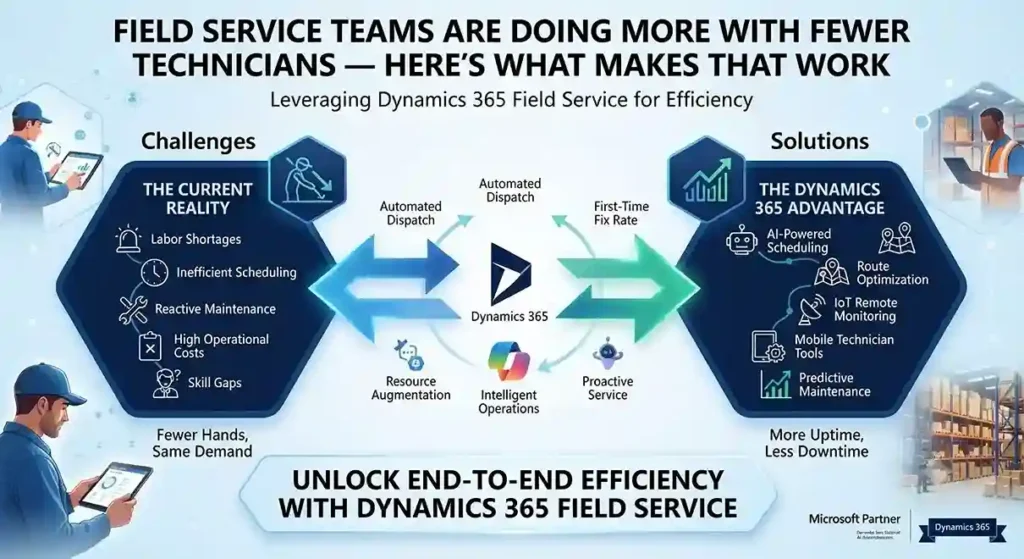
Fewer onsite technicians. Less face-to-face customer contact. The same expectation of fast, reliable service. That’s the operating reality most field service teams are managing now, and it’s forcing a shift from reactive dispatch to genuinely proactive service — sending the right person, with the right parts, before a customer even calls.
Dynamics 365 Field Service is built around that shift, with AI-driven scheduling, remote collaboration tools, and IoT-based alerting doing the work that used to require more people on the road.
First-Time Fix Rate Is the Metric That Actually Matters
A technician’s onsite time is expensive — every callback for a missed fix compounds that cost. Field Service’s Inspections feature lets technicians capture structured data during a visit, improving quality and safety documentation without extra paperwork afterward. Built-in time tracking — automated where possible, manual where needed — feeds precise data back into scheduling, so utilization decisions are based on what visits actually take, not estimates.
Remote Expertise, Without the Travel
Dynamics 365 Remote Assist lets a technician using a HoloLens headset record and share a live session with an expert elsewhere — someone who can guide a fix in real time instead of the technician calling it in and waiting for a callback. That’s a direct lever on first-time fix rates: the technician gets specialist input on-site, in the moment, instead of after a second visit gets scheduled.
AI Alerting Turns IoT Data Into Action, Not Noise
Connected equipment generates a constant stream of telemetry — the hard part has never been collecting it, it’s knowing which alerts actually predict a failure worth dispatching for. Field Service uses AI-generated suggestions based on historical service data to surface the IoT alerts most likely to matter, paired with time-series views that let a dispatcher see an asset’s alert history at a glance rather than piecing it together manually.
The practical effect: better incident categorization feeds directly into parts inventory planning and technician scheduling, which is where a lot of avoidable service cost actually lives.
One System, Not Five Disconnected Tools
Field Service now integrates more tightly with the rest of the Microsoft stack:
- Power Automate extends automation into Field Service workflows without custom development for every connector
- Dynamics 365 Supply Chain Management connects asset management to the field service workflow end-to-end, so a technician isn’t working from stale parts-availability data
- Intune for Field Service Mobile gives IT a standard way to manage the mobile app across a technician fleet, rather than treating field devices as a separate management problem.
Scheduling Is Where Efficiency Either Happens or Doesn’t
Resource Scheduling Optimization automatically matches jobs to the technicians, equipment, and facilities actually equipped to handle them. The current scheduling board adds drag-and-drop functionality and materially better performance over the previous version — which matters more than it sounds, since a slow scheduling tool pushes dispatchers toward manual overrides that undo the optimization in the first place. Manager and dispatcher dashboards surface utilization data directly, so schedule adjustments come from visible patterns instead of guesswork.
What This Looks Like at Scale
Siemens Smart Infrastructure — which connects energy systems and building infrastructure across industries — runs Dynamics 365 Field Service to support over 12,000 employees, including 7,500 service technicians. Proactive service delivery, AI-driven scheduling, and real-time coordination are what let an organization at that scale stay responsive to disruption instead of falling back on manual dispatch when volume spikes.
Want to see Dynamics 365 Field Service against your current dispatch process? Contact Trident Information Systems for a demo.
FAQ
What is Dynamics 365 Field Service used for?
It’s Microsoft’s platform for managing onsite and remote service operations — scheduling technicians, tracking work orders, and using AI and IoT data to shift from reactive to proactive service delivery.
Does Dynamics 365 Field Service work with IoT devices?
Yes — it uses AI to analyze IoT alerts from connected equipment and prioritize which ones are most likely to require a technician dispatch, based on historical service data.
Can Dynamics 365 Field Service integrate with Business Central?
Yes — Field Service integrates with Business Central and Supply Chain Management to connect asset management and inventory data directly into the field service workflow.