Welcome to Trident Information Systems!
Write us to - info@tridentinfo.com
Let's Socialize

nav implementation partner

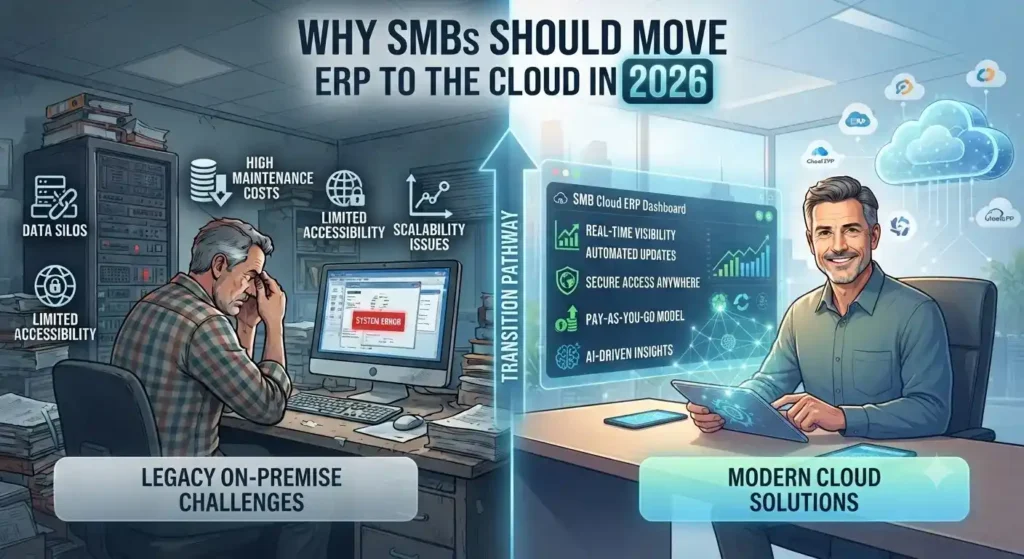
Cloud ERP dashboard helping SMBs manage finance, inventory, operations, and business performance.

Why SMBs Should Move ERP to the Cloud in 2026

Why SMBs Should Move ERP to the Cloud in 2026 Roughly 44% of small businesses now run meaningful cloud infrastructure, and that number keeps climbing. But most of that adoption is email and productivity tools — not the ERP system running finance, inventory, and operations. That gap is where SMBs quietly lose money every year. The Real Cost of Staying on Legacy ERP Companies spent 40% of their IT budgets in 2025 just keeping legacy systems running — patching, maintaining, and working around software that was outdated the day it was installed. That’s not investment; it’s maintenance debt with no return. Every year an SMB delays ERP migration, that wasted spend tends to grow, not shrink, because the gap between legacy capability and modern cloud ERP keeps widening. Global public cloud spending is projected to hit $723.4 billion in 2025, up from $595.7 billion the year before — a jump driven largely by core workloads shifting into the cloud, not just email. ERP is where legacy costs compound fastest, which is exactly why it’s driving so much of that growth. Predictable Costs Instead of Capital Surprises The CapEx-to-OpEx shift is the change SMBs feel first. Instead of a large upfront hardware and licensing spend followed by unpredictable maintenance bills, cloud ERP runs on subscription pricing tied to actual usage. For Microsoft-centric SMBs, this gets stronger. Azure Hybrid Benefit lets businesses that already own Windows Server or SQL Server licenses apply them toward cloud costs, cutting Azure VM costs by up to 40-55% compared to standard pay-as-you-go pricing. If your SMB already runs Microsoft 365 or Windows Server, that discount alone changes the ROI math on a Dynamics 365 migration. Security Concerns Are Backwards Now The instinct to keep ERP on-premises for “control” doesn’t hold up anymore. Modern cloud platforms often deliver stronger security, better uptime, and greater scalability than most SMBs can achieve running their own infrastructure. Built-in compliance frameworks and dedicated provider security teams cover ground most SMB IT teams can’t staff for — a real constraint for a five-person IT department juggling help desk tickets and server patching at the same time. Scalability Without the Hardware Gamble Legacy ERP forces a bet: buy enough server capacity for growth you haven’t hit yet, or underprovision and hit a wall mid-quarter. Cloud ERP removes that bet. Resources scale with actual transaction volume, seasonal demand, or headcount growth, with no hardware refresh cycle every three to five years. What This Means for a Dynamics 365 Decision For SMBs already in the Microsoft ecosystem, this isn’t a “should we move to the cloud” question anymore — it’s a “why are we still running Dynamics NAV or an on-prem F&O instance in 2026” question. The path to Dynamics 365 Business Central or Finance & Operations keeps the interface logic staff already know, while shifting cost structure, security posture, and scalability all at once. Still running ERP on-premises or on an older Dynamics NAV instance? Talk to Trident’s Dynamics 365 team about what a cloud migration looks like for your cost structure and timeline. FAQ Q: Is cloud ERP more secure than on-premises ERP for SMBs?A: Often yes — cloud providers invest in dedicated security teams and compliance frameworks most SMB IT departments can’t match in-house. Q: How much can SMBs save moving ERP to Azure?A: Businesses with existing Windows Server or SQL Server licenses can save 40-55% on Azure costs through Azure Hybrid Benefit. Q: What’s the cost of staying on legacy ERP systems?A: Organizations spent roughly 40% of their 2025 IT budgets just maintaining legacy systems — spend that delivers no new capability, only upkeep.
Why SMBs Should Move ERP to the Cloud in 2026 Read More »

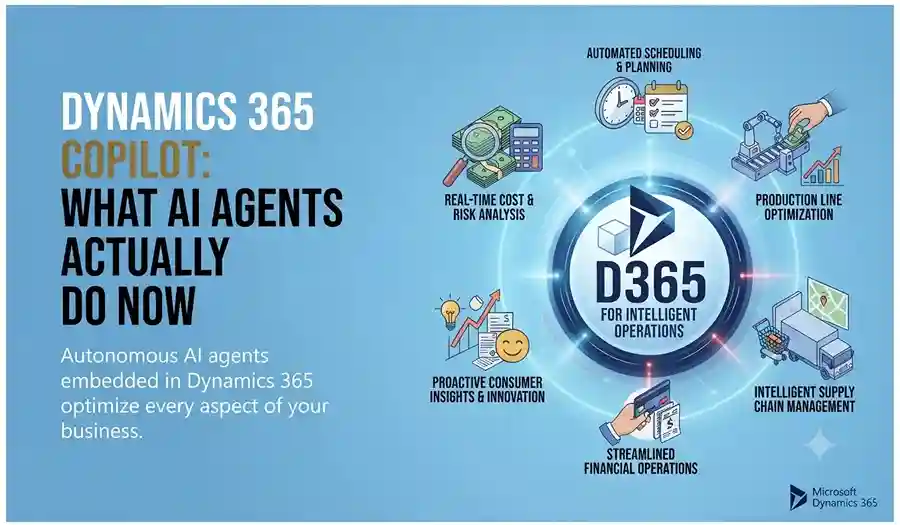
Dynamics 365 Copilot AI agents automating business tasks, analyzing data, and assisting sales, service, finance, and operations teams.

Dynamics 365 Copilot: What AI Agents Actually Do Now

INTRO An AI agent that can see a lead record but not that person’s purchase history, loyalty status, or churn risk isn’t actually helping anyone — it’s guessing with half the picture. That’s the gap Dynamics 365’s 2026 release wave is closing: Copilot and autonomous agents now connect directly to Customer Insights data through Microsoft’s Model Context Protocol, giving every AI interaction the full customer context instead of a fragment of it. Customer Insights Agents Now See the Whole Customer Dynamics 365 Customer Insights has moved past static dashboards into agentic AI that helps teams build and optimize engagement journeys with far less manual work. Copilot can draft entire email campaigns — copy and creative — based on customer signals and segmentation, and recommend the next best message or offer per customer automatically. The bigger structural change is a Customer Insights MCP server that lets Copilot Studio agents pull unified profile data — purchase history, segment membership, loyalty status, predictive churn scores — directly into chat and workflow interactions, rather than requiring custom integrations to expose that data to every agent. Sales Copilot Connects CRM Data With Microsoft 365 Signals Sales forecasting hasn’t disappeared — it’s been absorbed into a broader Copilot experience that spans CRM data and Microsoft Graph signals like email and meeting recaps. Sellers get consistent, actionable insights whether they’re working inside Dynamics 365 or elsewhere in Microsoft 365, with proactive alerts when a deal needs attention rather than waiting for a manual pipeline review to catch it. Service and Contact Center Are Fully Agentic Dynamics 365 Customer Service now runs agentic capabilities across case management, email handling, and intent recognition, with AI-infused admin and supervisor tools built for transparency into what the agents are actually doing. Dynamics 365 Contact Center extends this further with deeper automation and higher containment rates across every channel — the goal being faster resolution without a human touching every ticket. What This Means If You’re Still Running Pre-Copilot Dynamics 365 If your organization’s Dynamics 365 environment predates this shift, the practical question isn’t whether to adopt Copilot — it’s how much of your customer, sales, and service data is actually structured well enough for an agent to use it. Grounding an agent in messy or siloed data produces the same problem the 2026 release is designed to solve, just with an AI layer on top of it. Not sure how ready your Dynamics 365 environment is for Copilot and agentic AI? Talk to Trident about a readiness assessment.

Dynamics 365 Copilot: What AI Agents Actually Do Now Read More »

Business team using CRM software to manage sales, customer data, and communication workflows.

5 Clear Signs Your Business Needs CRM Software in 2026

Here is a question most business owners ask too late: at what point does managing customer relationships in spreadsheets, email inboxes, and memory become a liability rather than a system? The honest answer is — sooner than you think. Customer Relationship Management (CRM) software is not just for large enterprises with complex sales teams. It is for any business that wants to grow its customer base, retain the customers it already has, and make sure no opportunity falls through the cracks. The challenge is recognising when the moment has arrived. Here are five clear signs that your business needs CRM software — and why Microsoft Dynamics 365 is the platform most businesses choose. What Is CRM Software and Why Does It Matter? CRM software is a centralised system that manages every interaction between your business and your customers — from the first marketing touchpoint through the sales cycle, the initial purchase, ongoing service, and renewal. Done well, CRM gives every team member a complete, real-time picture of every customer relationship. Sales knows what marketing has sent. Customer service knows what sales has promised. Management knows exactly where every opportunity stands. Without CRM, this information lives in individual inboxes, personal spreadsheets, and people’s heads — and every time someone leaves the business, some of that knowledge leaves with them. 5 Signs Your Business Needs CRM Software Now Sign 1 — You Are Losing Leads Without Knowing Why Leads come in through your website, social media, phone calls, and referrals. But if you are managing them manually, some of those leads are simply not being followed up — because they were logged in the wrong place, assigned to the wrong person, or forgotten during a busy week. A CRM captures every lead automatically, assigns it to the right team member, sets follow-up reminders, and tracks every interaction. Nothing gets lost. Every opportunity gets the attention it deserves. If you have ever discovered a warm lead that was never followed up weeks after it arrived — your business needs CRM. Sign 2 — Your Marketing and Sales Teams Work in Silos Marketing generates leads. Sales closes deals. But when these two teams work from different systems and different data, the handoff between them is where opportunities die. Marketing does not know which leads converted. Sales does not know which campaigns generated their best prospects. Neither team can make decisions based on the complete picture — because that picture does not exist in any single place. CRM creates a shared view of every customer and every lead — so marketing can see which campaigns produce sales-ready prospects and sales can engage leads with full context on their marketing journey. The result is better targeting, higher conversion rates, and a measurable improvement in revenue. If your marketing and sales teams regularly blame each other for pipeline problems — your business needs CRM. Sign 3 — You Cannot Easily Create Quotes and Track Invoices For businesses that sell through a quotation process — professional services, manufacturing, technology, or any B2B operation — the ability to create, track, and follow up on quotes directly impacts how quickly deals close. A CRM with a built-in quoting and invoicing module connects the entire opportunity-to-cash process: If your team is manually creating quotes in Word documents and tracking them in a spreadsheet — your business needs CRM. Sign 4 — Customer Service Issues Are Falling Through the Gaps Customer service quality is directly tied to information quality. When a customer calls with a problem, the speed and accuracy of the resolution depends on whether your team can instantly see their complete history — what they bought, when, what issues they have had before, and what was promised. Without CRM, this information is scattered across email threads, support tickets, and different team members’ notes. The customer ends up repeating themselves. Issues take longer to resolve. Satisfaction drops. CRM centralises customer service management: If customers regularly complain about having to repeat their issue to multiple people — your business needs CRM. Sign 5 — You Cannot See How Your Business Is Really Performing Good management decisions are built on good data. But if your sales pipeline lives in a spreadsheet, your customer data is in email, and your service records are in a helpdesk tool — getting a clear, current picture of business performance requires manual compilation that takes hours and is outdated the moment it is finished. CRM provides real-time dashboards and reports that give every level of the organisation instant visibility: If your management team regularly makes decisions based on instinct because the data is too hard to access quickly — your business needs CRM. Why Microsoft Dynamics 365 CRM Microsoft Dynamics 365 is one of the world’s most widely adopted CRM platforms — and for good reason. It covers every scenario described above in a single, unified platform: lead management, marketing automation, sales pipeline, quoting and invoicing, customer service, and real-time analytics — all connected on the same data model. Key advantages over standalone CRM tools: Why Trident Is India’s Trusted Dynamics 365 CRM Partner As a certified Microsoft Dynamics 365 partner, Trident Information Systems has helped businesses across sales, marketing, manufacturing, retail, and professional services in India implement CRM solutions that close the gaps described in this article. Our CRM implementations are configured around your specific sales process and customer management requirements — not a generic template. Ready to find out how CRM software can transform your customer relationships? Book a free Dynamics 365 CRM assessment with Trident today. For more insightful content and industry updates, follow our LinkedIn page.

5 Clear Signs Your Business Needs CRM Software in 2026 Read More »

Enterprise ERP software dashboard managing retail, hospitality, and manufacturing operations.

Enterprise ERP Software for Retail, Hospitality & Manufacturing: 6 Benefits That Transform Your Business

Running a business in retail, hospitality, or manufacturing means managing a constant flow of moving parts — staff schedules, customer orders, inventory levels, supplier deliveries, and financial transactions — all happening simultaneously, every single day. When those moving parts are managed through disconnected systems — a spreadsheet here, a separate POS there, a standalone HR tool — the gaps between them create errors, delays, and blind spots that cost real money. Enterprise ERP software brings everything together. One platform. One source of truth. Every department — finance, operations, HR, sales, and customer service — working from the same real-time data. Here is how ERP transforms operations specifically in retail, hospitality, and manufacturing — and why Microsoft Dynamics 365 Business Central is the platform Trident recommends. Why Retail, Hospitality, and Manufacturing Need ERP Most These three industries share a common challenge: high operational complexity at every level. A retail chain manages hundreds of SKUs across multiple locations. A hotel or restaurant balances reservations, kitchen operations, staff rotas, and customer satisfaction simultaneously. A manufacturer coordinates raw material procurement, production scheduling, quality control, and order fulfilment — often across multiple sites. Without a unified system connecting all these functions, management is reactive. With the right ERP, it becomes proactive — with real-time visibility that enables better decisions at every level of the organisation. 6 Key Benefits of ERP for Retail, Hospitality and Manufacturing 1. Real-Time Data Across Every Department Business data changes constantly. Inventory levels shift with every sale. Staff schedules update daily. Customer orders flow in around the clock. Financial positions move with every transaction. Without real-time visibility, managers make decisions based on yesterday’s data — and the gaps between systems mean different departments often work from different numbers. ERP solves this fundamentally. Every transaction updates the central system instantly — so whether you are checking stock levels, reviewing sales performance, or approving a purchase order, you are always working from current, accurate information. No delays. No discrepancies. No guesswork. 2. Integrated Point of Sale In retail and hospitality, the POS system is the heartbeat of the operation. Every sale, every order, every payment flows through it — and what happens to that data after the transaction determines how well the rest of the business functions. A standalone POS that does not connect to inventory, finance, and customer management creates manual work and data silos. An ERP-integrated POS changes everything: For retail chains and multi-outlet hospitality businesses, this integration is particularly powerful — giving head office a live view of every location’s performance without waiting for manual reports. 3. Smarter Customer Management Your customers are your most valuable asset — and your ERP should help you treat them that way. An ERP system captures complete customer profiles: purchase history, preferences, communication records, loyalty points, and service interactions. This data enables: In hospitality especially, knowing your guest’s preferences before they arrive is a powerful differentiator. In retail, personalised offers based on real purchase data consistently outperform generic promotions. ERP makes both possible at scale. 4. Efficient Employee Management Managing staff across retail stores, restaurant shifts, or manufacturing shifts — potentially across multiple locations — is one of the most operationally demanding functions in any of these industries. ERP centralises employee management in one system: When employee data is connected to operational data, managers can make faster and fairer staffing decisions — and compliance documentation is always complete and current. 5. Streamlined Inventory Management Inventory management is the operational function where ERP delivers the most immediate and visible impact — particularly in retail and manufacturing. Without a connected inventory system, businesses either over-order (tying up cash in excess stock) or under-order (losing sales to stockouts). Neither is acceptable in competitive markets. ERP provides: For manufacturers, ERP takes this further — connecting inventory management directly to production planning and supplier procurement, ensuring materials are always available when production needs them. 6. Unified Financial Management Every operational decision has a financial consequence — and ERP connects the two in real time. Rather than waiting for month-end reports compiled manually from multiple systems, ERP gives finance teams live visibility into revenue, costs, margins, and cash flow across every business unit. Invoices are matched automatically. Budget variances are flagged immediately. Financial close processes that once took days are completed in hours. For multi-entity businesses — retail chains, hospitality groups, or multi-site manufacturers — ERP consolidates financial data across all locations into a single, accurate picture that leadership can act on immediately. Why Microsoft Dynamics 365 Business Central Microsoft Dynamics 365 Business Central is the modern, cloud-native evolution of Dynamics NAV — one of the most widely deployed ERP platforms in retail, hospitality, and manufacturing globally. It delivers all six benefits above in a single, integrated platform — with the added advantage of: Whether you are running a single restaurant, a retail chain, or a manufacturing facility, Business Central scales with your operation — without platform replacement as you grow. Why Trident Is India’s Trusted ERP Partner As a certified Microsoft Dynamics 365 Business Central partner, Trident Information Systems has helped businesses across retail, hospitality, and manufacturing in India implement ERP solutions that deliver measurable results — from initial assessment through go-live and ongoing optimisation. Ready to unify your business on one intelligent platform? Book a free ERP assessment with Trident today.

Enterprise ERP Software for Retail, Hospitality & Manufacturing: 6 Benefits That Transform Your Business Read More »

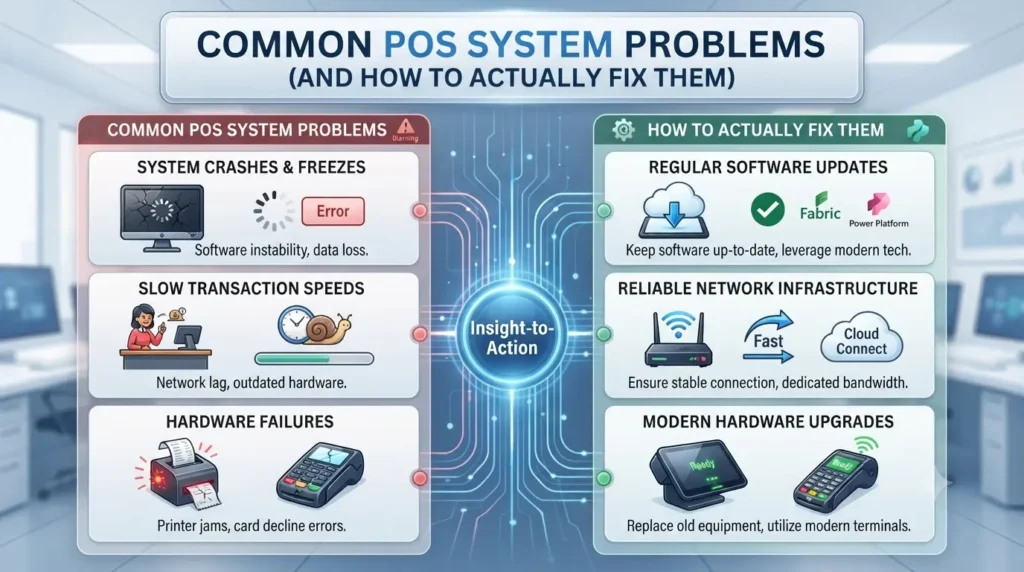
Retail POS system displaying sales, inventory management, payment processing, and troubleshooting alerts.

Common POS System Problems (And How to Actually Fix Them)

POS System Problems and Solutions for Retail A single unencrypted Wi-Fi network shared between your POS terminals and customer guest access is one of the most common ways retail payment data gets exposed — and it’s still standard setup in a lot of small and mid-size stores. Most POS problems aren’t software failures. They’re implementation gaps that show up months after go-live, when nobody’s watching for them anymore. Here are the five that come up most often, and what actually fixes each one. 1. Security Gaps That Go Unnoticed Until It’s Too Late A single data breach can undo years of customer trust — and PCI-DSS non-compliance carries real financial penalties on top of the reputational damage. The fix isn’t a single tool; it’s a checklist most retailers skip at implementation: A POS platform with built-in breach detection catches anomalies — like a terminal suddenly processing transactions outside normal hours — before they become a full incident. 2. Choosing a POS System That Can’t Scale With You Retailers often pick POS software based on sticker price alone, then discover it can’t handle multi-location reporting or real-time inventory sync once they open a second store. Reporting inaccuracy at that point isn’t a bug — it’s the system reaching its architectural limit. Treat POS selection as infrastructure, not a one-time purchase. A platform built to handle your business at 3x its current size costs more upfront but avoids a forced, disruptive migration in 18 months. 3. No Fallback When the Internet Drops If your POS is fully cloud-dependent and your internet connection fails, you can’t process a single transaction — not ideal during a Saturday afternoon rush. This is a design flaw many retailers only discover during their first outage. Two fixes, not mutually exclusive: a backup hotspot connection as a stopgap, and a POS platform with offline transaction mode that queues sales locally and syncs once connectivity returns. LS Central, built on Microsoft Dynamics 365 Business Central, supports offline resilience so a dropped connection doesn’t mean a dropped sale. 4. Paying for Features You Never Turn On Sales reporting, email marketing integration, e-commerce sync, employee management — most modern POS platforms include all of it, and most retailers use a fraction of it. That’s not a software problem; it’s an onboarding problem. Nobody walked the team through what the platform can actually do beyond ringing up sales. An implementation partner should include a features audit 60-90 days post go-live, not just at launch, since usage patterns and business needs shift once the system is live. 5. Staff Who Never Got Properly Trained A new POS rollout without structured training turns every shift into a slowdown — staff second-guessing screens, mis-keyed transactions, frustrated customers in line. High retail staff turnover makes this worse: every new hire restarts the same friction if training isn’t systematized. Platforms built on familiar Microsoft interface logic — Business Central, Windows, Office — cut this ramp-up time meaningfully, because staff already know the underlying navigation patterns. Pair that with a standard onboarding checklist your team follows for every new hire, not ad hoc shadowing. Choosing a Partner, Not Just a Platform A POS rollout isn’t a one-time transaction — it’s the start of a long-term relationship with whoever implements and supports it. Trident Information Systems is a Microsoft Solutions Partner delivering LS Central, an end-to-end retail solution built on Dynamics 365 Business Central covering POS, inventory, merchandising, demand planning, and back-office operations in a single platform — no stitching together separate systems for headquarters and store-level reporting. Facing one of these problems in your current POS setup? Talk to Trident’s retail solutions team about an LS Central assessment for your store or chain. FAQ Q: What are the most common POS system problems?A: Security gaps from shared Wi-Fi networks, systems that can’t scale to multiple locations, no offline fallback during outages, underused features, and insufficient staff training. Q: What happens if a POS system loses internet connection?A: Fully cloud-dependent systems can’t process transactions during an outage; platforms with offline mode queue sales locally and sync once connectivity returns. Q: Is LS Central suitable for multi-location retail chains?A: Yes — built on Dynamics 365 Business Central, it unifies POS, inventory, and back-office operations across store locations from a single platform.

Common POS System Problems (And How to Actually Fix Them) Read More »