Welcome to Trident Information Systems!
Write us to - info@tridentinfo.com
Let's Socialize

upgrade nav to dynamics business central

NAV to Dynamics 365 Business Central

Upgrade NAV to Dynamics 365 Business Central if you Haven’t Already!

Microsoft Dynamics NAV, an on-premises ERP that assists businesses in managing enterprise-wide systems and procedures, is being phased out. Microsoft advises NAV to Dynamics 365 Business Central upgrade for current Dynamics NAV users.  Dynamics 365 Business Central, being a modern company management tool, enables organizations to integrate all their processes into one platform. It integrates activities across the departments of production, supply chain, customer service, sales and marketing, and finance. The Business Central on-premises or cloud-based versions are available to businesses.  End of Dynamics NAV Support!  Microsoft has announced the discontinuation of support for various NAV versions, which means that there will NAV to Dynamics 365 Business Central not be any further NAV ERP updates. Additionally, it will stop offering any kind of extended support, which means that the NAV versions will not receive any security patches.  The system will become more open to external threats due to Microsoft’s lack of support. Additionally, the system will age over time and be unable to keep up with technological advancements. Finding IT workers who are knowledgeable about NAV will get harder over time.  Why Would You Get a NAV to Dynamics 365 Business Central Upgrade?  Since Business Central is a new system and many businesses are unfamiliar with it, several businesses using MS Navision are delaying their choice to upgrade. Although it is a modern ERP, it is built on the Microsoft Dynamics NAV platform and has many advantages over NAV. There are various reasons to choose NAV to Dynamics 365 Business Central upgrade such as:  It is Economical  Any business can afford the on-cloud edition of Business Central. Depending on the number of users, the company must pay a licensing cost either monthly or annually. Microsoft Azure is used for hosting. The business pays less money on hardware like servers, security measures, installing software, etc. Microsoft also upgrades Business Central twice a year, which lowers the cost of maintenance.  A Safe Solution with Modern Features and Capabilities  Microsoft offers better features and functionality than NAV, a 99.9% uptime guarantee, is mobile-friendly, and gives around-the-clock access through a web browser from any location.  Users can automate repetitive operations, which will save them a ton of time and increase their productivity. According to their needs and the role-based rights provided to them, users can quickly create reports and share them with others.  Microsoft employs a group of professionals to oversee the solution’s security and provide routine backups.  Improved third-party and native integration capabilities  Power BI, Microsoft Office 365, Microsoft Azure, and other Microsoft products are all effortlessly integrated with Dynamics 365 Business Central. Additionally, it offers consumers a single sign-on option for the complete Microsoft product line. To expand its functionality, it can also integrate with apps developed by third parties.  Enhanced Interface  A user-friendly, contemporary interface is offered by Business Central. The design is consistent with that of other Microsoft products. Across all devices, it offers a consistent user experience.  Numerous possibilities for deployment and adaptable licensing  It comes in two varieties, as was already established. The business can pay the on-cloud version’s monthly licensing fees. The business can instantly expand and add new users with ease. For an upfront cost, a business can purchase perpetual licenses for the on-premises version.  How can Trident Information Systems Assist?  The most recent versions of Microsoft Dynamics NAV deployments can be upgraded by a team of experts at Trident. We have tested the method to deliver the upgrading projects, from advising to going live. To prepare an upgrading plan, you must first figure out your necessary budget.  Trident Information Systems is a D365 Gold Partner and LS Retail Diamond Partner. With our technical professions and robust record of accomplishment, we have managed to gain a massive clientele. Let our professionals guide you through the Microsoft Dynamics NAV to Dynamics 365 Business Central upgrade process. Book an appointment for a free demonstration. Contact us right now. 

Upgrade NAV to Dynamics 365 Business Central if you Haven’t Already! Read More »
Business Central Upgrade

6 Reasons Why You Should Choose Business Central Upgrade

 Dynamics NAV (Navision) is one of the most widely used ERP solutions globally. It has established a reputation for its ubiquity and adaptability to suit a variety of enterprises and industries. However, do you think it’s time to replace your obsolete Microsoft Dynamics NAV system with a Business Central Upgrade? You would have relied on your Dynamics NAV system for years. However, you may now notice foundational fractures and rising maintenance expenditures. Therefore, you need a system that can handle more and speed up processing as your firm expands.  Why Do You Need a Business Central Upgrade?  Upgrade NAV to BC as It’s an agile and durable solution that expands your business. Therefore, It incorporates Dynamics NAV capabilities as well. Furthermore, Microsoft has invested millions of dollars in developing this technology. Moreover, they have emphasized assisting businesses in operating the way their business owners want. Evidently, this technology has developed into much more than simply an ordinary ERP platform.   Hence, with automatic updates, highly tailored software systems, and individualized add-ons the software matches the business’s every unique need.  Microsoft aspires to assist businesses via their digital changes through Business Central Upgrade. Thus, If you’re looking to Upgrade Dynamics NAV Solution, these are the top 6 reasons why Business Central is a wise, strategic choice:  #1 Business Central Is Simple to Pick Up and Use  Even with its sleek new web-based interface, Business Central still has the familiar Microsoft Office look and feel. Furthermore, it offers integration capabilities with the entire suite of Microsoft products. Therefore, Upgrading to Business Central doesn’t require a steep learning curve. Users appreciate how their personalized information presents more clearly, notably through improved dashboards and the use of graphs.  #2 It Is Easily Adaptable for Expansion  Business Central now has access to all the features of the most widely used mid-market ERP system in the world. Further, the Business Central Upgrade is smooth, and the system scales with your company. Therefore, you can put as much of it into practice right away as you’d like. Besides, you will never require another system implementation or update after this one.  #3 Automatic Upgrades Twice a Year While Your Customization Stays Intact  Dynamics 365 Business Central addresses the time and upgrading issues. Business Central  ensures the partners and customers can add third-party business apps or other customizations. Therefore, not changing the core system and not influencing the upgrade path. However, with NAV upgrades, the changes to the fundamental code must be undone before an upgrade. Thus, depending on how complicated the environment is, this could take months to finish.  #4 A Variety of Customizable Deployment Options  From private to public cloud deployment choices, Business Central offers a variety of alternatives. They are designed to integrate easily with other Microsoft apps. Therefore, users no longer need to worry about on-premises solutions’ expensive hardware, operating systems, and maintenance costs. All thanks to Microsoft’s proactive move to a cloud-based ERP system. Nevertheless, you may still install Business Central locally if you like. However, doing so may prevent you from taking advantage of premium integration with state-of-the-art Dynamics and Azure services.  #5 Business Central Incorporates Every Dynamics NAV Capability   Some people might hesitate to get a Business Central Upgrade and assume that Business Central is a very different solution. Since, it is a brand-new development platform, they perceive it to be different from NAV. For the people who create software, this might be true. Nonetheless, most of the comprehensive business code architecture and processing algorithms of NAV are still included in the Business Central Base Application. Furthermore, these features have only recently been improved, tested, and further developed over a long period.  #6 Business Central Scales with Your Business  Visual Studio, a cross-platform, open-source development environment, is the basis for Business Central’s multi-language development environment. Furthermore, with the.AL Extension for Visual Studio, developers can extend Business Central by creating specialized apps for a specific customer. For instance, AppSource, Microsoft’s ever-expanding app marketplace, allows developers to publish these apps for sale.   You must get a Business Central Upgrade, or you may lag in the competition. If you are looking for Microsoft Business Central Implementation Partner, you can Contact Trident Information Systems. We are Gold D365 Implementation Partner and LS Retail Diamond Partner. Every business is different and have different needs. Nevertheless, Trident has always satisfied customers with their excellence.

6 Reasons Why You Should Choose Business Central Upgrade Read More »

NAV to Business Central Upgrade

Top 5 Reasons to Upgrade Dynamics NAV to D365 Business Central You Can’t Ignore

While it can be difficult for firms to change ingrained operational procedures, doing so is imperative to stay up with the quick pace of technology development. Agility is crucial for survival in the fast-paced corporate world of today. Thus, invest in NAV to Business Central Upgrade so you can earn a massive competitive advantage.  For small and mid-sized enterprises looking to automate, improve, and manage their operations more efficiently, Dynamics NAV is an excellent ERP (Enterprise Resource Planning) solution. The most recent version of Microsoft Dynamics NAV is called Dynamics 365 Business Central. It is a complete business management solution that makes it easy to combine several systems into one. Office 365 and other Microsoft products, including Business Central, are compatible.  Business Central is available both on-site and cloud. Therefore, migrating to the cloud can bring about the most significant changes. Microsoft Dynamics Business Central (BC) has enhanced and rebranded Dynamics NAV. When you choose NAV to Business Central Upgrade, you can expect a combination of old and new capabilities.  5 Reasons to Choose NAV to Business Central Upgrade  Many companies are still using outdated programs like Dynamics GP or NAV. You should opt for NAV to Business Central Upgrade for several reasons, including:  Some businesses have been reluctant to get a NAV to Business Central Upgrade as they are concerned about implementation delays, related expenses, and business interruptions. There is a lot of false information concerning switching from Dynamics NAV to BC. Given below are the top 5 reasons to Upgrade from NAV to Business Central:   Choose between On-Premises and Cloud as per Your Comfort  Dynamics Business Central, which is based on Microsoft Dynamics NAV code, gives companies the option of on-premises or cloud deployments. Additionally, Microsoft has improved its user interface so that organizations can host their ERP Solution either in the cloud or on-premises. This improvement made it more user-friendly and oriented toward end users. Both choices are easily managed. Therefore, with NAV to Business Central Upgrade, you can decide whether you want to work on-premises or on the Cloud.   A Unified Platform   You can control all corporate services, apps, data, processes, teams, and people in one place with Microsoft Dynamics Business Central. It offers a smooth transfer of information throughout the entire company. Organizations can utilize it to get a consolidated view of many business touchpoints and get rid of data silo-related obstacles.   Customize as Per Requirement   Users of Dynamics NAV frequently modify the software to their specifications. However, it can be too expensive to switch to a different solution because customizations are fairly expensive. However, with a NAV to Business Central Upgrade, you can customize the software at your own pace. Again, thanks to Dynamics Business Central’s improved flexibility, you may even be able to do without some customizations. Upgrading from NAV to Dynamics 365 Business Central can open multiple doors of multiple opportunities.   Integrate with Third-Party Application   Business Central offers a variety of native integration capabilities that let you connect to well-liked outside programs. The development environment fosters adaptability and the capacity to create user integrations. By connecting to the Microsoft App Source business apps marketplace, you can also obtain programs suited to your company’s requirements.   Seamlessly Integrate with Other Microsoft Tools   Microsoft Dynamics Business Central integrates Office 365 suite, Power BI, Microsoft Outlook, and SharePoint without any issues. Additionally, users of mobile devices, web browsers, and Outlook can utilize the data simply by navigating between applications. Employee training costs have decreased due to the range of operational commonalities across many applications.  It is high time for NAV to Business Central Upgrade if you haven’t already. Keep up with the competition using Microsoft Dynamics 365 Business Central’s most advanced and reliable tools. If you wish for a NAV to BC Upgrade, you can Contact Trident Information Systems. We are a Gold Microsoft Dynamics 365 Implementation Partner and Diamond LS Retail Partner. For any inquiry, you can Contact Us anytime. Our executives will be happy to help you. 

Top 5 Reasons to Upgrade Dynamics NAV to D365 Business Central You Can’t Ignore Read More »

You Will Never Dread Inflation Again with ERP Software for Retail

You are already aware that the rising inflation rate is having a detrimental effect on consumers and businesses. As prices for everything, including food, electricity bills, and household goods, soar to record highs, everyone is feeling the effects. Trade associations, particularly among poorer households who are more vulnerable to the effects of inflation, like the National Retail Federation (NRF) in the US, which monitors industry changes, emphasize some of the ways that these kinds of events alter consumer behavior. Retail industry leaders too are impacted by the situation. However, they can use it as an opportunity with ERP Software for Retail. With Retail Business Software, retailers can make ground-breaking profits in inflation with attractive policies.   Even though it’s challenging to predict exactly what will occur in the coming months, we do know that the retail business has survived and, in some circumstances, even thrived throughout prior recessions. Analyst McKinsey provides a more optimistic analysis of the situation, saying that “retailers may convert these obstacles into opportunities – if they make bold, strategic decisions.” These decisions are typically influenced by retailers’ digital transformation journeys, (ERP Software for Retail) which aid them in acquiring the transparency, knowledge, and abilities required to safeguard margins and promptly address shifting customer and corporate demands.  In light of this, the following five technological strategies can help your business become more resistant to inflation and other issues in the future:  Order Only What Will Sell  It might seem obvious that you must stock the necessary items but is it that easy? Without real-time insights, you cannot understand what items will sell at a specific time. Implement ERP Software for Retail which allows live market updates and statistics to help you analyze the right strategy for upcoming sales. LS Retail ERP will help you analyze the sentiments and spending patterns of your customers to provide them with the best deals during inflation.   Furthermore, ERP for Retail will help you identify present and future buying trends and upcoming shortfalls in your supply chain. Reinforcing your business with retail analysis helps you understand your customer’s patterns, which will be useful for your marketing planning.   Set Reasonable and Appealing Pricing   To attract customers, you do not have to sell your products cheaply all the time, nor must you run a marketing campaign most of the time. Your customers may perceive your brand otherwise and may not even want to pay enough for the full price for your products.   Instead, with ERP Software for Retail and its analytic tools, use this time as an opportunity to reset your promotional strategies. You can think of creative ideas of how you can provide products to customers at reasonable prices while saving your costs and profit margin.   A UK-based retail company, Sainsbury’s, did just that. They introduced new pricing pledges during the inflation as it eased the financial pressure on customers while helping them make more profit. This way not only did they bond emotionally with them but also managed to make a profit. CEO Simon Roberts said that they have invested £60 million to lower the prices so their customers could get exclusive offers and meal deals on budget.  Improve Your Staff Performance with ERP Software for Retail   It doesn’t take long to see that high staff turnover continues to be a significant concern for merchants in this sector. The average staff turnover rate in retail, according to NRF, is over 60%, which is significantly higher than the average for other industries, which is approximately 19%. The expenses incurred due to all those people joining and leaving your payroll quickly mount up. Recruiting, recruiting, onboarding, and training consume time and resources from store management and cost your company money. What can you do, then, to entice the greatest employees, maintain their productivity, and motivate them to stay with you?  A cutting-edge POS Software Solution undoubtedly helps. It not only enables you to organize and monitor employee schedules, but it also provides you with a comprehensive picture of costs and results. With this knowledge, you can handle brief and overstaffed times, identify high performers and reward them, and give those who require tailored coaching and guidance.  Filter Your Omnichannel Strategies   Retailers are preparing for less foot traffic in their businesses due to rising energy costs and gasoline and fuel costs. According to a poll by Alvarez and Marsal’s Consumer and Retail Group (CRG), more than half of consumers usually or exclusively shop when they truly need something, which results in fewer trips to the store and more things being purchased in bulk per transaction.  In these circumstances, maintaining a connection with your consumers and enticing them to do business with you depends on having a seamless physical and digital presence. Make those experiences count whether customers are visiting your business less frequently or shopping online less frequently. McKinsey provides the following illustration of what this coordinated shopping experience may entail: Retailers can access all of our omnichannel chances to place an order and pick it up using ERP Software for Retail, which will also assist you with navigating and offer you visibility into the goods in the shop. You are welcome to use a QR code to conduct product research while standing in the aisle.  Inflation hits every business but retail the hardest. Retailers need ERP Software for Retail during this time to accurately analyze the market and supply chain. LS Retail provides a complete ERP and CRM suite to help retailers thrive even during inflation. If you are looking for an LS Retail Implementation Partner, you can Contact Trident Information Systems. We are a Gold Microsoft Dynamics 365 Implementation Partner and Diamond LS Central Partner. For further details Contact Us Today!  

You Will Never Dread Inflation Again with ERP Software for Retail Read More »

What is the Difference between Microsoft Dynamics Business Central and Dynamics NAV? 

  You must be aware of the significant functional changes and new features of Dynamics 365 Business Central when comparing it with Dynamics NAV. D365 BC is the upgraded version of Nav. With NAV to Dynamics Business Central Upgrade, you can get a whole new set of advanced features. We will explore some key distinctions between Dynamics NAV and Dynamics 365 Business Central in this blog post.  40% of Business Central clients are in the United States, 12% are in the United Kingdom, and 6% are in Canada, according to enlyft.com. Small businesses make up 41% of all consumers, medium-sized businesses make up 44%, and large enterprises make up 14%.  For small and mid-sized organizations, Business Central is a cloud-based ERP solution that automates finance, sales, operations, and customer care to increase customer interactions, streamline business processes, and make smarter decisions. To take advantage of the improved features and capabilities that Dynamics 365 Business Central has to offer, many Fortune 500 organizations prefer NAV to Business Central Upgrade.  Difference Between Dynamics NAV and Dynamics 365 Business Central    Despite the many similarities between Microsoft Dynamics NAV and Microsoft Dynamics 365 Business Central, there are also significant distinctions that encourage many users to switch from NAV to Business Central  While Dynamics NAV is an on-premises ERP solution, D365 Business Central is a cloud-based ERP solution.  You may access your data and applications using Dynamics 365 Business Central from any location and on any device.  While Dynamics NAV needs some customization and third-party add-ons to obtain the same degree of functionality, D365 Business Central comes with a comprehensive collection of features and functionality.  While Dynamics NAV is licensed on a per-server basis, Business Central is licensed per user. When utilizing Dynamics NAV, you must pay for the server regardless of how many people are accessing the system, whereas, with Business Central, you only need to pay for the users who will be using the system.  Other major differences include:  User Interface   The user interface is where there are the biggest differences. With its simple navigation and cloud-based ERP solution design, Dynamics 365 Business Central increases efficiency. In contrast to Microsoft Dynamics NAV, which uses C/AL (Client Application Language), the new Business Central interface uses AL language code.  In Microsoft Dynamics 365 Business Central, the usage of AL language code allows for additional customization and aids in managing, upgrading, and creating extensions.  All the programs, including Office 365’s Outlook and Excel and Microsoft Dynamics 365 Sales, and Power BI Services are included in Microsoft Dynamics 365 Business Central (CRM). Automating processes avoid silos and raise productivity. End-users may build robust workflows and connectors without learning sophisticated coding.  Hosting   Dynamics 365 Business Central was first introduced to bring Dynamics NAV functionality to the cloud. Extensions and updates are significantly simpler to do with Microsoft Azure Cloud hosting. It makes it unnecessary for you to purchase and maintain your internal servers and allows you to expand or decrease capacity with a simple click. The main advantages of SaaS systems include improved security, lower risk of data loss, and better accessibility.  Upgrades  To prevent the systems from being out of date, important upgrades are automatically released twice a year. With constant enhancements, businesses are an optimal version of Business Central, unlike Microsoft Dynamics NAV. Updates enhance security and user experience. You can even delay it for 90 days. Users are forced to Upgrade NAV to Business Central by this function.  User License   The monthly subscription-based Microsoft Dynamics 365 Business Central software is offered in “Essentials” and “Premium”. Users can gain from usability on numerous platforms, Single Sign-On, iOS, Android, and PC. Remote work is convenient thanks to the cloud-based ERP solution, which also makes it incredibly flexible and affordable for enterprises. As opposed to Dynamics NAV, which comes in Starter and Extended Packs.    How Can You Move from NAV to Business Central    Dynamics NAV has been used by most businesses for years. Consequently, switching from NAV to Business Central update could be a little challenging. However, if users receive greater usability and more functionality than the NAV solution, it will be worthwhile.  It is challenging to transition Navision to contemporary platforms like Business Central because it is an extremely ancient program with a sophisticated code base. The transition is pricey, difficult, and time-consuming. However, there are several actions you must take if you want to get better over time.  NAV has been replaced by Business Central. Unlike the previous Navision, which required customization, it is a robust, adaptable application with capabilities that are ready to use. Although it costs money, it is the quickest way to pick up new skills and shorten the time to market. Any reputable and authorized Microsoft partner, such as Trident Information Systems, a gold partner of Microsoft, can sell Microsoft Dynamics 365 Business Central.  During the relocation, we will adopt the following procedures:  Step 1: Assessing your current NAV offering  Step2: Testing/Migration.   Step 3: Appropriate training and evaluation  Step 4: Properly start the migration  Step 5 is to keep supporting your company continuously.  If you are looking for a Business Central Upgrade Partner, you can Contact Trident Information Systems. We are a Gold Microsoft Partner and LS Retail Diamond Partner/ LS Central Diamond Partner. 

What is the Difference between Microsoft Dynamics Business Central and Dynamics NAV?  Read More »

How can IoT Help in Achieving Excellent Automotive Product Quality in Your Manufacturing Plant? 

Today’s economies are dramatically changing, triggered by new markets, digital developments, increased automation, and the rise in modern technologies around the world. These factors have revolutionized several industries, and the automotive industry is no exception. People these days have become more quality conscious. Hence, pressuring manufacturers to provide the best quality automotive items at lower costs. Manufacturers seek the best IoT for Manufacturing such as a Machine Vision Application to produce excellent quality products.   The automotive industry can expect consistent growth in the market. According to a report by Mckinsey, the automotive revenue pool will significantly increase and diversify towards on-demand mobility and driven data services. It can generate about 1.5 trillion or 30% more as additional revenue in 2030. This is a massive opportunity for automotive manufacturers. However, this opportunity tags along with various challenges. Among these, the most obvious one is – high competition.   To stay ahead of the competition, you have to offer exceptional services and excellent quality automotive products to the customers. You can easily achieve this with an IoT solution for Manufacturing (preferably Artificial Intelligence based Software). A Machine Vision Inspection helps you achieve exactly what you need; excellent quality products at lower costs. This Smart Manufacturing IoT is designed specifically for you to cut waste and increase your staff’s productivity.   In this article, we will discuss how a Machine Vision Application can help you achieve the desired quality of your products.   How Can Machine Vision Application Help You Achieve First-Class Production Quality?  To ensure the quality of your products, first, you need superior quality raw material and then ensure that the produced items have no scratches, breakage, etc. A Manufacturing Defect Detection Software enables the dimensional gauging of the precision machine components like transmission, fasteners, and other sub-assemblies. The Machine Vision Application ensures only those items pass through the conveyor belt that fulfills the quality standards.    AI-based Manufacturing Inspection Software like Vision Intelligence System by Trident  Allows quality inspection in a similar environment. The best part is you do not even have to make additional changes to this IoT Factory Automation software.   What Can the Vision Intelligence System do? Identify   The Machine Vision Application can read barcode labels, barcodes from the marked parts, direct part marks (DPM), and verify labels.  Inspect   This IoT in Manufacturing Industry detects dents, wrinkles, and cracks in any part of the item. It can further detect piston defects (mishandling and foundry defects).   Measure/ Gauge/ Guide  You can easily measure the outer and inner diameters of the O ring, the angle of the metal tips, and the positions of labels and edges with Machine Vision Application.   Detects Minute Flaws   You can even detect flaws that are not visible to the naked eye such as small dents, scratches, dust, dust, etc.   Quality of the Glass  The Internet of Things Smart Manufacturing software helps detect little flaws on the windshield like cracks, scratches, breakage, discoloration, dust, and so on.   Missing Components   Detect missing bolts, nuts, screws, wires, and so on at one glance.   What Would You Get in the End?  Defect detection is a tiring process, yet the most important thing is to determine the quality of your production. If you employ Machine Vision Application , you can get the following benefits:   No Human Interaction Required  With Defect Detection Computer Vision like Vision Intelligence System, you can leave human dependency behind. The machine does all the work itself demanding no too low human interactions. This is the best way to avoid human errors.  Boosts Productivity   When you employ a robust machine like Machine Vision Application for quality check, you get faster and more accurate detection. Since the process becomes faster, you can cut waste and produce more items in less time.  Quick Reporting   The best part of this technology is its quick reporting facilities. Whenever there is a defect, it flashes the alert on the monitor. Hence, prompting the concerned person to take relevant actions. In human-based defect detection, the same process is more tedious and time-consuming.   The automotive industry has a bright future, and you, as a manufacturer, have a lot of opportunities. However, opportunities come with challenges. To stay ahead in the competition, you need to get AI (Artificial Intelligence) and IoT software working for you that supports you to provide excellent customer service.   Vision Intelligence System is one of the most renowned Machine Vision Application in the market that helps you boost productivity, cut human errors and increase your ROI (Return on Investment) impressively. For further information, you can Contact Trident Information Systems. 

How can IoT Help in Achieving Excellent Automotive Product Quality in Your Manufacturing Plant?  Read More »

It’s Time to Get Moving from NAV to BC Before 2022 Ends!

If you are still using Microsoft Dynamics NAV, this blog is for you. You need to get the NAV to Business Central Upgrade ASAP! The extended support for the latest and the final NAV version is ending on January 11th, 2023. You are running out of time and don’t want to be on your own when the support dies.   There will be nobody to fix your bugs or install upgrades. Your business will basically become handicapped after a while. This is one of the many reasons to Upgrade NAV to Business Central.   Why is NAV to Business Central Upgrade So Important?  Right now, you are getting security updates at no extra cost. However, things will change once the support ends. You will have to run paid services which are usually provided by the implementation partners like us (Trident Information Systems).   Furthermore, if you are on extended support of the latest NAV version, you may also have to face issues when you try to integrate this solution with other modern tools such as Power Platform or any third-party Solutions.  And the most concerning part is you cannot even update NAV with statutory changes or localization which puts you at risk.    Why Would You Move to Microsoft Dynamics 365 Business Central?  Microsoft Dynamics 365 Business Central is the upgraded version of Dynamics NAV. NAV is an on-premises software while Business Central is hosted on the cloud. Therefore, providing more agile and flexible features. Competition today is tough. This Cloud-based Microsoft Platform helps you not only to survive but to thrive. Dynamics 365 BC is way better than Navision because of:   The Interface  On one hand, where Dynamics NAV needs to be installed on your on-premises server or a virtual machine on a private network, D365 BC can be deployed on a web-based server or a Software as a Service (SaaS). With a modern interface, it becomes increasingly intuitive. NAV to Business Central Upgrade allows you to access AI which provides insights into your data and helps you make the right decision at the right time.   Hosting  Dynamics NAV was usually an on-premises software which meant it needed a private server. Whereas, Microsoft Dynamics Business Central is SaaS and is hosted on and by Microsoft Cloud Azure. Therefore, taking away the need for buying an SQL license or employing dedicated resources to take care of it.   Upgrades  If you are using Dynamics NAV which is still on its extended support, you can access Microsoft’s security and non-security updates. However, you may still have to discuss its pros and cons with your implementation partner as the updates may clash with your business environment. If you are using an older version, the hotfix and updates may pose a productivity threat instead if it doesn’t go well with your current environment.   Microsoft BC, on the other hand, keeps receiving minor updates every now and then, and major updates every six months. Minor updates happen automatically whereas, for major updates, you are notified prior. You can also postpone the major update to a certain extent. Once you decide on a NAV to Business Central Upgrade, you do not need a dedicated team of experts to maintain the software as everything will be managed automatically.  Software Licensing  NAV and D365 BC are licensed in different ways. For instance, NAV is licensed for concurrent users, types of users, limited devices, windows groups, etc. Whereas, Business Central licenses depend upon the name users and the type of essentials, team, premium, and external account.   You need to pay an upfront license cost and a 16% annual charge enhancement plan (EP). However, BC uses a monthly subscription model that changes per use and also includes features for the enhancement plans.  To stay ahead of the competition, you need the latest technology. Without its support, you cannot make it through. If you are still using NAV, it’s time to get a NAV to Business Central Upgrade. The end of its extended support in January 2023 is one of the most prominent reasons. Furthermore, it’s not as competent as a Cloud-Based Software. It demands a lot of attention and care, unlike its upgraded version Microsoft Dynamics BC which doesn’t need to be taken care of by the users.   If you wish to Upgrade Navision to Business Central, you can Contact Trident Information Systems. We are a Microsoft Dynamics 365 Gold Partner and LS Central Diamond Partner.  

It’s Time to Get Moving from NAV to BC Before 2022 Ends! Read More »

Upgrade NAV to Business Central

This is How Dynamics NAV Pushes Your Business Back into The Competition

Despite being a robust ERP system, Dynamics NAV is getting old and will be out of support soon in 2023. A new upgrade, Dynamics Business Central, has emerged which holds all the functionalities of D365 NAV, with quick and easy-to-use features. Personnel do not even have to be from a technical background to learn this software. Seeing the technological advancements in the market and cut-throat competition, it’s high time to Upgrade NAV to Business Central.  Sticking with NAV is pushing your business back in the race with all the complexities you are facing but your competition doesn’t. Data management is one of the most concerning aspects for any business that Navision fails to organize. It’s pretty complex and tough to build and configure reports in this software. Personnel usually get sick of it, and poor attempts to build reports manually make the situation worse.    Since everyone in your business cannot be a technical expert, it takes too much time to transform a big amount of data into small and precise information to aid decision-making. People working in inventory reconciliation to create a new vendor’s account are not fond of contacting excerpts every time to pull a report. Hence, they attempt to do it themselves manually on Excel and often are disappointed with the discrepancies later found in the reports.   If you do not Upgrade NAV to Business Central, you are most likely to face big issues responsible for pushing you back in the competition. Many users are already facing difficulties such as:    Delays: It takes a lot of time to create resorts. Personnel is dependent on the consultant to build reports and customization takes extra time. Employees are bound to allot their time from their already hectic schedule which delays the overall functioning of the business.    Data Errors: Not being able to create reports usually happens due to the system’s workarounds. From copy and paste to “Frankenstein” excel sheets and mistakes made due to manual actions impact your decisions.    Risks Involved: Lack of data or data inaccuracy impacts the visibility which can later cripple your business. If your executive team is getting the wrong information, you may as well close your eyes and make decisions randomly.   Lack of Productivity: Employees get frustrated when they cannot even create a report themselves and have to rely on someone else to get their work done. This impacts their morale, and they end up spending a good sum of their time fixing the patches. However, this is not the case if you Upgrade NAV to Business Central. You can easily create reports and customize them with no fuss.   Too much Dependency: Due to a lack of technical knowledge, personnel is bound to depend on technical professionals. Moreover, there is a shortage of analytics and NAV data experts in the market. Due to this, the business is entirely dependent on an implementation partner for custom reports and every other issue they encounter. But once you Upgrade NAV to Business Central, you can do most of the chores yourself; you can easily create and customize reports and will not need an expert for your basic requirements.   Extra Costs: everything boils up to one thing – costs. On top of errors and delay, you need an expert’s help to create and customize reports while demanding high charges. However, once you Upgrade NAV to Business Central, you will never see delays again. NAV to BC Upgrade ensures greater ROI and easy-to-use features.     Why Would You Upgrade NAV to Business Central?   One of the major reasons to Upgrade NAV to Business Central is the end of NAV support in 2023. It means you will be on your own when there is an issue. There will be no expert to fix bugs and glitches. Hence, it’s smarter to embrace NAV to Business Central Upgrade now to avoid the last-minute hassle.    Microsoft Dynamics 365 Business Central is hosted by and on Microsoft Azure Cloud. Therefore, providing bank-level security. There is no chance for any virus or malware to invade your systems. Furthermore, you will never lose your data as everything is carefully stored and backed up on a single server.    As everything is stored on a single server, the data is automatically updated with no extra effort while allowing real-time visibility into your business. When you Upgrade Navision to Business Central, you can now easily use Microsoft Power BI to create real-time reports.    Business Central, being cloud-based, allows easy navigation and hence boosts productivity. It uses AL language code which allows more customizations and helps manage upgrades and extensions. D365 Business Central includes Office 365 products (excel and outlook), and Microsoft Dynamics 365 Sales (CRM). NAV to Dynamics 365 Business Central Upgrade also automates operations and ensures more productivity and faster operations.   If you are looking to Upgrade NAV to Business Central, you can Contact Trident Information Systems. We are Microsoft Dynamics 365 Gold Implementation Partners and LS Central Diamond Partner. In the record of our accomplishments of 23 years, we have gained a 95% customer retention rate.   

This is How Dynamics NAV Pushes Your Business Back into The Competition Read More »

D365 Finance and Operations

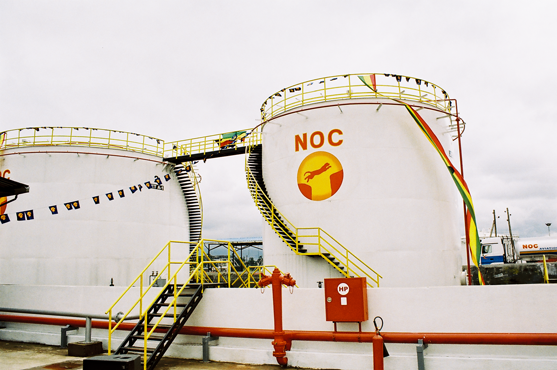
Case Study – Trident Implemented D365 Finance & Supply Chain Management for NOC Ethiopia

Established in 2004, National Oil Ethiopia Plc (NOC) is excelling in the marketing of petroleum products in the country. It is the first indigenous oil marketer to have distinct service stations located throughout the country.  NOC markets one of the leading lubricant brands commonly known as Chevron-Caltex Lubricants, as well as contribute to a major share in Ethiopia Oil Industry. It supplies over 100 lubricant grades for Industrial and Automotive applications. Additionally, the organization delivers other petroleum products such as LPG, Chemicals, Bitumen, and Petcock.   The business delivers services to keep their customers going by delivering services in the most cost-efficient and effective manner. Their team is divided into retail and commercial units to profitably market their products and achieve effective customer services and market leadership in the gas sector of Ethiopia.   The business aims at consistently improving its product and service offerings while expanding its business operations in Ethiopia and other African Countries. However, their current system was unable to comply with their requirements. Hence, they decided to contact Trident Information Systems for a suitable solution. After conducting thorough research, Trident found its core challenges and requirements and believed Microsoft Dynamics 365 Finance and Operations will be the most suitable solution.   Business Challenges  The business was struggling with financial management and supply chain issues which included:   Difficulty in figuring out the accurate volume of fuel transported in the truck.   Tough time allocating charges on import purchase orders and knowing the landed cost on the inventory.   Difficulty in allocating departmental costs and expenses.  The manual approach to the regular activities caused redundancy and similar issues.   Disparate systems and no real-time data availability hampered decision-making.   Uncontrolled operations and compliances throughout the organization and vendors.   Business Requirements  The business needed a unified approach in the financial management of the business and required the following:   To calculate the accurate fuel volume transported in trucks, know the losses and gains during the transit.   To allocate charges on the import purchase order and to know the actual landed cost on inventory.   Needed to identify departmental cost and expenses for actual cost allocations.   Configure and customize the automation process for regular activities.   Unified software solution for real-time data availability.   Robust support of operations and compliances throughout the organization and vendor.  Solutions Provided by Trident Information Systems  After digging out the organization’s core challenges and requirements, Trident implemented Dynamics 365 Finance and Supply Chain. Other benefits the solution provided include:   DIP Measurement Process- as NOC uses Dip Measurement to calculate fuel volume transported in the truck to find out the losses and gains during the transit.   Insightful reports and dashboards on financial transactions with D365 Finance and Supply Chain.   Enhanced Process Automation.   Captured all landed costs while adding them to the Inventory.   A centralized view on operations, costing, compliances, and inventory.   A sophisticated vendor management system.   Benefits to Business  After implementing Dynamics 365 Finance and Supply Chain, NOC noticed a considerable change in their financial management and supply chain. Trident’s solution delivered the following benefits:   The business could manage and schedule its resources in real-time and project costs accurately.   NOC could identify the actual fuel volume transported in the truck to know the gains and losses during the transit.   Their revenue was now managed more systematically and accurately.   A centralized system for planning and project analysis could better control operations and compliance across the organization.   Better vendor management and regulatory compliance.   Advantages of Dynamics 365 Finance and Supply Chain  Microsoft Dynamics Finance and Supply Chain put flexibility and Scalability at the core of your business, allowing you to quickly grow, and adapt at your own pace. You can easily tailor and extend the application to meet your unique business or industry-specific needs. It can offer the benefits given below but not limited to:   Supports critical operations throughout the business.   Exceptional reporting functionality that allows businesses to collect data and assess situations right then and there.   Microsoft backed and developed functionality to enable seamless integration within the enterprise.   Enables in-depth accounting and financial functionality.   Reduces IT maintenance load.   It automates and streamlines the supply chain.   Endorses innovation with a modern and adaptable platform.   Streamlines asset management.   Bottom line   After struggling with successfully managing their expanding business’ finance and supply chain, NOC Ethiopia finally decided to contact Trident Information Systems for Dynamics 365 Finance and Supply Chain solution. After the implementation, the business could witness benefits like optimum resource management and scheduling, systematic revenue management, centralized view of the entire supply chain, and so on. Trident is a Microsoft Dynamics 365 Gold Implementation partner. Contact us for further information

Case Study – Trident Implemented D365 Finance & Supply Chain Management for NOC Ethiopia Read More »

Upgrade NAV to Business Central

How Sticking with Dynamics NAV Can Bring Your Business Down? 

The major reason for your business to suffer if you choose to stick to Dynamics NAV is its end of support which will eventually leave you on your own. Dynamics NAV 2017 version met its end-of-life-cycle support in Jan 2022, whereas Dynamics NAV 2018’s support is still viable till Jan 2023 leaving you a noticeably short time to optimize it further. It is best to Upgrade NAV to Business Central.  Some businesses still use Dynamics NAV to support their production environment. The decision to stick to the older version could be derived from its perceived stability: it can resolve all the issues and does exactly what it is expected to do.   Alternatively, a business may decide to delay its NAV to BC Upgrade to save IT capital cost while “sweating” its resources to extract maximum return on investment. However, this approach will eventually lead to the business’s downfall as it can collapse anytime.  What Would Happen If You Still Glued with Dynamics Nav Without Support?  You are welcoming a huge security risk, limited disaster recovery options, no more updates and patches, and a lack of functionality if you still expect Dynamics NAV to facilitate core functionalities to your business. Hence Upgrade NAV to Business Central.  A Massive Security Threat   Once your vendor ends the support for Dynamics NAV, you are no longer entitled to the relevant upgrades or patches. You will no longer receive any support for issues occurring in the application. Since you cannot resolve them on your own, the application starts posing a risk to your overall business rather than a medium for its growth.   Limited Disaster Recovery   Not having NAV to Business Central Upgrade means no more support from Microsoft leaves businesses to struggle on their own. Suppose if something wrong happens to the application and the entire environment demands a rebuild, the user is liable to source the correct version (which is not so easy). In this scenario, businesses will have to track aged operating system and SQL Server versions. This can even jeopardize your security and lead to data loss or data theft by hackers.   In the worst-case scenario, you may not even get to access the older version and require an urgent NAV to Dynamics 365 Business Central upgrade. An upgrade project can take a good sum of time. Even if the upgrade is planned, it can take up to months to complete. Leaving you with months of downtime and eventually, making your production suffer.   Functionality Deficiency  Many businesses who have been paying for maintenance licensing are entitled to access the latest NAV versions. However, delaying the upgrade is not useful either. Upgrade NAV to Business Central as Microsoft Dynamics 365 has a pedigree of ongoing developments and upgrades. For more than three decades, NAV has been redefined to provide greater functionalities. No doubt, it provided great services to its users, but the end of support will reverse the situation. The user can no longer access the new upgrades and functionalities while declining productivity.   So, what is the Solution?  The only solution is to Upgrade NAV to Business Central. Microsoft introduced Business Central on April 2nd, 2018. The newer technology delivers more robust features, tailored functionalities, and a more agile interface. It did not take too long to conquer a special place among SMBs as one of the most reliable, flexible, and scalable ERPs (Enterprise Resource Planning). The NAV to Business Central Upgrade Enables – advanced mobile access, application integration, custom adaptability, seamless upgrades, affordability, and reporting capabilities.   However, besides worrying about training employees for a newer version, heavy historical data transition brings chills down the user’s spine. Little do they realize that the data structure of NAV and BC is the same. Thus, if your data is organized and corruption-free, you are good to go.   Dynamics 365 Business Central automatically upgrades your application frequently without disturbing your business’s ecosystem, and twice a year with major upgrades, for which the user is notified a couple of days prior.   Dynamics 365 BC is a cloud-based application that enables remote control, which means it is accessible anytime, anywhere, from any device. Thus, leaving you no scope for investing in hardware, server, and maintenance agreements.   The data is completely secured as 3,500 cyber-security experts are protecting, responding, and detecting cyber threats.  Business Central endorses faster and more flexible financial reporting via Jet Reports and Power BI (Business Intelligence). Machine learning and AI (Artificial Intelligence) (Artificial Intelligence) support tools monitor and forecast more precise data.   Its flexible licensing fees enable the user to manage cash flow. Instead of an annual enhancement, you only pay per user every month.  Bottom Line   No matter how efficient you perceive your Dynamics NAV to be, the fact remains that it is on the verge of its life. It is recommended to Upgrade NAV to Business Central as soon as possible as it will define your business’s future. If you are planning for a NAV to BC Upgrade, contact Trident Information Systems. We are Dynamics 365 Business Central Gold Partner and LS Central Diamond Partner. 

How Sticking with Dynamics NAV Can Bring Your Business Down?  Read More »