Dynamics 365 Business Central is strong where ERPs are supposed to be strong — finance, inventory, and operations. But if your business sends technicians into the field, Business Central on its own doesn’t give dispatchers a scheduling board, technicians a mobile work order, or finance a real-time view of what a job actually cost. That gap used to mean bolting on a third-party field service tool and living with disconnected data. Microsoft closed it with a native integration between Dynamics 365 Field Service and Business Central — and Trident Field Serv is our implementation and support offering built around getting that integration right for your business.
This guide covers what the integration actually does, what has to be in place before you can use it, and where the real implementation effort goes.
Why Field Service Matters for Business Central Users
Business Central alone handles the back office well: general ledger, inventory valuation, purchasing, and financial reporting. What it doesn’t natively give you is the field-side layer — technician scheduling, mobile work orders, parts consumption at the point of service, and asset history a technician can pull up on-site.
Without that layer, most service businesses end up running two disconnected systems: a scheduling/dispatch tool for the field team and Business Central for finance. The result is familiar — a technician finishes a job, and it’s days before that job shows up as an invoice, and weeks before anyone can say whether it was actually profitable.
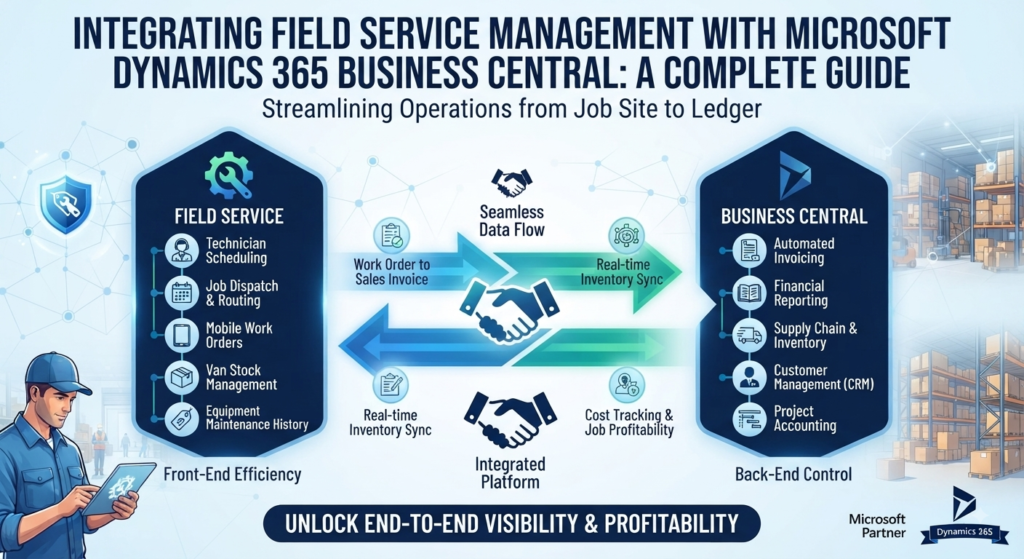
The native Field Service integration removes that gap by connecting Dynamics 365 Field Service’s operational side — work orders, resources, scheduling, asset history — directly with Business Central’s Jobs, Service Management, inventory, and financial modules.
What the Integration Actually Connects
Real-time two-way sync. Work orders and consumption entries created in Field Service flow into Business Central for invoicing and fulfillment. Resource and inventory availability in Business Central becomes visible to technicians before a job is scheduled, so a technician isn’t dispatched without the parts the job needs.
Inventory and parts availability by location. With inventory availability by location enabled, allocated quantities from Field Service work orders are reflected in Business Central’s gross-requirements calculation — so planning accounts for what’s already been committed to a job in the field, not just what’s on the shelf.
Work order to invoice, without re-keying. Once a work order is completed in Field Service, the consumption and labor data flow through for fulfillment and invoicing in Business Central — closing the gap between a technician finishing a job and finance being able to bill it.
Financial visibility on service work. Because every work order becomes cost and revenue data in Business Central rather than a line item in a separate system, you get job-level profitability without waiting for month-end reconciliation.
What Has to Be True Before You Start
This is the part most overview articles skip, and it’s where an implementation actually succeeds or stalls:
- Licensing. The integration requires a Business Central Premium license, and the User Experience field on the Company Information page has to be set to Premium. This isn’t optional — if your current BC environment is on Essentials, that’s a licensing conversation before it’s a technical one.
- Integration scope decision. You can integrate Field Service with project management features only, or with both project management and service management features — but service management can’t be enabled on its own; it’s a package with project management. Deciding which scope your business actually needs is a design decision, not a checkbox.
- Data readiness. Resource, item, and customer master data needs to be clean and aligned across both systems before go-live — the integration syncs what’s there, including any inconsistencies.
The Business Impact
Done properly, the integration changes three things for a service business:
Resource utilization. Dispatch decisions are made against real inventory and technician availability, not a spreadsheet that’s a day behind.
Cost control. Every work order becomes a P&L event in near real time, instead of a mystery until month-end close.
Customer experience. Technicians arrive with the right parts and full case/asset history, and invoices go out while the job is still fresh in the customer’s mind — not three weeks later.
How Trident Field Serv Fits In
Trident’s Business Central implementation teams across India, the UAE, Nigeria, and Kenya handle the full path from licensing and scope decisions through data migration, integration setup, and post-go-live support — so the gap between “the integration exists” and “our field team is actually using it” is measured in weeks, not a stalled project.
Ready to Connect Your Field Team to Business Central?
If your technicians and your finance team are still working from two different pictures of the same job, the native Field Service and Business Central integration closes that gap — and getting the licensing, scope, and data readiness right up front is what determines whether it closes cleanly.
Contact Trident for a free consultation on your Field Service and Business Central integration.