Welcome to Trident Information Systems!
Write us to - info@tridentinfo.com
Let's Socialize

hospitality management solution

Is outdated technology destroying your retail business? 9 red flags to look out for

Your retail management system is at the heart of your business efficiency. It keeps your operations smooth, connects all parts of your business, and helps you deliver services and experiences that meet and go beyond your customers’ expectations. Still, many retailers operate on legacy IT. Often, these patched-together systems can’t sync information properly, are hard and costly to maintain don’t allow retailers to deliver the services that consumers demand. Although many retailers are afraid of the investment required by a new system, outdated tech may be already costing them more than a complete technology overhaul. Are you, like many retailers, losing competitiveness because of your outdated software systems? We have compiled a list of the top red flags you should look out for. If two or more of these points hit home, it’s time for a technology overhaul. You can’t accept product returns across channels Today’s consumers browse and shop on multiple channels, and they expect to be able to return purchases the way they like, too. According to a study by Forrester Research, consumers demand simple and easy returns, and the ability to return items bought online to brick-and-mortar store locations. “There are a lot of people who don’t even bother returning [products] because it’s such a pain, and when they don’t bother returning, they just don’t shop with you again,” says Sucharita Mulpuru, retail analyst at Forrester.  Ask yourself: Does my current technology enable me to offer customers the abilty to buy online and return in-store? You can’t offer click and collect or curbside pickup Click and collect – also known as BOPIS, for Buy Online and Pick up In Store – is one of the most sought-after services by consumers. Curbside pickup has been around for a few years, but it surged in popularity during the pandemic. Both options are expected to remain in high demand with shoppers, as they bridge the gap between ecommerce and physical retail, and are both highly convenient and – when needed – contactless. Click and collect also holds benefits for retailers, as it has been shown to lead to larger shopping baskets as customers add unplanned items when they go pick up their purchases.  Ask yourself: Am I missing out on both sales and upselling opportunities by keeping my e-commerce and physical locations disconnected? You regularly oversell items In many retail chains, each store location runs on its own database, and the eCommerce website runs on another platform altogether. When information is saved in separate places, if the systems do not communicate with each other in real time, there is a very high chance you might sell an item on your eCommerce website even if the product is actually out of stock. At that point, you’ll have to inform the customer you can’t deliver the item they bought – losing the sale, and perhaps, the customer’s trust.  Ask yourself: Do I have out-of-sync, siloed information? Is inventory information updated too seldom, causing a stale view of inventory and overselling? You don’t give customers visibility into the inventory Consumers are increasingly taking purposeful shopping trips. Today, two out of three consumers check if the item they are looking for is available before they head out to shop, the IBM Institute for Business Value reports. If you don’t give visibility into what products are available in your stores, customers may not make the trip to your store at all. Yet, only around one third of retailers give customers access to accurate product availability across store locations, and 45% offer no access to inventory at all, according to data by Sapio Research. It’s not just consumers that don’t get the visibility they need. Less than 15% of retailers give their store associates effective inventory visibility across channels, according to BRP research. This means that sales staff can’t, for example, tell customers whether an item they desire is in stock in another store location, or instantly offer a suitable replacement. Ask yourself: Do I force shoppers to make the trip in person to find out if a product is available in my stores? Can my sales associates help consumers, looking up product availability in other locations? You waste a lot of time on manual tasks You’d be surprised at how much time is spent on doing manually tasks that could be digitized. EKN reports that two out of three retail professionals are still forced to spend time completing physical paperwork during store visits! All these physical documents must then be analyzed and transcribed, manually – leading to further waste of time and risk of errors. Crocodile International, one of our customers, told us that their accounting staff used to spend many hours at the end of each month to manually verify inventory figures against sales orders. They were forced to because of legacy systems that didn’t communicate with each other. The delayed transaction postings also made them unable to know exactly how much stock was available at a given time.  Ask yourself: Am I wasting a lot of man-hours with manual entering and double-checking of data? You can’t recognize customers across channels Today, the average shopping journey can begin with a customer seeing a new item on your Facebook page. They might then check out the item in one of your store locations, and buy it later on your eCommerce site. To engage customers, you need to be able to identify and follow them across the various channels and touchpoints they use. You must then share this information across your enterprise, and use it to create personalized interactions. Unfortunately, this is near impossible to achieve if, like many retailers, you manage each channel – perhaps each store – as a separate entity. Some companies don’t even have an integrated customer database, and valuable customer information like sales per client, payments, loyalty points, is stored in separate systems which don’t communicate with each other. The result? Duplicate information, incomplete and inconsistent records, and no clear view of who each consumer is, what they like, etc. When you don’t know your customers, you cannot design meaningful loyalty programs and rewards, deliver personalized recommendations, or offer relevant promotions. Ask yourself: Can I connect my customers’ data and use it to create personalized interactions? Or is

Is outdated technology destroying your retail business? 9 red flags to look out for Read More »

The future of the Point of Sale: why retail is going mobile, contactless and more personalized

Despite the undeniable rise of online, physical retail and the experience that goes with it – going into a store and discovering new products, seeing, touching and testing them in person, trying them on, and asking a store associate for advice – remains critically important.   Over the past decade, POS systems have evolved from a static cash register at the checkout point to a collection of valuable touchpoints that sit at the heart of the entire retail experience. Moving on, POS technology will move from a transactional role to one of consumer empowerment, bringing the shopping experience to wherever the customer wants it, however they want it.   “What we’re seeing retailers deploy now is typically applications which run a little bit in the cloud, a little bit on a mobile device, perhaps on the associate’s device, perhaps on a fixed device, perhaps even on the consumer’s own device,” said George Lawrie, vice president and principal analyst at global research firm Forrester. “The technology is now in place to do that. But also to mine a terrific amount of information and to give people some contextual content depending on where they are, what time of day it is, what day it is – that’s making a terrific difference.” Here are some ways in which the POS is evolving and how it is helping transform the customer experience for the better. 1. Moving the POS to the consumer’s device Running a POS on a mobile device like a smartphone or tablet is already commonplace in the industry. And while retailers are still exploring the opportunities that this approach offers, they also recognize that more customers expect to be able to interact in the retail environment with their own mobile devices too. UK retailer Marks & Spencer launched its Mobile Pay Go consumer app to beat long queues in its busy city stores and provide customers with a checkout-free payment option. Using the app, customers can purchase their lunch in under 40 seconds.  “Making it as easy as possible for customers to come in, purchase our products and be on their way is hugely important to us,” said M&S Clapham Junction store manager Joe Erskine.  Other retailers are taking a similar tact, introducing mobile POS in stores but also adding scan, pay and go functionality to consumer apps, putting the power of the transaction in their customers’ hands. Spar and Eurospar convenience stores in Northern Ireland introduced this type of mobile app so that customers can check whether items are in stock before they leave their homes, and build shopping lists ahead of planned store visits. But the convenience extends well beyond planning ahead. Using the app, they can be guided around the premises using aisle satnav, scan goods as they shop and check allergen, dietary and even sustainability information, such as the recyclability of each item’s packaging. 2. Cloud-based technology Retail employees need to be able to access store transactions or sales data quickly from their devices wherever they are. Cloud technology is now widely adopted across the retail industry, also because it enables retailers to integrate customer, transaction and inventory data with omnichannel orders, and make all the data available in real time for store associates. This wealth of information also empowers retailers to deliver personalized brand experiences, offer endless aisle shopping, create offers that resonate with customers and optimize store fulfilment and inventory management.  UK grocery retailer Waitrose is giving some of this functionality back to its customers: they can now build a basket in the cloud which can be accessed and added to on any device. It means the customer can begin the shopping journey on the mobile, adding the basics they know they need, then add more stuff on their laptop at home. Once they’re in store, they can scan more items in before they pay. At the same time, they know they’re getting the items for the best possible price as the same promotion engine runs across all channels.  With consumer habits changing quickly, it’s important to have technology that keeps you ahead of the competition. A big advantage of cloud-based POS solution are the automated updates and upgrades. New features and functions are automatically added to the entire network as soon as they’re made available by the technology provider, enabling retailers to keep pace with change. 3. Personalizing the experience A recent Epsilon survey of 1,000 US adults found that eight in ten want personalized offers and experiences from retailers. In another survey by Accenture, 91% of consumers said they tend to shop with businesses who know them and give offers and suggestions that are relevant to them. Today, POS software can help you tailor the experience to the needs of each customer. For example, a POS with clienteling functionality allows you to identify customers who have a profile with you, enabling store associates to deliver highly personalized and relevant product advice. Using machine learning (ML) you can take this a step further, and identify the products a customer will want to buy again in the future based on their past interactions. At the POS, then, an ML-powered recommendation engine can automatically generate a list of suggested products, which the store associate can use to make personalized recommendations. Intelligent retail will probably extend to more touchpoints in the future. Every time a customer shops in an Amazon Go store, for example, Amazon learns so much from their shopping behaviors to the point where it’s highly feasible in the not-too-distant future that they will be prompted to buy staples that they haven’t picked up recently or have recipes suggested to them based on items already in their shopping cart. Hyper-personalized, dynamic promotions will likely become the norm. So when a customer scans a product, they could automatically be pointed to another item they usually buy which is on offer on the same aisle. Or if they input their dietary requirements and health goals, they could have alerts and guidance pop up on their device as they shop.  4. Contactless tech The Covid-19 crisis has accelerated adoption and development of contactless technology. Contactless payments have come of age: a recent survey by Rapyd found

The future of the Point of Sale: why retail is going mobile, contactless and more personalized Read More »

Streamline ordering and communication with a connected Kitchen Display System (KDS)

Since LS One 2020 was released in July, the LS One team has been developing extra functionality to enhance the system. They have put special focus on extending the capabilities for restaurants and food service businesses. Trident is LS Retail Central Platinum Partner, offering ERP for Retail & Hospitality. The Kitchen Display System (KDS) is a digital order viewer that replaces paper tickets and printers in a restaurant kitchen. A KDS has become an essential component in a modern kitchen, as it helps organize and streamline work: No more stained, hard-to-read paper tickets: all orders are displayed on screens, clear and tidy. No need for servers to waste time running from the front to the kitchen and back: all communication between kitchen and front (orders, items, their preparation status) goes through your POS system. Items and orders are automatically routed and displayed at the proper food preparation stations. Items are shown on the screens by production order, so kitchen staff can start and complete preparation timely. Kitchen staff can bump dishes to different stations, or mark orders and items as ready. The Kitchen Display System and the POS are connected via a two-way communication system. Front-of-house staff can see the status of orders at the POS, and make sure all dishes are delivered to the guests at the right time. You can add screens and set up specific automations to follow your kitchen’s flow. In the past, to connect a KDS to LS One you needed to do your own integration. From this version of LS One onwards, you can use your LS One POS system with the LS Retail Kitchen Display System. The systems are connected out of the box, no extra work needed. Picture this: Your server takes the order at the POS. When they send the order to the kitchen, the items are automatically routed to the KDS in the correct kitchen station (for example, the grill station versus the sauté or dessert station), and displayed in the right order of production. When a guest asks “When is my dish coming?” front-of-house staff can check at the POS the status of the order, and update the table. Easy, quick, and professional. Sell groups of items easily with assembly items It’s now easier than ever before to sell multiple items at once – for example, as a gift basket. In LS One you can now create “assembly items” by combining different items into one. The options are endless: Set up deals (or meal deals, if you run a restaurant or café) Create hampers and gift baskets Make bills of materials Set up recipes, managing the ingredients as separate items Assemble supply kits Do you run a chain, and want to differentiate your offering across locations? You can vary the list of component items between locations, and easily substitute products or ingredients as needed. For example, your holiday hamper can include Gouda cheese, instead of brie, in some of your store locations. You can set a special price for the final item, or add up the prices of the items that compose it – your choice. If you want, you can also display the list of components on the POS receipt, on the printed receipt, and on kitchen orders – or you can hide it. The integration to SAP Business One ERP just keeps on getting better Since we introduced the out-of-the-box integration between LS One and ERP SAP Business One, more and more businesses have moved from other POS solutions to LS One. Using their valuable feedback, we have been working on the integration to make it even more immediate and seamless. You can now add a U.S. tax setup when you create a customer on the POS The login service layer is more intuitive and quicker We have added tax synchronization for specific localizations You can now easily connect to different versions of SAP Business One HANA More enhancements to come as the LS One team keeps on ironing out the wrinkles. Endlessly enhancing LS One We are continuously working on improving LS One in terms of functionality, speed and simplicity. Some highlights from this release: You can now add the company’s country information Discount calculations are way faster than before We have redesigned the “send to station” and “menu type selection” dialogs (restaurant-specific functionality) The kitchen printing/send to station functionality is now fast and seamless (restaurant-specific). You can find more enhancements and fixes in the release notes. And as usual, more improvements are ahead as the team keeps on working to make LS One the best POS in the industry. If you have any comments, suggestions, or any query for us, get in touch! or write at info@tridentinfo.com

Streamline ordering and communication with a connected Kitchen Display System (KDS) Read More »

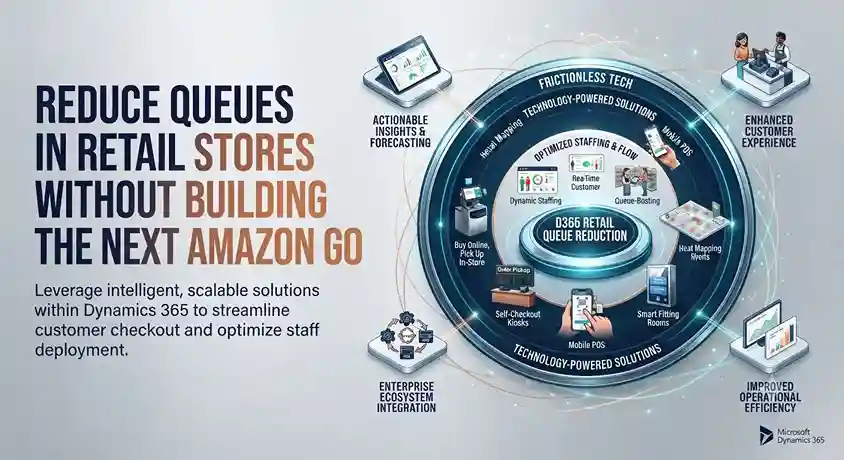
Retail store using mobile POS and digital checkout solutions to reduce customer queues and improve checkout speed.

Reduce Queues in Retail Stores Without Building the Next Amazon Go

INTRODUCTION Nine out of ten shoppers in the UK say they will completely avoid a store with a long line; this means that every minute spent waiting to pay represents a real risk of losing the sale, not just a minor inconvenience. Amazon Go made headlines by eliminating checkout lines entirely, but a complete overhaul to remove checkouts is not feasible for most retailers. These six approaches can significantly reduce wait times without going to such extremes. 1. Bring the checkout to the customer with mobile POS systems Using a tablet or smartphone-based point-of-sale (POS) system allows staff to look up items, process payments, and print receipts wherever the customer is—whether inside or outside the store—instead of funneling all transactions through a fixed checkout counter. Furthermore, this solution facilitates scalability during peak periods: adding more mobile devices does not require allocating physical space for additional checkout stations, as traditional registers do. 2. Designate a specific line for complex transactions Simple purchases are quick, whereas returns, custom orders, and loyalty program sign-ups take longer. Mixing the two types in the same line means that every complex transaction slows down the progress of those waiting behind. Since straightforward sales usually far outnumber complex ones, routing complicated processes to a dedicated service point allows the main line to move at the pace most customers actually need. 3. Try virtual queuing Virtual queuing systems—common in banks and post offices but still rare in most retail stores—allow customers to get a number and reserve their spot without having to physically stand in line. Beyond convenience, this creates a genuine opportunity for upselling: a customer browsing the store while waiting for their turn might notice an item they hadn’t originally planned to buy. 4. Offer appointments for visits requiring personalized attention Not every store visit needs to be spontaneous. For specialized consultations or services, scheduled appointments allow retailers to manage visitor flow and devote proper attention to each customer, rather than rushing to serve them as quickly as possible. Watches of Switzerland took significant steps in this direction after reopening, organizing 13,000 one-on-one appointments (combining virtual and in-person formats) in just two weeks. While this model doesn’t suit every retail category, for purchases requiring more customer deliberation, it transforms queue management into an enhanced service experience rather than a compromise on the quality of care. 5. Implement self-scanning technology (Scan-and-Go) Self-scanning apps put the scanning process in the customer’s hands: items are scanned and added to a running total as they are placed in the cart, rather than all being scanned at once during checkout. Although this method is more established in the grocery sector, there is no structural reason preventing its application in sectors such as fashion, electronics, health, or home improvement. It offers an advantage beyond speed: scanning a barcode allows product details—such as ingredients, materials, or care instructions—to be displayed directly to the shopper, eliminating the need to consult staff or handle the packaging. 6. Ensure technology works correctly before it becomes a problem Unreliable point-of-sale (POS) technology not only slows down transactions but can bring them to a complete standstill. A Trident client recounted how their old system crashed during the Christmas Eve rush: every checkout in the store stopped working, transactions had to be processed manually, lines wrapped around the building, and the business estimated losses of $20,000 that day alone—not to mention the likely long-term impact on customer loyalty. Their conclusion, in their own words, was that reliability must be the primary criterion when evaluating payment technology, taking precedence over features or price. Before implementing new strategies to reduce queues, it is essential to ensure that the current system itself does not become the actual bottleneck. Are you looking for payment technology capable of handling demand spikes without failure? Contact Trident to discuss the best solution for your store.

Reduce Queues in Retail Stores Without Building the Next Amazon Go Read More »

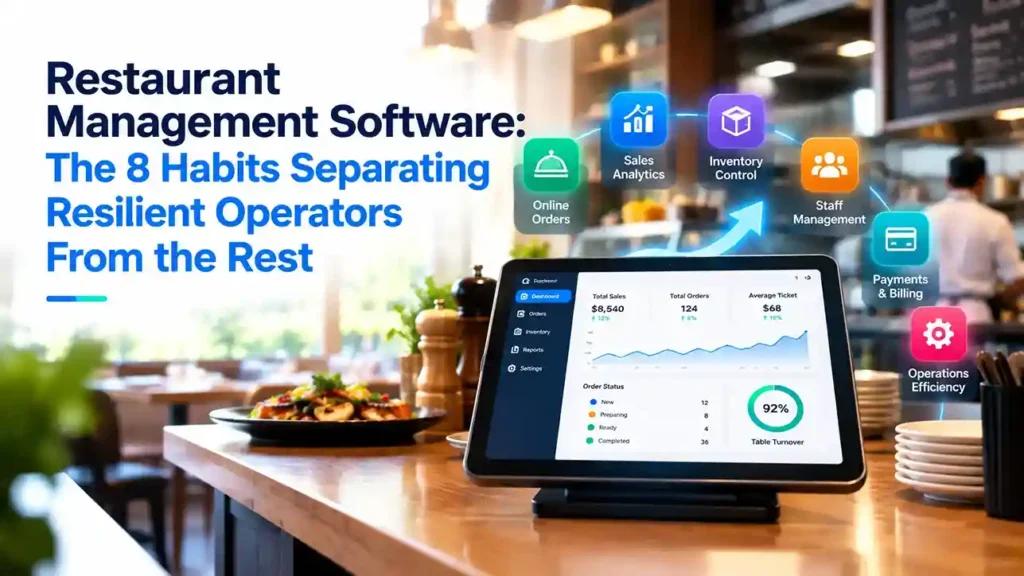
Restaurant management software dashboard showing sales, inventory, food costs, staffing, orders, and real-time restaurant performance.

Restaurant Management Software: The 8 Habits Separating Resilient Operators From the Rest

INTRODUCTION Contactless payments, curbside pickup, QR code menus—none of these options were commonplace in restaurants just a few years ago. Today, they are standard expectations. The restaurants that adapted most successfully weren’t necessarily the ones that adopted the most technology, but rather those that managed it through a single, integrated platform instead of a disjointed array of tools. This distinction separates operators who achieved lasting resilience from those who implemented stopgap solutions that didn’t stand the test of time. Design the entire experience, not just a stopgap solution A payment terminal wrapped in plastic is a patch, not a solution; in fact, it often negates the very contactless functionality it was meant to protect. The shift toward contactless payments, delivery, drive-thru service, and curbside pickup is here to stay; therefore, it pays to build a robust infrastructure around these practices rather than relying on makeshift fixes. QR code menus are a prime example: they are useful right now for hygiene reasons, but they offer long-term value by allowing restaurants to instantly update prices or menu items without incurring reprinting costs. Table management software follows the same logic: it is useful today for maintaining social distancing and facilitating contact tracing, and it will remain valuable indefinitely for optimizing occupancy and speeding up table turnover. Take your POS system mobile When a server relies on a fixed terminal, customers are kept waiting, staff waste time walking back and forth, and lines form at the register. A mobile POS system allows servers to take orders, process payments, and close out checks without leaving the dining area; this results in faster service, less unnecessary movement, and the elimination of shared terminals among staff. The greatest advantage arises when the mobile POS connects directly to kitchen display systems: an order taken at the table is automatically sent to the appropriate kitchen station, eliminating the back-and-forth between the dining area and the kitchen that slows down service and leads to order errors. Opt for a single platform rather than multiple disconnected solutions Fragmented systems—standalone tools for point-of-sale (POS), inventory management, and reporting—entail higher integration and maintenance costs while offering managers only a partial view of the business. A unified platform provides a comprehensive, real-time view of operations and customer data, enables faster access to actionable reports, and lowers total costs by eliminating the need for ongoing integration work. Cloud-based implementation proved crucial during times of rapid change: restaurants without legacy on-premise infrastructure could quickly roll out delivery, pickup, and curbside services, whereas those reliant on local systems moved much more slowly. Furthermore, software-hardware compatibility is just as important as the individual components themselves; a system that looks good on paper but fails to integrate properly with existing hardware will fail in practice, regardless of its features. Analyze how customer behavior is actually changing Consumption patterns shift—new customers arrive, and regulars visit at different times or with different needs—and a restaurant that fails to collect this data lacks a solid foundation for designing a loyalty strategy. Reliable, up-to-date data enables actionable decisions, such as creating predictive cost models to set menu prices when ingredient sourcing becomes difficult, or redistributing inventory among locations based on foot traffic. Rethink which metrics truly matter A metric like table turnover rate is meaningless if there aren’t enough customers to fill the tables. Traditional key performance indicators (KPIs) should be reviewed periodically—not just once—since current customer behavior cannot reliably predict what the situation will look like a few months down the line. The goal is not to discard metrics, but to ensure that the ones being monitored continue to reflect the reality of the business. Use predictive analytics, not just historical reports Most restaurant analytics still look to the past: what happened and why. The real value lies in predictive analytics—finding correlations across large, disparate datasets that reveal where the business is heading before it gets there. Combining internal data with external context—local events, weather patterns, general market trends—refines that insight; even a small process adjustment based on this type of information can yield disproportionately large results. Technology is no substitute for the human touch Social distancing and digital ordering changed the dining-out experience, but customers still seek warm, personal service—and it is empowered staff with decision-making authority who truly deliver that. Genuine loyalty stems from a real connection, not just a points program: knowing a customer well enough to offer something relevant is what keeps them coming back, and that starts with how the restaurant treats its own staff. View technology as infrastructure, not a reaction Curbside delivery wasn’t the industry norm until, suddenly, it was. Investing in restaurant management technology requires the same long-term vision as investing in essential kitchen equipment: it is infrastructure that should be implemented before demand forces action, not after. A feature that doesn’t offer an immediate return on investment (ROI) can still be valuable simply because it prepares the business to respond quickly when conditions shift again—and conditions will keep changing. Are you ready to move beyond fragmented systems and adopt a unified platform? Contact Trident to discuss what this transition would look like for your restaurant.

Restaurant Management Software: The 8 Habits Separating Resilient Operators From the Rest Read More »

Why organizational change projects fail and how to prevent implementation disaster

New IT installations often fail. At least that’s the widespread belief surrounding organizational change initiatives today. One frequently cited study from the 1993 book Reengineering the Corporation goes as far as saying that as many as 70% of the organizations that undertake a reengineering effort do not achieve the dramatic results they intended. A more recent McKinsey survey of more than 1,500 executives who had undertaken a significant change effort in the past five years found that only 38% of respondents said “the transformation was ‘completely’ or ‘mostly’ successful at improving performance. After two decades of hearing about high failure rates related to change, it’s unsurprising that business leaders are wary of organizational change projects. Organizational psychologist Nick Tasler explained that these negative biases can create a toxic self-fulfilling prophecy. “When a change project falls a day behind schedule, if leaders and employees believe that successful change is an unlikely outcome, they will regard this momentary setback as the dead canary in the coalmine of their change initiative. (Never mind the fact that three other initiatives are still on time or ahead of schedule),” he wrote in an article for Harvard Business Review. “Suddenly, employees disengage en masse and then the change engine begins to sputter in both perception and reality.” Yes, change is hard, and complex IT implementation projects, particularly ERP installations, can be particularly challenging. But it doesn’t mean they are doomed to failure. So where do you start? How can you choose the right technology for your retail business, and ensure that the implementation project runs as smoothly as possible and you get the most from your investment? Here are some of the main causes for failure in any organizational change initiative, and how can you prevent them from happening: Mistake #1: Failure to plan Issue: An outdated legacy system is impacting business performance, and it needs replacing quickly. In their rush to get the project going, business management jump straight into the implementation without taking the time to develop a well thought-out organizational change management plan. Solution: Don’t be tempted to cut corners in your planning. Analyze your business, decide what should be prioritized, and understand all the different ways the project will impact your routines at every stage of the process. “Companies should start by analyzing their current and future requirements and processes,” says Gunnar Ingimundarson, Chief Consulting Officer at LS Retail. “How many software solutions are they currently using, and what are they used for? Map out the disparate solutions in the stack, alongside their dependencies and interconnections. The next step is to figure out where they can draw the biggest – or quickest – benefits. Is your POS system not generating the information you need on stock levels and product visibility? Or, are there integrations that repeatedly cause problems or break down? Do you experience missing data? Identify the area(s) where a new system would bring immediate value in terms of savings or returns. That’s where you should start, and that should determine your priorities.” Once the priorities are set, break the project down into manageable chunks, from pilot phase to initial implementation to company-wide rollout. Consider when it’s most appropriate to start each phase of the installation so you won’t place unnecessary strain on your business during busy times. Mistake #2: Key stakeholders aren’t onboard, or have unrealistic expectations Issue: Management want the new technology in place quickly and only focus on the end goals. They get frustrated by how long the project is taking and threaten to pull the plug. Or they wonder why the new software isn’t being adopted widely and successfully when they failed to communicate the changes to everybody in the business and get company-wide buy in. Solution: All stakeholders need to be committed to the project’s success right from the beginning, and to clearly understand the project’s scope and goals. “Internal resistance can kill even the best implementation project,” says Eric Miller, Regional Director for the Americas at LS Retail, building on his 13 years of experience in software implementations. “Get the buy-in from all stakeholders from the start, and make sure that the goals, objectives and expected end results of the project are clear and communicated from you to the stakeholders, and from the stakeholders to all the customer parties involved. It never pays off to sell a dream you can’t deliver on.” Bring together personnel from different departments to understand their requirements and what outcomes they hope to achieve from the implementation. Similarly, they need to understand how much time should be devoted to a project like this and ensure project teams are given sufficient time to carry out the work. Set realistic timeframes from the start, and ensure everyone knows exactly what’s required of them. Mistake #3: Unforeseen changes throw the project off track Issue: Even the best prepared projects encounter hurdles along the way, but if unforeseen issues arise and major milestones are missed, it can be tempting to throw in the towel and deem the entire project a failure. Solution: Know that when you’re dealing with a large-scale IT implementation, it’s hard to plan for every eventuality. Be willing to adapt and take a different approach if it ultimately means the project will be a success. “What was deemed to be the best approach initially may need to change – this might even happen after the pilot is completed. I have seen companies that went through multiple pilots before finding the right balance. It’s a learning process, and it’s never over,” says Miller. It’s worth learning everything you can from the pilot implementation. Instead of rushing on to roll out store #2, take a moment to see how the system is working and to identify any issues that you couldn’t have planned for in your testing environment. Success comes to those who take a considered approach. Mistake #4: Picking the wrong technology partner Issue: It may be tempting to go for the cheapest technology provider, but cheapest upfront may not necessarily deliver the long-term business value you hoped for. You quickly realize they can’t help you achieve your outcomes, because they lack drive,

Why organizational change projects fail and how to prevent implementation disaster Read More »

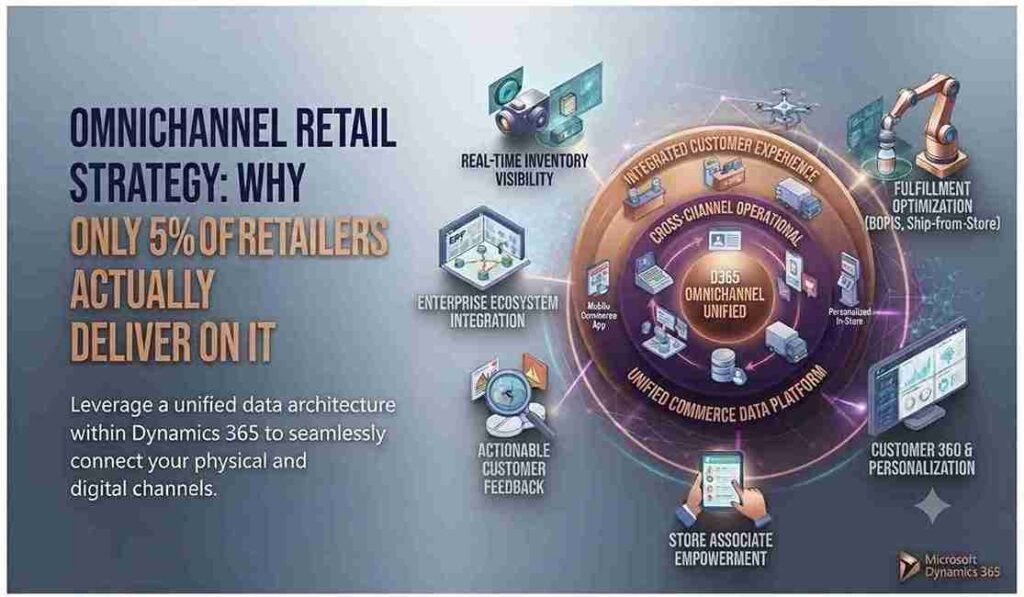
Omnichannel retail strategy connecting POS, eCommerce, inventory, customer data, and analytics across retail channels.

Omnichannel Retail Strategy: Why Only 5% of Retailers Actually Deliver On It

INTRODUCTION Retailers have been talking about omnichannel for more than a decade. However, only about 5% actually allow a customer to initiate a purchase on one channel and complete it on another. Meanwhile, customers aren’t waiting: The vast majority research and select products online before setting foot in a physical store, and half of in-store shoppers check their phone during the visit to check specifications, compare prices or confirm a decision. The gap between what customers expect and what most retail systems can deliver is where sales are lost. Make all channels reflect the same brand A disjointed brand experience—slick in-store, clunky in-app, and slow on social—quietly erodes trust with each inconsistency. Nespresso is a great example of how to do it right: the same visual language is maintained on their e-commerce site, mobile app, order confirmation emails and even on the physical packaging; Thus, the brand is perceived identical at each touch point, instead of reinventing itself channel by channel. Unify your sales channels, not just your brand image Customers expect basic cross-channel functionality: checking if a specific store is in stock, adding an item they saw in person to their online cart, or making a hassle-free return on an in-store purchase. Most retailers cannot yet reliably offer this, as their systems have been assembled from separate, poorly integrated tools rather than being built as a single platform; This often results in the inability to see real-time inventory across locations, difficulty accepting returns across channels, and the risk of selling items that are no longer available. A unified commerce platform like LS Central solves this at the root: centralized inventory and location visibility allows exchanges and returns to work the same way, regardless of the channel where the original purchase was made. Be transparent about shipping costs and conditions Approximately 70% of online shopping carts are abandoned before completing the order, with unclear or unexpectedly high shipping costs being the most common reason. Retailers who clearly list delivery time, shipping cost, and return conditions next to each product—rather than revealing them at the final checkout step—allow customers to make an informed decision from the start, building the kind of trust that reduces cart abandonment. Show real inventory, not just a product catalog Most customers expect to see product availability online before visiting a store; some retailers, like IKEA, even go so far as to display exact stock quantities at each location. At a minimum, product catalogs should be kept up-to-date across all channels (a unified system allows e-commerce, point-of-sale and back-office to use the same data in real time), include detailed product information to compensate for the inability to physically touch or try it, use high-quality images and videos, and display customer reviews; All of these factors directly influence confidence when purchasing and decision-making. Design thinking about what the customer really needs The retailers who succeed are not those who insist most on selling, but those who solve a real problem. CVS’s pharmacy app is a useful example: it helps customers manage complex medication schedules with reminders and notifies them when a prescription is ready for pickup. The value is not promotional, but functional; Precisely because of this, it generates the type of trust that translates into recurring purchases. Turn collected data into actions, not just reports Retailers collect huge amounts of behavioral data (pages viewed, items abandoned in cart, return patterns, top customer preferences), but collecting it is not the same as using it. GameStop’s loyalty program, with tens of millions of members, is a clear example of how to do it right: Analysis of member data revealed that rewards alone don’t drive engagement, but personalized offers do. This change reportedly allowed email open rates to more than double when GameStop moved to using hyper-segmented messages based on purchase history. Turn collected data into action, not just reports Retailers gather vast amounts of behavioral data—pages visited, items abandoned in carts, return patterns, and the preferences of key customers—but collecting data is not the same as using it. GameStop’s loyalty program, with its tens of millions of members, is a prime example of getting this right: analysis of member data revealed that rewards alone do not drive engagement, whereas personalized offers do. This shift more than doubled email open rates when GameStop switched to using hyper-segmented messages based on purchase history. For most retailers, the obstacle isn’t a lack of data, but rather data fragmentation. Having data scattered across disconnected systems means most companies can only meaningfully analyze a small fraction of the information they collect. A unified commerce platform that consolidates data from all channels into a single location is what truly enables a comprehensive view of the customer. Want to see what a unified omnichannel platform would look like for your retail business? Contact the Trident team to discover the possibilities offered by LS Central.

Omnichannel Retail Strategy: Why Only 5% of Retailers Actually Deliver On It Read More »

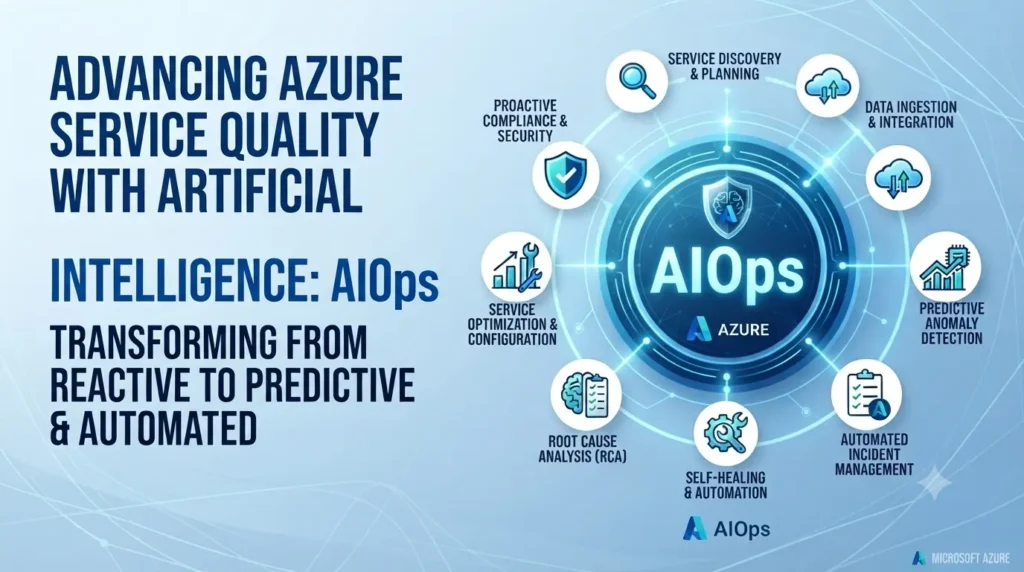
Microsoft Azure AIOps dashboard displaying AI-powered monitoring, predictive failure alerts, and real-time infrastructure health.

Advancing Azure service quality with artificial intelligence: AIOps

INTRO Somewhere on Azure’s infrastructure, a disk was predicted to fail — and your workload was migrated off it before that failure ever happened. That’s not a hypothetical. It’s Azure AIOps, Microsoft’s use of AI and machine learning to detect, predict, and fix infrastructure problems before they become customer-facing outages. For a business evaluating cloud reliability, this matters less as an engineering curiosity and more as a straight answer to a practical question: why does Azure keep improving its uptime numbers year over year? Failures Get Predicted, Not Just Detected Traditional infrastructure monitoring tells you something broke. Azure’s hardware failure prediction model tries to catch it before it does — flagging disks, memory, and networking hardware likely to fail, then automatically live-migrating affected virtual machines to healthy nodes. The customer impact of a hardware failure, in the cases this catches, is zero downtime rather than an outage ticket. Faster VM Provisioning, Powered by Prediction Azure’s pre-provisioning system uses historical deployment patterns to predict what VM configurations customers are likely to request — and creates a pool of them in advance. When a matching request comes in, it’s assigned from that pool instead of built from scratch. The practical effect for a business is faster deployment latency, without needing to know any of the prediction modeling happening behind it. Incidents Get Resolved Before They Escalate Azure tracks incident response against three metrics: time to detect, time to engage, and time to mitigate. AI-driven anomaly detection — built to catch not just obvious spikes but slow-building patterns like memory leaks — feeds directly into routing the right engineering team to an issue immediately, and in some cases triggers automated fixes with no human step at all. For a business running production workloads, that translates to shorter, less frequent disruptions. Safe Rollouts Prevent Widespread Impact Microsoft rolls out infrastructure changes constantly, which creates real risk of a bad change spreading before anyone notices. An internal system (code-named Gandalf) analyzes rollout patterns to catch issues that surface hours or days later, flagging suspicious changes before they propagate further. This is part of why platform-wide incidents from routine updates are rare rather than common. What This Actually Means for Your IT Roadmap None of this requires action on your end — it’s infrastructure Microsoft operates on your behalf. What it does mean is that Azure’s reliability improvements aren’t marketing claims; they’re the output of a systematic prediction-and-automation investment, which is a reasonable thing to weigh when comparing cloud providers on uptime and reliability, not just price. Want to know how Azure’s reliability engineering translates to SLAs for your specific workload? Talk to Trident about your cloud infrastructure options. FAQ What is Azure AIOps?Azure AIOps is Microsoft’s use of AI and machine learning to predict, detect, and resolve infrastructure issues on Azure automatically — including hardware failure prediction, faster VM provisioning, and automated incident response. Does Azure AIOps require any setup from customers?No — it operates at Microsoft’s infrastructure level. Customers benefit from improved reliability and uptime without configuring anything themselves. How does Azure predict hardware failures before they happen?Microsoft Research and Azure built models that analyze disk, memory, and networking behavior to flag components likely to fail, then automatically migrate affected virtual machines to healthy hardware.

Advancing Azure service quality with artificial intelligence: AIOps Read More »

Microsoft Dynamics 365 for Manufacturing dashboard displaying production planning, inventory, supply chain management, and quality control.

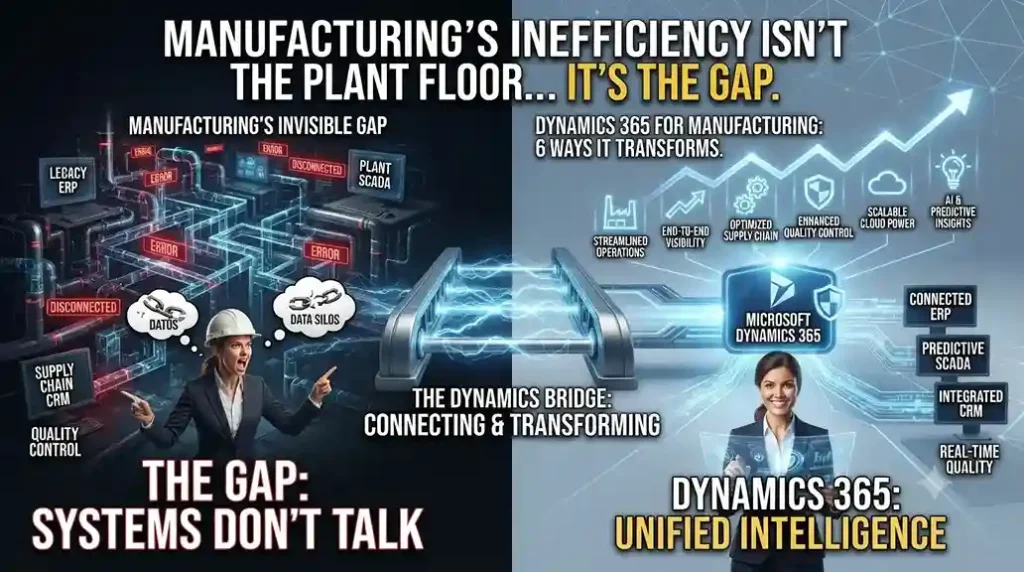
Manufacturing’s Biggest Inefficiency Isn’t the Plant Floor — It’s the Gap Between Systems

INTRO A machine on the shop floor and a service technician in the field often work off completely different data — one sees production output, the other sees a support ticket, and neither sees the customer’s purchase history. Dynamics 365 for manufacturing exists to close exactly that gap, by ending the divide between CRM and ERP instead of running them as separate systems that happen to sit on the same network. Here are the six shifts that gap-closing actually produces on the ground. 1. Supply Chain Visibility That Goes Beyond a Dashboard Collecting and visualizing supply chain data across every location does more than create a nicer report — it changes how fast a disruption gets caught. Manufacturers using remote monitoring across distributed installations have shortened time-to-market by catching supply issues before they cascade into production delays, rather than discovering them after a shipment is already late. 2. Asset and Production Management, Consolidated Into One View When production oversight and real-time equipment monitoring sit in one system instead of three, manufacturers stop reacting to breakdowns and start resolving issues remotely before they cause downtime. This is the operational basis for near-continuous uptime models in equipment-heavy manufacturing — and it also opens a second revenue line: monitoring and proactive support sold as an ongoing service, not a one-time sale. 3. Customer Engagement Built on Usage Data, Not Guesswork Personalized service at scale requires predictive analytics and self-service options that are actually relevant to what a specific customer does with the product — not a generic contact form. Manufacturers with a connected sales-through-service platform can flag potential equipment issues before a customer notices a problem, while also tailoring offers based on that customer’s real purchasing and usage pattern. 4. Service Centers as a Profit Center, Not a Cost Center Falling costs for IoT sensors and mobile devices have made remote monitoring and proactive maintenance commercially viable additions to standard break/fix support — not just a premium add-on for enterprise accounts. Combining customer records, technician availability, and inventory into a single mobile-accessible system is what lets a service team actually deliver on that model instead of just theorizing it. The Data Advantage: Better Products, Not Just Better Service IoT-connected parts and equipment feed usage data back to engineering — which components fail early, which are over-built, how products actually get used in the field. That feedback loop is what shortens the cycle between a design flaw and a fix, rather than waiting for failure reports to pile up. 5. Technicians Who See the Full Job, Not Just the Ticket A 360-degree view of a customer’s asset and service history changes what a technician can do on-site — they’re working from context, not just a work order. Paired with machine learning that surfaces similar past cases, this turns troubleshooting into pattern-matching against real precedent instead of starting from zero on every call. 6. One System Connecting the Floor to the Front Office Manufacturers that unify production and project management data with CRM stop treating customer service and customer engagement as separate departments working from separate records. The practical result is service and recommendations grounded in what a customer has actually bought and experienced — not assumptions. Why Dynamics 365 Specifically Dynamics 365 for manufacturing removes the artificial line between CRM and ERP, running both on one system with embedded analytics rather than bolting a reporting layer on top of disconnected tools. For a mid-size manufacturer, this matters less as a technology upgrade and more as an operating model change — supply chain, service, and sales working from the same data instead of reconciling three versions of it. Curious what a unified CRM-ERP model would look like on your production floor? Talk to Trident about a Dynamics 365 manufacturing assessment.

Manufacturing’s Biggest Inefficiency Isn’t the Plant Floor — It’s the Gap Between Systems Read More »