
Welcome to Trident Information Systems!
Write us to - info@tridentinfo.com
Let's Socialize

Customer Story : CRANE Worldwide Logistics centralised their sales platform with Microsoft Dynamics 365

As it approached its 10-year anniversary and its first billion in revenue, global logistics and freight company Crane Worldwide Logistics looked for a modern platform that brought all its sales tools into one place. With the Microsoft Relationship Sales solution, which brings together LinkedIn Sales Navigator and Microsoft Dynamics 365 for Sales, its salespeople have the tools to drive more meaningful engagements with customers, convert opportunities faster, and create more revenue. Just by getting the team using the platform, we’ve seen an uplift in activity in all areas. We’ve had record growth since implementing Microsoft Relationship Sales—the last quarter was excellent for us. John Jergens: Vice President of Global Sales Crane Worldwide Logistics A global sales team From a startup created in the risky business climate of the 2008 recession, Crane Worldwide Logistics has become a major player in the global transport and logistics industry, on track to hit USD1 billion in revenue in 2019. Created by former Eagle Global Logistics executives and headquartered in Houston, Texas, Crane Worldwide aims to provide customers with full transparency into its supply chains by coupling talented people with game-changing technology. But with salespeople spread across the globe, Crane Worldwide found itself with a visibility problem. “We weren’t all working on a common platform, so we were lacking in visibility,” says John Jergens, Vice President of Global Sales at Crane Worldwide. “We knew we had a vast sales pipeline out there, but there wasn’t much data available on it—so we couldn’t see how robust it was.” From data silos to connected visibility A key part of the Crane Worldwide ethos is providing customers with meaningful interactions—and that relies on having a customer relationship management (CRM) solution that salespeople can use to build and maintain relationships and convert opportunities more effectively. But, with a seven-year-old siloed CRM system that it had simply outgrown, the company lacked the tools its salespeople needed. “The previous system never had very good adoption,” Jergens adds. “It just wasn’t very functional.” So, the team went looking for a platform that could replace it. With implementation support from Microsoft Partner Network member PowerObjects, Crane Worldwide deployed the Microsoft Relationship Sales solution, a powerful combination of Microsoft Dynamics 365 for Sales and LinkedIn Sales Navigator, to support personalized, meaningful customer engagements. The team was already using LinkedIn Sales Navigator and Microsoft Office 365, so Dynamics 365 for Sales was the ideal addition to the Crane Worldwide ecosystem. “We saw how Microsoft Relationship Sales could help us focus on being easy to work with from a customer’s perspective,” explains Jergens. “So this whole deployment was part and parcel of becoming easier to do business with.” Now, just six months into deployment, Crane Worldwide has 300 Microsoft Relationship Sales users in its ranks, including 150 direct sellers along with employees from its marketing and account management teams. New processes, simpler sales Using the Microsoft Relationship Sales solution, Crane Worldwide salespeople have already changed the way they work. And they’re reaping the benefits of the visibility they’ve gained into the sales pipeline. “Once we rolled out Microsoft Relationship Sales, the overwhelming response was that it’s really easy to use, and it doesn’t take much time,” says Jergens. “We created a very simple weekly routine where our sellers spend about 30 minutes adding new data into Dynamics 365 for Sales. That’s just six minutes a day to keep everything up to date.” With faster processes freeing up more time for the sales team, sellers can focus their energy where it matters most—building the customer relationships that turn into revenue. And, at the end of each week, management can analyze activity through a global dashboard, which combines CRM and customer interaction data into detailed executive reports that show how salespeople are turning relationships into revenue. “With Microsoft Relationship Sales, we can generate KPIs that tell us what a healthy pipeline should look like. We look at the number of prospects and targets, how long the sales cycle takes, and the time from when we close an account to the time it generates revenue,” explains Jergens. “And if the pipeline isn’t where it should be, we can support the sellers with the resources that they need—it’s more productive all around.” A centralized sales platform Because Microsoft Relationship Sales brings together so many sales capabilities, Crane Worldwide sellers have everything they need to do their jobs in one place. Previously, they had to manage a relationship from scoping to sale across disconnected tools and platforms, far from an efficient process. “It’s difficult to put a number on what it’s like to manage 30 or 40 customers with an email folder and a spreadsheet,” says Jergens. “Now, once the salesperson finds a prospect using LinkedIn Sales Navigator, they use Dynamics 365 for Sales to easily track those conversations. Instead of creating and referencing a lot of notes, they can quickly link activities and discussions through Microsoft Relationship Sales.” With LinkedIn Sales Navigator and Dynamics 365 for Sales together, salespeople can start building the context they need to deliver a meaningful interaction before the first contact even occurs. Insight into potential prospects’ roles, connections, and priorities through LinkedIn Sales Navigator is fed straight into Dynamics 365 for Sales—increasing conversion chances from the very start. “It’s had a direct impact on the time it takes to develop customer relationships, because we have true visibility into those opportunities now,” explains Jergens. A built-in assistant also sends prompts to help sellers accelerate the sales cycle, reminding them to contact a lead that might go cold or nudge an opportunity as it approaches its estimated close date. A roadmap for integration In businesses the world over, sales and marketing teams struggle to communicate and collaborate effectively. As the sales team adapts to Microsoft Relationship Sales, Crane Worldwide is already adopting more of the solution’s capabilities to help sales and marketing stay on the same path. “The marketing teams are able to work in tandem with the sales team to help them understand how marketing activities can help nurture their
Customer Story : CRANE Worldwide Logistics centralised their sales platform with Microsoft Dynamics 365 Read More »

Dynamics 365: 2020 release wave 2 plan

The Dynamics 365 release plan for the 2020 release wave 2 describes all new features releasing from October 2020 through March 2021. You can either browse the release plan online or download the document as a PDF file. The PDF file also includes information about Power Apps, Power Automate, Power Virtual Agents, Power Platform governance and administration, and Common Data Model and data integration. The Microsoft Power Platform features coming in the 2020 release wave 2 have been summarized in a separate release plan as well as a downloadable PDF. 2020 release wave 2 overview The 2020 release wave 2 for Dynamics 365 brings new innovations that provide you with significant capabilities to transform your business. The release contains hundreds of new features across Dynamics 365 applications including Marketing, Sales, Customer Service, Field Service, Finance, Supply Chain Management, Human Resources, Commerce, Fraud Protection, and Business Central. Marketing Dynamics 365 Marketing improves the customer journey canvas experience and adds integration with Microsoft Teams for virtual events. Segmentation is enhanced with a new natural language experience to create and consume segments, helping eliminate the specialized skills needed to build complex segments. Sales Dynamics 365 Sales continues emphasis on simplified experiences, app integrations, gamification, a new mobile experience for quick access to customer information, and new enhancements to forecasting to natively create and manage bottom-up sales forecast processes. Dynamics 365 Sales Insights continues investments across multiple areas: sales acceleration, conversation intelligence, relationship intelligence, and advanced forecasting and pipeline intelligence with predictive lead and opportunity scoring to help sales teams uncover top deals. Dynamics 365 Product Visualize empowers sellers and accelerates complex sales processes by showcasing and customizing products in their real-world environment. Sellers can place a 3D digital twin of a product in their customer’s environment and make detailed notes about their requirements. Service Dynamics 365 Customer Service expands agent productivity capabilities enabling agents to engage in multiple sessions simultaneously. Omnichannel for Customer Service is enhanced with additional extensibility options to enable integration with mobile applications, Microsoft bot framework, and outbound messaging channels. Dynamics 365 Customer Service Insights adds new capabilities to help agents using similar case suggestions to resolve customer issues quickly and easily. A new analytical view for customer service managers helps them focus on key support areas that need attention. These highlights will also be included directly in the core Customer Service Hub app so that users can get insights in context without having to switch between applications. Dynamics 365 Field Service continues to add intelligence capabilities including a new Field Service dashboard for monitoring key KPIs and work order completion metrics. There are many user experience enhancements to enable proactive service delivery. The Field Service mobile app is enhanced with capabilities such as push notifications and real-time location sharing. This release wave also includes scheduling enhancements such as multiday manual scheduling and enhanced skill-based matching. Dynamics 365 Remote Assist expands its range of scenarios beyond calls, allowing technicians to perform activities such as capture service and repairs data, perform surveys and walk-throughs independently, and derive service insights from their service operations. Finance and Operations Dynamics 365 Finance continues to focus on automating common tasks to reduce the number of manual processes and add insights and intelligence in Finance. Asset leasing enhances the core capabilities of Finance and the global coverage for Finance continues to expand in this release wave. Dynamics 365 Supply Chain Management expands planning optimization for Manufacturing to perform supply and production planning in near real time with in-memory services. Enhancements to Product Information Management include engineering change management and product versioning capabilities. Cost Management includes new features that will enable global companies maintain multiple cost accounting ledgers by allowing dual currency and dual valuation. Enhancements to the job card device include a new user experience and a new feature to enable reporting serial numbers. Dynamics 365 Guides is focusing on intelligent workflows in this release wave. By taking advantage of data and AI innovations, work instructions can be configured to adjust on the fly based on operator inputs. In addition, insights will make it easier to use time-tracking data and connect that data to your business. Dynamics 365 Project Operations unifies operational workflows to provide the visibility, collaboration, and insights needed to drive success across teams from sales to finance. Project Operations connects your sales, resourcing, project management, and finance teams within a single application to win more deals, accelerate delivery, empower employees, and maximize profitability. Human Resources Dynamics 365 Human Resources expands leave and absence and benefits management capabilities to transform the employee experience. Employees and managers will be able to manage leave and absence directly from Microsoft Teams. This release wave enables streamlined integrations to recruiting and payroll partners, thereby building a Human Capital Management (HCM) ecosystem. Commerce Dynamics 365 Commerce continues to expand capabilities enabling non-developers to easily design and manage digital commerce experiences. Customers can increase lift online and in store with “Shop similar looks” for recommendations. Customers can discover and deploy third-party services, connectors, modules, and themes from Microsoft AppSource. Dynamics 365 Connected Store adds a number of new capabilities such as integration with Dynamics 365 Commerce, front-line worker task assignment and tracing with Microsoft Teams, integrated workflows with Microsoft Power Platform, intelligent command center, store analytics, and store insights solutions such as anomaly detection, inventory recommendations, and shift management recommendations. Fraud Protection Dynamics 365 Fraud Protection adds integration with Dynamics 365 Commerce and a new “manual review” capability that allows customers to use the Fraud Protection rules experience to flag transactions for review, and then allow expert human agents to consume and adjudicate those transactions. SMB Dynamics 365 Business Central investments for this release wave include service enhancements to meet the demands of a rapidly growing customer base, improved performance, handling of file storage, geographic expansion together with support for Group VAT, top customer-requested features, and deeper integration with Microsoft Teams. Customer data platform Dynamics 365 Customer Insights enables every organization to unify disparate data—be it transactional, observational or behavioral sources—to gain a single view of customers and derive intelligent insights that drive key business processes. Dynamics 365 Product Insights enables organizations to understand their customers’ journey, usage,

Dynamics 365: 2020 release wave 2 plan Read More »

Why it makes sense to move your retail management software to the cloud

As a successful retailer, chances are you are already running some of your IT functions in the cloud. That’s smart. The next logical step is to move your entire retail management system to the cloud, and go from the on-premises version to its software as a service (SaaS) one. But even if you know that the cloud is experiencing exponential growth, and that you will, one day, take the leap, you may be hesitant to do it now. Perhaps you are afraid you’re not ready for the change. Perhaps you have security concerns. Maybe you can’t clearly identify which practical, day-to-day benefits you’d get from moving to the cloud. Whichever your reasons, you want the best for your business, and you care about staying competitive. You want to make the right decision, and employ technology that will propel you forward today and tomorrow. While you are debating whether the cloud is for you, here are 8 good reasons why you should consider migrating your system. 1. Stay up to date, automatically With traditional on-premises software, businesses are responsible of keeping their hardware and software up to date. In order to stay current (and safe), they’d need to purchase new hardware every few years, and to update their software every few months. But in reality, retailers usually have more pressing concerns than keeping track of the latest software patch or upgrade. And if the company is using multiple software solutions and there are integrations in place, a system upgrade can become a costly and lengthy project. As a result, many companies end up with outdated IT environments that work, but don’t really support the business, and may even hinder it. In the worst cases, this old tech might reduce the company’s ability to grow and take on new projects, or stay on top of consumer demands. When you are using SaaS in the cloud, all these concerns belong to the past. You don’t need to worry about periodic maintenance, or to budget for expensive and complicated software upgrades. Instead, your supplier takes care of updating your software regularly. And if you have configured your add-ons correctly, you can maintain all your extensions, and even your configurations. SaaS software guarantees that you are always, automatically, on the latest version, and can use all the new functionality that comes with it. 2. Enhance productivity with intelligence One of the biggest advantages of the cloud is the advanced computational power it offers. Tasks that until yesterday were too complex for even the most powerful computer, for example predicting future sales patterns, are now within reach of any retailer. Businesses can run their data into Artificial Intelligence (AI) and machine learning (ML) powered tools available in the cloud, and without having to pay for extra servers or data scientists, they can get the answers they need, with minimal effort, very rapidly, and at a fraction of the cost than comparable on-prem technology. There is a wide variety of AI tools available in the cloud, giving businesses infinite possibilities to improve their effectiveness and productivity. AI can also help make smarter decisions, and deliver more personalized, to the point customer service. Would you like to send personalized promotions and special deals to your customers based on their shopping history and specific tastes? Are you thinking about adding a chatbot or virtual agent as a first-line customer support? Or perhaps you’d like to offer intelligent search on your e-commerce site? When you run your software in the cloud, all these initiatives are accessible to you, and can be started within a very short timeframe. But AI can do much more than help deliver bespoke customer experiences. You can use optimize your inventory with advanced forecasting that can factor seasonality, promotions, trends, and product substitutes and complements into your forecasts. You can refine your hiring practices with intelligent talent acquisition solutions. You can simplify searches across your catalog for both staff and customers using AI-powered accurate product tagging applied to images. When you infuse your business with intelligence, you also make it more proactive, agile, and profitable. 3. Guarantee business continuity with a reliable infrastructure With traditional in-house IT setups, businesses are at constant risk of downtimes and failures. On-site servers can’t usually guarantee a consistent performance, and if a key piece of your hardware breaks down, you may be left unable to serve customers or close sales – and could even risk losing your business data. As regards reliability, a traditional infrastructure usually necessitates a disaster recovery plan, requiring you to build redundancy, carefully monitor conditions, having dual firewalls and more – in short, you need to budget for time-consuming, expensive, complex monitoring. Switch to SaaS software, and you can step away from all of these problems. Even if you experience a hardware failure – say your computers or servers break down – you won’t lose your data, as it is safely stored in the cloud and can be accessed when and as you need to. The cloud also guarantees higher reliability. Large cloud services like Microsoft Azure, with expansive resources and entire dedicated teams, have already built in redundancy, from failover hardware to datacenters located across the world. As a result, Azure, the service where the cloud-based version of LS Central resides, can guarantee 99,995% uptime, and top security features. 4. Respond quickly to changing market conditions You know how important speed of action is in the retail industry. Yet, traditional IT environments are all but agile: even a project as simple as adding new servers or applications can be very time consuming. First, your IT staff needs time to procure the hardware or software that will fit within the current infrastructure. Then they have to set it up and test it, and finally, they’ll have to go through implementing it. In the past, this process was the only way to implement change. Today, this is an outdated and ineffective way of operating – especially when the businesses you are competing against are agile and unburdened by traditional infrastructure, such as e-commerce players. To stay

Why it makes sense to move your retail management software to the cloud Read More »

Case Study : Abu Dhabi government builds one-of-a-kind integrated customer service platform using Microsoft Dynamics 365

Established to lead excellence in government services, Abu Dhabi Digital Authority (ADDA) strives to lead the digital future of Abu Dhabi. Taking advantage of Microsoft Dynamics 365, Power BI, and Azure solutions, TAMM integrates Abu Dhabi government services to provide communities and businesses with a seamless, proactive, and personalized customer experience, one that promises to change the way UAE citizens and residents interact with their government for the better. [/vc_column_text][vc_column_text][/vc_column_text][vc_column_text] Abu Dhabi as a digital innovation destination Abu Dhabi Digital Authority (ADDA) has a vision that offers a new way of interacting with the citizens and residents in Abu Dhabi and throughout the world. ADDA’s vision embraces technology that delivers value through innovation and service excellence. ADDA is building a digital hub that integrates Abu Dhabi’s 1,600 government and business services with over 55 entities into one central platform. This modernizing journey toward global competitiveness means citizens can look forward to a smarter, happier future with better quality of life—all thanks to the TAMM integrated services platform. Digital smart government, powered by Microsoft The TAMM integrated service platform is an intelligent customer support center. Taking advantage of Microsoft Dynamics 365, Power BI, and Azure solutions, TAMM unifies Abu Dhabi’s government and business services into 80 integrated journeys. This integration merges a 360-degree view of customers’ information and their interactions across the government into a seamless, proactive, and personalized customer experience. It promises to completely revolutionize the way citizens interact with the government. Dynamics 365 creates a seamless omni-channel experience. The portal provides United Arab Emirates (UAE) citizens, residents, and visitors with a range of government services through one access point. Operating with Azure and AI increases efficiency and improve customer experience through fast, agile responses to citizen information requests. It provides stakeholders and field workers with decision-making capabilities through in-depth business intelligence on customer behavior. “Through Power BI, we are now able to ensure that all government data is viewed, including our services that are unified and user-centric,” explains Fatima Al Obeidli, Director – Contact Center Business Management Department at ADDA. “This drives our commitment to superior customer service. The Power BI unified dashboard replaces the multiple reports of the past, ensuring one-of-a-kind customer service experience.” Microsoft’s customer-first approach has been proven by its profound understanding of ADDA’s vision. “The aim is to establish a unique service model for Abu Dhabi government. Microsoft is a trusted partner, providing us with tools and mechanisms that empower us to lead the digital future of Abu Dhabi,” explains H.E. Saeed Al Mulla, Director, Government Services at ADDA. Powered by innovation, inspired by society “By leading with a modern, reliable, and integrated digital system that serves all walks of life in society, ADDA supports the business environment, attracts more investments into Abu Dhabi, and enhances the Emirate’s global competitiveness,“ says Ali Nimer, Strategy Advisor to the Director General and Head of Digital Excellence Office at ADDA. Through Power BI, we are now able to ensure that all government data is viewed, including our services that are unified and user-centric. This drives our commitment to superior customer service. The Power BI unified dashboard replaces the multiple reports of the past, ensuring one of a kind customer service experience.                                                                –  Fatima Al Obeidli: Contact Center Business Management Department

Case Study : Abu Dhabi government builds one-of-a-kind integrated customer service platform using Microsoft Dynamics 365 Read More »

Why organizational change projects fail and how to prevent implementation disaster

New IT installations often fail. At least that’s the widespread belief surrounding organizational change initiatives today. One frequently cited study from the 1993 book Reengineering the Corporation goes as far as saying that as many as 70% of the organizations that undertake a reengineering effort do not achieve the dramatic results they intended. A more recent McKinsey survey of more than 1,500 executives who had undertaken a significant change effort in the past five years found that only 38% of respondents said “the transformation was ‘completely’ or ‘mostly’ successful at improving performance. After two decades of hearing about high failure rates related to change, it’s unsurprising that business leaders are wary of organizational change projects. Organizational psychologist Nick Tasler explained that these negative biases can create a toxic self-fulfilling prophecy. “When a change project falls a day behind schedule, if leaders and employees believe that successful change is an unlikely outcome, they will regard this momentary setback as the dead canary in the coalmine of their change initiative. (Never mind the fact that three other initiatives are still on time or ahead of schedule),” he wrote in an article for Harvard Business Review. “Suddenly, employees disengage en masse and then the change engine begins to sputter in both perception and reality.” Yes, change is hard, and complex IT implementation projects, particularly ERP installations, can be particularly challenging. But it doesn’t mean they are doomed to failure. So where do you start? How can you choose the right technology for your retail business, and ensure that the implementation project runs as smoothly as possible and you get the most from your investment? Here are some of the main causes for failure in any organizational change initiative, and how can you prevent them from happening: Mistake #1: Failure to plan Issue: An outdated legacy system is impacting business performance, and it needs replacing quickly. In their rush to get the project going, business management jump straight into the implementation without taking the time to develop a well thought-out organizational change management plan. Solution: Don’t be tempted to cut corners in your planning. Analyze your business, decide what should be prioritized, and understand all the different ways the project will impact your routines at every stage of the process. “Companies should start by analyzing their current and future requirements and processes,” says Gunnar Ingimundarson, Chief Consulting Officer at LS Retail. “How many software solutions are they currently using, and what are they used for? Map out the disparate solutions in the stack, alongside their dependencies and interconnections. The next step is to figure out where they can draw the biggest – or quickest – benefits. Is your POS system not generating the information you need on stock levels and product visibility? Or, are there integrations that repeatedly cause problems or break down? Do you experience missing data? Identify the area(s) where a new system would bring immediate value in terms of savings or returns. That’s where you should start, and that should determine your priorities.” Once the priorities are set, break the project down into manageable chunks, from pilot phase to initial implementation to company-wide rollout. Consider when it’s most appropriate to start each phase of the installation so you won’t place unnecessary strain on your business during busy times. Mistake #2: Key stakeholders aren’t onboard, or have unrealistic expectations Issue: Management want the new technology in place quickly and only focus on the end goals. They get frustrated by how long the project is taking and threaten to pull the plug. Or they wonder why the new software isn’t being adopted widely and successfully when they failed to communicate the changes to everybody in the business and get company-wide buy in. Solution: All stakeholders need to be committed to the project’s success right from the beginning, and to clearly understand the project’s scope and goals. “Internal resistance can kill even the best implementation project,” says Eric Miller, Regional Director for the Americas at LS Retail, building on his 13 years of experience in software implementations. “Get the buy-in from all stakeholders from the start, and make sure that the goals, objectives and expected end results of the project are clear and communicated from you to the stakeholders, and from the stakeholders to all the customer parties involved. It never pays off to sell a dream you can’t deliver on.” Bring together personnel from different departments to understand their requirements and what outcomes they hope to achieve from the implementation. Similarly, they need to understand how much time should be devoted to a project like this and ensure project teams are given sufficient time to carry out the work. Set realistic timeframes from the start, and ensure everyone knows exactly what’s required of them. Mistake #3: Unforeseen changes throw the project off track Issue: Even the best prepared projects encounter hurdles along the way, but if unforeseen issues arise and major milestones are missed, it can be tempting to throw in the towel and deem the entire project a failure. Solution: Know that when you’re dealing with a large-scale IT implementation, it’s hard to plan for every eventuality. Be willing to adapt and take a different approach if it ultimately means the project will be a success. “What was deemed to be the best approach initially may need to change – this might even happen after the pilot is completed. I have seen companies that went through multiple pilots before finding the right balance. It’s a learning process, and it’s never over,” says Miller. It’s worth learning everything you can from the pilot implementation. Instead of rushing on to roll out store #2, take a moment to see how the system is working and to identify any issues that you couldn’t have planned for in your testing environment. Success comes to those who take a considered approach. Mistake #4: Picking the wrong technology partner Issue: It may be tempting to go for the cheapest technology provider, but cheapest upfront may not necessarily deliver the long-term business value you hoped for. You quickly realize they can’t help you achieve your outcomes, because they lack drive,

Why organizational change projects fail and how to prevent implementation disaster Read More »

6 tips to help you win at omni-channel

Even if retailers have been talking about investing in omni-channel for over a decade, many still lack basic omni-channel capabilities. For example, only 5 percent of retailers can successfully give consumers the ability to start and finish a sale in their preferred channel, Luxury Daily reports. But consumers aren’t waiting for retailers to get their act together. In the past year, almost 9 out of 10 (88%) shoppers have researched and selected options online before heading out to a store, the Ecommerce Foundation reports. And when in-store, Google reports, 50% of them turned to the internet: to research products they’ll then discuss with the sales staff, to remind themselves of what to buy, to see product specs, and more. Retailers have no time to waste. They need to be where their customers are, with answers to their questions, smooth and simple shopping journeys, and timely information and support. In your journey on improving your omni-channel strategy, here are seven points on which you should concentrate your efforts: 1. Be consistent with your branding There’s nothing worse for an omni-channel brand than to offer a disconnected experience across the different channels. Successful brands are consistent in both brand image (think color scheme, corporate story, style, products, voice) and quality of service (customer support, return policies, personalization, product suggestions) in-store, on their website, on the loyalty app and on social media. International coffee company Nespresso is a great example of cohesive visual branding. The graphic design and color palette are kept consistent throughout the channels, and they function as a common thread that guides every step of the customer journey, from e-commerce website, to mobile app, to the confirmation e-mail customers receive after placing an order — all the way to the package that arrives to the customer’s doors. If your offline presence is hip, youthful and colorful, but your app is dull and offers few options to interact with products; if you emphasize customer service, but then don’t respond timely (or don’t reply at all!) to customer queries on Twitter; if customers receive different information depending on which representative they contact – you will confuse and lose customers. 2. Unify the sales channels Customers want to be able to see on your website whether the latest smartphone model is available in gold in a specific store. They want to go on your e-commerce, and add to their cart that art deco lamp they saw in your shop while they were on holiday. They want to send back at their convenience the too-tight shoes they bought in one of your store locations. These are all common requests – and yet, too many retailers can’t fulfil them. That’s because many of them are still using separate best-of-breed, badly-integrated solutions. “Many retailers have pieced together disparate systems and processes to try and create a holistic shopping environment, but it really doesn’t provide what the customer is looking for,” says Kathleen Fischer, director of marketing at Boston Retail Partners, Boston. The result is Inability to see what products are available in real time – or where they are located; Inability to accept returns across channels; Risk of selling items that are not in stock; Inability to offer highly in-demand services like click & collect, ordering from store, or online inventory search. The only way you can fulfil these demands is by implementing technology that gives you centralized visibility and control over your stock, locations and sales. A unified commerce platform like LS Central gives you the visibility you need to know how many items are still available and where they are located exactly, and lets you easily accept exchanges and returns across your whole retail network. 3. Be honest and clear Research shows that seventy percent of online shoppers abandon their shopping cart before finalizing their purchase. The most common cause? Unclear or excessive shipping costs, which often become apparent too late in the buying process. Successful retailers display their sales conditions in clear and visible format on their website. Take, for example, sportswear and outdoors retailer Transa. When you browse the product selection, the key sales conditions (delivery time, shipping costs, return conditions) are stated clearly next to each item. Buyers know the conditions of the sale before they have added an item to their cart, so they can make an informed decision early in the shopping journey. To decrease the chance of shopping cart abandonment, create a relationship of trust with your customers, and be upfront about shipping prices and times, shipment restrictions and special conditions. You don’t want to tell a customer that their country is not eligible for delivery when they are ready to check out a full cart of products. 4. Let customers check product availability According to Forrester research, 71 percent of customers expect to be able to see available inventory online. Leading retailers are taking note, and even taking it one step further: on its e-commerce website, IKEA lists where each item is available alongside the quantity left in stock in each store. Even if you don’t want to go to such lengths, your product listing should at least: Be complete and updated. Customers should be able to see in which location the product they want is available, in their preferred variant. If you use a unified commerce system, you can maintain information in one database, and then distribute it to the e-commerce, POS and back office. This way, both staff and customers can access the same real-time data, and if the inventory changes, for example if an item is sold, this is instantly reflected on all touchpoints. Include detailed product information. When shopping for items online, customers don’t have the touch-and-feel element. Make up for it by including the item materials (or ingredients), any special care warnings, warranty information, and special return policies. If you stock similar products, you should ensure that you give enough information so consumers can make an informed choice. Better yet, include a comparison table. Feature clear, high-quality pictures. According to research by Field Agent, 83% of consumers believe product images are very important when selecting and purchasing a product. If you can, consider including videos: according to a survey by Wyzowl, 80% of people say that product videos give them more confidence when purchasing a product online. From showing

6 tips to help you win at omni-channel Read More »

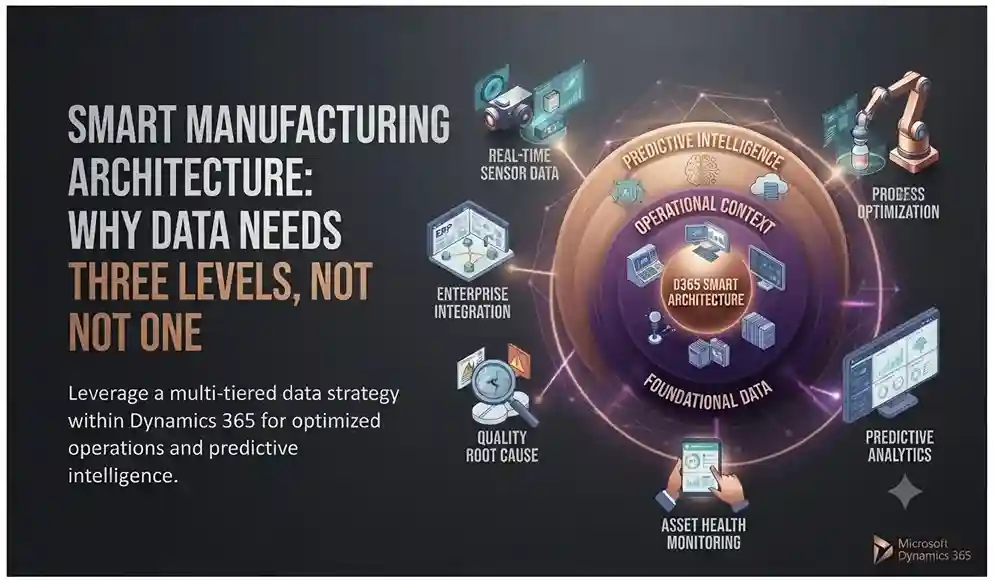
Smart manufacturing architecture connecting machines, factory operations, and enterprise systems across three data levels.

Smart Manufacturing Architecture: Why Data Needs Three Levels, Not One

INTRODUCTION A sensor on the production floor that generates data no one analyzes does not constitute smart manufacturing; it is simply noise with an Internet connection. Real value emerges when that data follows a structured path: it is captured at the machine level, coordinated at the plant level, and analyzed at the enterprise level, where patterns are truly transformed into predictions. That three-tier architecture is what distinguishes functional Industry 4.0 implementations from costly sensor installations that never generate a return on investment (ROI). Why the convergence of OT and IT is the true starting point Most factories operate using operational technology (OT)—machines, equipment lines, robotic devices—that was historically not designed to connect to anything. Smart manufacturing relies on connecting that OT layer with IT systems, enabling real-time data capture, predictive maintenance, and cognitive analytics. Without that convergence, investments in “smart” factories often result in isolated dashboards rather than enabling connected decision-making. The three levels through which data must flow Edge level: where the physical work takes place. Machines and sensors generate raw data on the factory floor in real time as production progresses. Plant level: where local activity is coordinated. Data from multiple sources at the edge is aggregated and orchestrated at the facility level, offering plant managers a unified view rather than dozens of disconnected sensor data streams. Enterprise level: where the actual analysis takes place. Data from all plants is stored, visualized, and analyzed at scale; this is where genuine predictive insights become possible, moving beyond simple monitoring. Skipping any of these levels often leads to a specific failure: omitting coordination between the edge and the plant results in disconnected local systems; If the connection between the plant floor and the enterprise level is omitted, the result is plants incapable of learning from one another’s failure patterns. What predictive maintenance really requires Predictive maintenance is often discussed as a standalone capability, but its effectiveness relies on an end-to-end data chain. To predict a failure before it occurs—rather than simply detecting it after the fact—production quality data must identify the issue at the edge, transmit it to the plant level, and analyze it against historical patterns at the enterprise level. That is the difference between saying “the machine broke down” and “this machine will likely require maintenance within the next two weeks”; only the latter allows for the prevention of unplanned downtime. The role of Dynamics 365 and Azure IoT in this architecture Instead of treating the edge environment, the plant floor, and the corporate level as three independent systems requiring separate integration efforts, Azure IoT Hub and Azure IoT Edge natively manage the flow of data from the edge to the cloud. Meanwhile, Dynamics 365 Supply Chain Management and Power BI operate at the corporate level, transforming aggregated data into maintenance plans, quality alerts, and inventory decisions that a plant manager can actually act upon. This architectural concept holds true regardless of the vendor; the difference lies in whether the manufacturer must integrate three distinct platforms or utilizes a unified, connected system—spanning everything from the sensor to the dashboard. Are you designing a smart manufacturing architecture for your plant? Consult Trident on how Dynamics 365 and Azure IoT can integrate with your existing systems.

Smart Manufacturing Architecture: Why Data Needs Three Levels, Not One Read More »

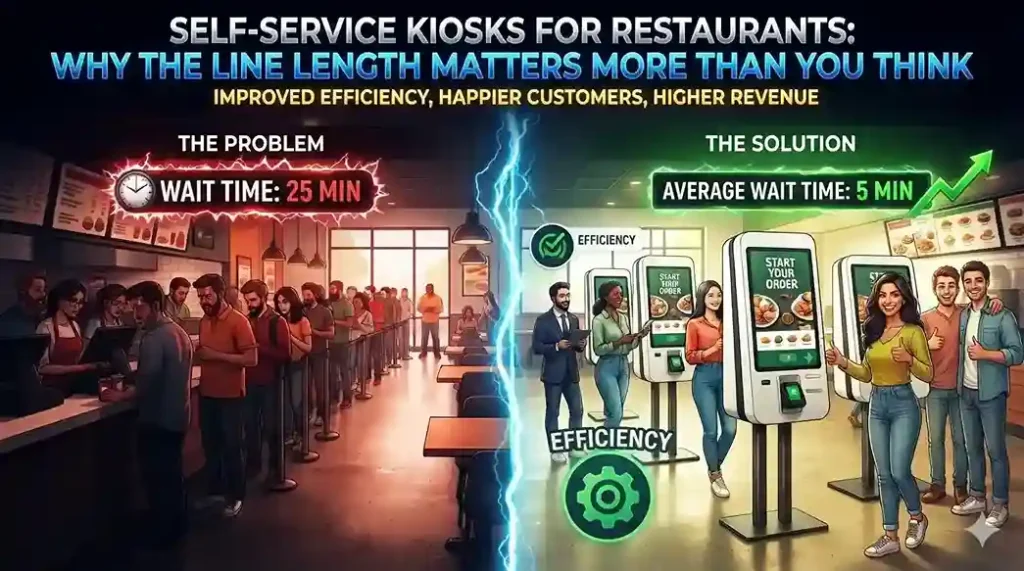
Self-service kiosks for restaurants helping customers place orders faster and reduce queues during busy periods.

Self-Service Kiosks for Restaurants: Why the Line Length Matters More Than You Think

INTRODUCTION Almost three out of four customers at quick-service establishments say they would leave the line if seven people were waiting ahead of them; that figure rises to more than nine out of ten when the queue reaches ten people. This is not merely a minor loss of conversions, but actual revenue vanishing before an order is even placed. Restaurant self-service kiosks exist precisely to eliminate this friction point, and adoption data confirms their effectiveness: McDonald’s rolled out kiosks across its 14,000 U.S. locations and has recorded measurable sales increases directly linked to their use. Kiosks do more than reduce wait times—they also change order size The most interesting effect of self-service ordering isn’t speed. What really matters is that customers order differently when they don’t have someone standing behind them or a cashier waiting for them to make a decision. Concession stands at Dodger Stadium saw a 20% increase in average order size after introducing self-service kiosks; meanwhile, Subway has reported that customers using kiosks are more likely to add extras and spend more per visit than those ordering at the counter. The key lies in removing social pressure from the ordering process: customers can explore options at their own pace, notice add-on items, try new combinations, and avoid rushing to choose their usual or “safe” order simply to avoid holding up the line. The integration choice that determines whether the system truly works Many restaurants add kiosks as a standalone system running its own software, linked to their existing point-of-sale (POS) system. This approach entails managing two systems that require constant integration, updates, and maintenance: every menu change, price update, and new promotion must be implemented twice. A unified restaurant management platform, such as LS Central, avoids this issue by running kiosks on the same POS system already used by cashiers. This is crucial, as most restaurant management systems are too complex to implement on a self-service kiosk without specific staff training—which would defeat the very purpose of self-service. Menu customization becomes a sales tool, not just a display option Since kiosk menus operate on the same system as the POS, changes are applied instantly across all locations, eliminating the need to configure each kiosk individually. This opens up real tactical possibilities: A/B testing menu item presentations to see what actually drives upselling, highlighting high-margin items at the top of the screen, or simplifying options during peak hours to speed up ordering when time is of the essence. It also solves a practical inventory issue. If stock for a specific product runs low, the kiosk menu can update in real time to promote what is actually available—prioritizing chicken over beef or offering milkshakes when the smoothie machine goes down—instead of having to manually cross out items on a physical menu board. The kitchen benefits just as much as the front counter Orders placed at kiosks are automatically sent to a kitchen display system and organized by preparation station, ensuring that items from the same order are ready simultaneously rather than arriving piecemeal. The system can alert staff to orders that have been pending for too long, and front-of-house staff can view order status in real time; this allows customers to know exactly when they will receive their food, so they don’t have to linger near the counter. Is it a passing fad or a permanent shift? Self-service kiosks in quick-service restaurants are not a new idea; For over a decade, the industry has questioned the slow pace of its adoption. What has changed is that the technology has matured enough for major brands to commit to it on a large scale, and customer expectations have evolved accordingly: diners increasingly expect self-service as a standard option, and a significant number clearly prefer it over ordering with a cashier. Are you considering installing self-service kiosks in your restaurant? Talk to Trident about implementing LS Central at your locations.

Self-Service Kiosks for Restaurants: Why the Line Length Matters More Than You Think Read More »